
Convert kilometers to nautical miles or nautical miles to kilometers with the exact factor and the number of decimal places you want.
Table of contents
How to use our Kilometers to Nautical Miles Converter
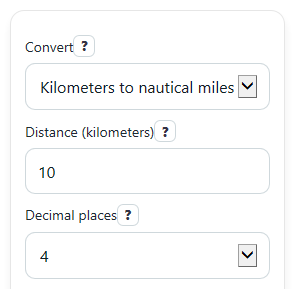
- Choose a direction in Convert: either kilometers to nautical miles or nautical miles to kilometers.
- Enter your starting value in Distance. You can type whole numbers or decimals, and commas are fine.
- Pick how many digits to show in Decimal places, then click Calculate.
- Read Converted distance first, then check Conversion factor used and Formula used if you want to verify the math.
- Sanity-check the result: if you convert kilometers to nautical miles, the answer should be smaller, and if you convert nautical miles to kilometers, the answer should be larger.
Definitions
Nautical mile (nmi): A distance unit used mainly for sea and air navigation. One international nautical mile is exactly 1,852 meters [1].
Kilometer (km): A metric distance unit equal to 1,000 meters.
Conversion factor: The fixed number used to change one unit into another. In this tool, it is either 1 km = 0.539956803 nmi or 1 nmi = 1.852 km.
Decimal places: How many digits appear to the right of the decimal point in the displayed answer.
Formula used: The rule applied for the selected direction, such as nautical miles = kilometers / 1.852.
Common mistakes and quick fixes
Mistake: Leaving Distance blank and clicking Calculate.
Fix: Enter a number in Distance before calculating.
Mistake: Typing a negative number in Distance for a real travel length.
Fix: Use 0 or a positive value in Distance . Negative distances are not converted.
Mistake: Forgetting to switch Convert when you want the reverse direction.
Fix: Set Convert to the unit you are starting from, then enter that amount in Distance .
Mistake: Thinking Decimal places changes the math itself.
Fix: Decimal places only changes how many digits are shown. The Conversion factor used stays the same for that direction.
Mistake: Reading Converted distance without checking the unit.
Fix: Look at the full Converted distance label so you know whether the answer is in kilometers or nautical miles.
Mistake: Rounding too early and getting a slightly off final answer.
Fix: Choose more Decimal places first, or compare your result with Formula used before rounding for your final use.
Limitations & Key Assumptions / Boundary Conditions
- This converter uses the international nautical mile definition of exactly 1,852 meters, so results match that standard unit choice.
- It converts distance units only. It does not account for route shape, wind, currents, terrain, or real travel path.
- Negative values are treated as invalid because a traveled distance cannot be less than zero in this tool.
- Displayed answers depend on Decimal places. Fewer decimals make the result easier to read but less precise after rounding.
- Very large inputs are supported, but the shown result is still a rounded display value rather than an unlimited exact decimal expansion.
Methodology
How the conversion works
The calculator uses one fixed relationship: 1 nautical mile equals exactly 1.852 kilometers, which is the same as 1,852 meters [1].
nmi = km / 1.852
km = nmi * 1.852
1 km = 1000 / 1852 = 0.5399568034557235 nmi
Worked example
If Convert is set to kilometers to nautical miles and Distance is 10, divide 10 by 1.852.
10 / 1.852 = 5.399568034557235
With Decimal places set to 4, Converted distance shows 5.3996 nautical miles.
If you reverse it and enter 1 nautical mile, multiply by 1.852.
1 * 1.852 = 1.852
That gives 1.852 kilometers.
Display and rounding
The calculation uses the fixed conversion factor for the chosen direction, then rounds the displayed answer to the selected number in Decimal places. The exact factor is also shown in Conversion factor used so you can verify the rule behind the result.
Assumptions and limits
This method assumes you are converting plain distance units only. It does not adjust for map projection, route changes, or navigation conditions, and rounding can make the displayed value slightly different from the full exact decimal.