
Convert miles and nautical miles with exact meter-based math, plus a back-check and metric equivalents for quick accuracy checks.
Table of contents
How to use our Miles to Nautical Miles Converter
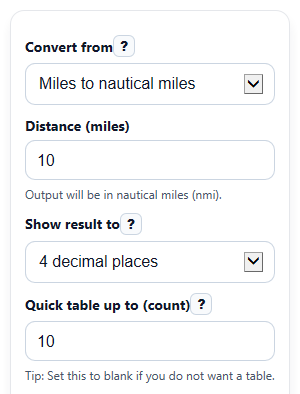
- Choose your direction in Convert from: either Miles to nautical miles or Nautical miles to miles.
- Enter your starting number in Distance. Use 0 or any positive decimal if needed.
- Pick how many digits to show in Show result to, and optionally enter a whole number in Quick table up to to build a short lookup table.
- Click Calculate to see Converted distance, Back-converted check, Same distance in meters, Same distance in kilometers, and the Conversion factor used.
- Sanity-check the answer by comparing Back-converted check to your original Distance. They should match except for display rounding.
Definitions
Mile: The usual land mile in the US, also called a statute mile.
Nautical mile: A different fixed distance used in sea and air navigation; it is exactly 1852 meters [1].
Converted distance: Your main answer in the other unit you chose.
Back-converted check: A reverse conversion that should return to your starting Distance except for display rounding.
Conversion factor used: The exact multiply-by relationship used for your chosen direction.
Decimal places: How many digits appear after the decimal point in the displayed result.
Common mistakes and quick fixes
Mistake: Typing a negative number in Distance .
Fix: Enter 0 or a positive distance only, because this converter uses distance magnitude.
Mistake: Leaving Convert from on the wrong direction and reading the result as the other unit.
Fix: Check Convert from first, then read Converted distance in the matching output unit.
Mistake: Thinking Show result to changes the actual conversion math.
Fix: Use any setting in Show result to for display only; the calculator still uses exact meter definitions behind the scenes.
Mistake: Entering text, symbols, or a blank value in Distance .
Fix: Type a real number only, such as 10, 3.5, or 0.
Mistake: Using a decimal or very large number in Quick table up to .
Fix: Enter a whole number from 1 to 100 in Quick table up to to create a clean Quick reference table .
Mistake: Seeing a small mismatch and thinking the converter is wrong.
Fix: Compare Back-converted check with your starting value and remember that tiny differences can come from the digits shown in Show result to .
Limitations & Key Assumptions / Boundary Conditions
- This converter handles distance only. It does not convert speed units such as miles per hour or knots.
- It rejects negative values because a distance magnitude cannot be negative in this tool.
- Results are calculated with full precision, but displayed values are rounded to the selected number of decimal places, so the back-check may differ slightly on screen.
- Quick table up to is limited to whole numbers from 1 to 100 so the table stays readable and fast.
- The tool uses fixed modern definitions: 1 mile = 1609.344 meters and 1 nautical mile = 1852 meters. If a class or source uses rough rounded factors, your handwritten answer may differ a little.
- This page converts between statute miles and nautical miles, not survey miles or other historical mile definitions.
Methodology
Calculation method
The converter first turns the starting distance into meters using exact unit definitions, then converts from meters into the target unit. This avoids errors from using rough rounded factors too early.
nmi = mi * 1609.344 / 1852
mi = nmi * 1852 / 1609.344
km = m / 1000
Constants used
1 mile = 1609.344 m
1 nautical mile = 1852 m
The nautical mile value is an exact standard definition used in navigation [1].
Worked example
For 10 miles to nautical miles, the tool calculates meters first: 10 * 1609.344 = 16093.44 meters. Then it converts to nautical miles: 16093.44 / 1852 = 8.689762419... Displayed to 4 decimal places, that becomes 8.6898.
For the back-check, it converts 8.689762419... nautical miles back to miles: 8.689762419... * 1852 / 1609.344 = 10.
How to read the outputs
Converted distance is the main answer. Back-converted check helps you confirm the result. Same distance in meters and Same distance in kilometers show the same length in metric units, which is useful for science class or map comparisons. Conversion factor used shows the exact factor for hand calculations.
Assumptions and calculation limits
The tool assumes your input is a non-negative distance and that you want statute miles, not a historical or survey mile. It rounds only the displayed outputs, not the internal math. The quick table lists whole-number starting values from 1 up to your chosen limit, so it is a lookup aid rather than a full data table.