
Convert decimal feet into feet and inches with your choice of decimal inches or common tape-measure fractions.
Table of contents
How to use our Decimal Feet to Feet and Inches Converter
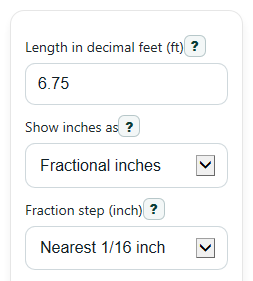
- Enter the value in Length in decimal feet (ft), such as 6.75.
- Choose Show inches as: pick Fractional inches for tape-measure style output or Decimal inches for a decimal inch result.
- If you chose fractions, set Fraction step; if you chose decimals, set Decimal inch places.
- Click Calculate to see Feet and inches, Copy-ready result, Exact total inches, and the Rounding note.
- Sanity-check the answer by confirming that Exact total inches equals your feet value times 12, and that the inch part makes sense for the decimal part you entered.
Definitions
Decimal feet: A length written in feet with a decimal part, such as 6.75 ft.
Feet and inches: A mixed-unit length that uses whole feet plus inches, such as 6 ft 9 in.
Fraction step: The inch rounding size used for fractions, such as nearest 1/16 inch.
Decimal inch places: How many digits appear after the decimal point when inches are shown as decimals.
Exact total inches: The full input length converted to inches by multiplying feet by 12.
Carryover: What happens when rounded inches reach 12, so the result adds 1 foot and resets inches to 0.
Common mistakes and quick fixes
Mistake: Typing feet and inches into Length in decimal feet (ft) , such as 6'9" or 6 9.
Fix: Enter one decimal-foot number only, such as 6.75.
Mistake: Leaving Show inches as on Fractional inches when you wanted a decimal inch answer.
Fix: Switch Show inches as to Decimal inches so the Feet and inches result uses decimal inches.
Mistake: Choosing a very coarse Fraction step and then expecting an exact tape-measure reading.
Fix: Use a smaller step like nearest 1/16 inch or 1/32 inch if you need a tighter rounded result.
Mistake: Reading Exact total inches as a rounded display value.
Fix: Use Exact total inches to check the math, and use Rounding note to see whether the displayed inches were rounded.
Mistake: Thinking a negative entry in Length in decimal feet (ft) should turn positive in the result.
Fix: Keep the sign you entered. A negative input should stay negative in Feet and inches and Exact total inches .
Limitations & Key Assumptions / Boundary Conditions
- This converter starts with a decimal-feet input only. It does not convert from separate feet-and-inches entries back to decimal feet.
- Fraction results are rounded to the selected Fraction step, so the displayed inch value may differ slightly from the exact length.
- Decimal-inch results are rounded to the selected Decimal inch places, which can also cause a small display difference.
- If rounding pushes the inch part to exactly 12, the result carries to the next foot and shows 0 inches.
- Very small negative values are kept negative in meaning, but the sign is applied to the overall measurement rather than to each unit separately.
- Results depend on standard US customary conversion using 12 inches per foot.
Methodology
How the conversion works
First, the converter keeps the whole-foot part of the entered value and turns the remaining decimal part into inches. This matches the usual decimal-feet-to-feet-and-inches method.[1]
feet_whole = trunc(decimal_feet)
inches_exact = abs(decimal_feet - trunc(decimal_feet)) * 12
The exact inch remainder can then be shown in one of two ways.
Decimal inches
If you choose decimal inches, the converter rounds the inch part to your selected number of decimal places.
inches_display = round(inches_exact, p)
If that rounding makes the inches become 12, the result carries to the next foot.
if inches_display = 12, then feet_whole = feet_whole + 1 and inches_display = 0
Fractional inches
If you choose fractional inches, the converter rounds the inch part to the nearest selected fraction step, such as 1/16 inch.
n = round(inches_exact * d)
inches_whole = floor(n / d)
frac_num = n mod d
frac_den = d
Then the fraction is reduced to lowest terms, so values like 8/16 become 1/2. If rounding makes the inch part equal 12, the result carries to the next foot instead of showing 12 inches.
Exact total inches
The checking value is the original decimal-feet input converted directly to inches.
total_inches_exact = decimal_feet * 12
Mini example
Suppose Length in decimal feet (ft) is 6.75. The whole-foot part is 6. The decimal part is 0.75, and 0.75 times 12 equals 9 inches. So the main result is 6 ft 9 in, and the exact total inches value is 81 in.
If the input is 3.999 ft and you round fractional inches to the nearest 1/16 inch, the inch part rounds up to 12 inches, so the converter shows 4 ft 0 in instead of 3 ft 12 in.
Assumptions used
The math assumes 1 foot equals 12 inches and uses normal rounding for the selected display style. Small differences can appear because decimal and fraction display choices round the inch part for readability, while Exact total inches stays the direct conversion value.