
Convert force units like newtons, pound-force, and kilogram-force fast, and compare the same force across all supported units if you want.
How to use our Force Converter Calculator
- Enter your number in Force value, including a minus sign if your work uses signed force direction.
- Choose the starting unit under Convert from and the target unit under Convert to.
- Pick Show all force units if you want a full list of equivalent values, and choose Rounded answer (significant figures) for display precision.
- Click Calculate to see Converted force, the Conversion used, and optionally Same force in all supported units.
- Sanity-check the result before using it: if the value seems off by about 9.8 times or by a huge amount, make sure you did not mix up mass units like kg or lb with force units like kgf or lbf.
Definitions
Force: A push or pull. Force is not the same thing as mass.
Newton (N): The SI unit of force. One newton is the force needed to accelerate 1 kilogram at 1 meter per second squared [2].
Kilonewton (kN): 1,000 newtons.
Meganewton (MN): 1,000,000 newtons.
Millinewton (mN): 0.001 newton.
Dyne (dyn): A smaller CGS force unit. 100,000 dyn = 1 N.
Kilogram-force (kgf): The force from standard gravity acting on a mass of 1 kilogram. It is a force unit, not a mass unit.
Gram-force (gf): The force from standard gravity acting on a mass of 1 gram.
Pound-force (lbf): A force unit based on standard gravity acting on 1 pound of mass.
Ounce-force (ozf): A force unit based on standard gravity acting on 1 ounce of mass.
Short ton-force (tnf_us): A force unit based on 2,000 pounds-force.
Long ton-force (tnf_uk): A force unit based on 2,240 pounds-force.
Significant figures: The number of meaningful digits shown in the displayed answer.
Common mistakes and quick fixes
Mistake: Entering a mass idea into Force value and then choosing Kilogram-force (kgf) or Pound-force (lbf) without meaning force.
Fix: Use this tool only for force units. If your starting number is mass in kg or lb, convert to a force first only when weight under gravity is what you mean.
Mistake: Picking the wrong starting unit in Convert from .
Fix: Check what unit your original number already uses before you calculate. The converter reads Force value as the unit selected in Convert from .
Mistake: Expecting a different number when Convert from and Convert to are the same unit.
Fix: The Converted force should stay the same because no unit change was needed.
Mistake: Thinking more digits always means a more accurate physical measurement when changing Rounded answer (significant figures) .
Fix: That setting changes display only. Pick a level that matches how precise your original measurement really was.
Mistake: Forgetting to turn on Show all force units and then wondering why the full comparison list is missing.
Fix: Choose Yes for Show all force units to display Same force in all supported units .
Mistake: Reading scientific notation in Converted force as an error for very large or very small values.
Fix: Scientific notation is just a compact way to show extreme numbers. You can still compare units using Conversion used or the full list.
Limitations & Key Assumptions / Boundary Conditions
- This converter handles force units only. It does not convert mass units such as kg, g, lb, or oz by themselves.
- Units like kgf, gf, lbf, ozf, and ton-force are based on standard gravity, using g0 = 9.80665 m/s^2. Real local gravity can differ slightly.
- The tool converts through newtons as the base unit, so displayed rounding depends on the Rounded answer (significant figures) setting even though the internal conversion stays more precise.
- Very large or very small results may be shown in scientific notation to keep numbers readable.
- A negative Converted force is allowed and simply keeps the sign of the entered force. It does not add a physical direction label by itself.
- If your original measurement was only approximate, the converted result can look more exact than the real measurement. Match the shown precision to your source data.
Methodology
How the converter works
The calculator first changes your entered value into newtons, then changes that newton value into the unit you picked under Convert to. This is a standard base-unit method for unit conversion.
value_in_newtons = input_value * factor_from_N
converted_value = value_in_newtons / factor_to_N
Here, factor_from_N means how many newtons equal 1 of the starting unit, and factor_to_N means how many newtons equal 1 of the target unit.
Core unit facts used
1 N = 1 kg*m/s^2
1 kgf = 1 kg * g0
1 gf = 0.001 kg * g0
1 lbf = 0.45359237 kg * g0
g0 = 9.80665 m/s^2
That gives standard factors such as 1 lbf = 4.4482216152605 N, 1 ozf = 0.27801385095378 N, and 1 dyn = 1e-5 N. The newton is the SI derived unit of force [2].
Mini-example
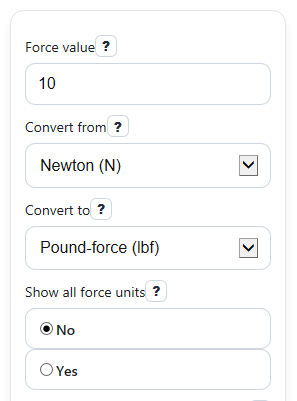
Suppose Force value is 10, Convert from is N, and Convert to is lbf.
value_in_newtons = 10 * 1 = 10 N
converted_value = 10 / 4.4482216152605 = 2.248089431 lbf
With 6 significant figures shown, the displayed answer becomes 2.24809 lbf.
How the extra outputs are made
Conversion used summarizes the relationship between the selected units so you can check the setup. If Show all force units is set to Yes, the calculator uses the same newton value and converts it into every supported force unit for the full comparison list.
Assumptions used in results
The calculator assumes standard gravity for kgf, gf, lbf, ozf, short ton-force, and long ton-force. It also assumes you entered a force unit, not a mass unit. Because of display rounding, the shown value may be rounded even though the internal conversion uses the stored unit factors.