
Convert cubic yards or project dimensions into estimated tons using a material preset or custom density, with all major ton types shown clearly.
Advanced options
How to use our Cubic Yards to Tons Calculator
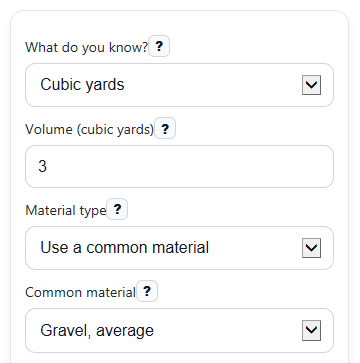
- Choose What do you know?, then either enter Volume (cubic yards) or enter Length (feet), Width (feet), and Depth (inches).
- Under Material type, pick Use a common material and select Common material, or choose Enter custom density and type Density (lb per cubic foot).
- Select your Main result unit and add Extra material (%) if you want an ordering buffer for waste, settling, or spillage.
- Click Calculate, then check Volume used and Density used first to make sure the estimate matches your job and material.
- Use Estimated weight for the main answer, compare it with US short tons, Metric tons, and Long tons, and read Note if the preset density may vary in real delivery.
Definitions
Cubic yard: A unit of volume, or how much space a material takes up. One cubic yard equals 27 cubic feet.
Density (lb per cubic foot): How much 1 cubic foot of a material weighs in pounds. Heavier materials have higher density.
Volume used: The cubic yards actually used in the math, either entered directly or calculated from length, width, and depth.
US short ton: A US weight unit equal to 2,000 lb.
Metric ton: Also called a tonne. It equals 1,000 kg, or about 2,204.62 lb.
Long ton: An imperial weight unit equal to 2,240 lb.
Extra material (%): An added percentage above the base estimate for waste, spillage, settling, or a small ordering buffer.
Common mistakes and quick fixes
Mistake: Entering both Volume (cubic yards) and the size fields, then expecting both to affect the answer.
Fix: Use the fields that match What do you know? . When you choose dimensions, only Length (feet) , Width (feet) , and Depth (inches) are used.
Mistake: Typing depth in feet into Depth (inches) .
Fix: Enter inches only. For example, type 3 for a 3-inch layer, not 0.25.
Mistake: Choosing Enter custom density but leaving Density (lb per cubic foot) blank or using 0.
Fix: Enter a positive density value in lb per cubic foot, or switch Material type back to a preset.
Mistake: Reading Estimated weight as a US ton when Main result unit is set to metric or long tons.
Fix: Check Main result unit before ordering, or use the separate US short tons , Metric tons , and Long tons outputs.
Mistake: Ignoring Density used when the result looks too high or too low.
Fix: Compare Density used with your supplier's number. If needed, use Enter custom density for a better estimate.
Mistake: Adding too much or too little buffer in Extra material (%) .
Fix: Leave Extra material (%) at 0 if you want the base estimate only, or enter a small positive percent and use Estimated weight with extra for ordering.
Limitations & Key Assumptions / Boundary Conditions
- This calculator gives an estimate, not an exact delivered weight.
- Preset materials use typical density values. Real density can change with moisture, compaction, rock size, and mix design.
- If you choose Use a common material, the result depends on that preset's average density. A supplier or quarry value is usually more accurate.
- The dimensions method assumes a simple rectangular area with even depth.
- Depth (inches) must be greater than 0, and all size inputs must be positive for a valid result.
- Estimated weight with extra only applies your Extra material (%) to the selected main ton unit. It does not change the separate comparison outputs.
- Results are only as good as Volume used and Density used. If either is off, the ton estimate will also be off.
Methodology
How the calculator works
This tool first finds the material volume in cubic yards. Then it converts that volume to pounds using density, and finally converts pounds into the three ton systems. Your selected Main result unit controls which ton value appears as Estimated weight.
Formulas used
volume_cy = (length_ft x width_ft x (depth_in / 12)) / 27
weight_lb = volume_cy x 27 x density_lb_ft3
short_tons = weight_lb / 2000
metric_tons = weight_lb / 2204.62262185
long_tons = weight_lb / 2240
result_with_extra = base_result x (1 + extra_pct / 100)
What each step means
Volume is space, while tons are weight. The calculator bridges those two ideas by using density, which tells you how many pounds each cubic foot of the material weighs. One cubic yard equals 27 cubic feet, so the density must be applied after converting yards to feet.
Mini example
If you enter Volume (cubic yards) = 3 and use a density of 105 lb per cubic foot, the calculator does this:
weight_lb = 3 x 27 x 105 = 8505 lb
short_tons = 8505 / 2000 = 4.2525
metric_tons = 8505 / 2204.62262185 = 3.8581
long_tons = 8505 / 2240 = 3.7969
If Extra material (%) is 5 and your main result is US short tons, then:
tons_with_extra = 4.2525 x 1.05 = 4.4651
Preset density note
Common material presets use typical bulk density values, but real bulk density can vary with moisture and storage conditions [1]. That is why the calculator always shows Density used, so you can compare the assumption with a supplier value.
Assumptions used
The dimensions method assumes a flat rectangular area with a uniform depth. Preset densities are estimate values, and the calculator does not adjust for unusual compaction, voids, or jobsite conditions. For ordering, check the unit your supplier uses and compare the result with their stated density when possible.