
Convert torque between inch-pounds and newton-meters, then see the exact result and the nearest usable wrench setting if needed.
Advanced options
How to use our Inch-lbs to Nm Converter Calculator
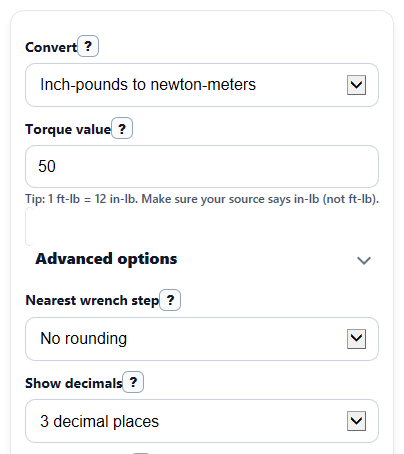
- Choose a direction in Convert, then enter your number in Torque value.
- If you want a practical tool setting, open Advanced options and choose a Nearest wrench step.
- Pick Show decimals to control how many digits appear in Converted torque.
- Click Calculate, then read Converted torque first and use Nearest wrench setting only if your wrench cannot match the exact value.
- Do a quick sanity check: if the answer looks about 12 times too big or too small, recheck Convert and make sure your source spec was not in foot-pounds instead of inch-pounds.
Definitions
Torque: A turning force, like how hard a wrench twists a bolt.
Inch-pound (in-lb): A torque unit often used for smaller fasteners and lower wrench settings.
Newton-meter (Nm): The SI torque unit used in many manuals and tool specs.
Converted torque: Your entered torque value changed into the other unit.
Nearest wrench step: The increment your wrench can realistically be set to, such as 0.1, 0.5, or 1 in the target unit.
Nearest wrench setting: The closest practical target-unit setting after rounding to the step you chose.
Conversion factor used: The number multiplied by the source value to change units in the selected direction.
Common mistakes and quick fixes
Mistake: Entering a foot-pound spec into Torque value while Convert is set for inch-pounds.
Fix: Confirm the source unit before calculating. A foot-pound value is 12 times an inch-pound value, so this mix-up can make Converted torque far off.
Mistake: Reading Nearest wrench setting as the exact math answer.
Fix: Use Converted torque for the exact conversion. Use Nearest wrench setting only when your tool adjusts in fixed steps.
Mistake: Choosing a large Nearest wrench step and missing a meaningful difference from the exact value.
Fix: If the rounded setting looks too coarse, switch Nearest wrench step to a smaller step or to No rounding.
Mistake: Thinking extra digits make the tool setting more precise than the wrench can actually set.
Fix: Match Show decimals to your need. More digits help with checking math, but your actual wrench may still require the Nearest wrench setting .
Mistake: Using the wrong conversion direction in Convert .
Fix: Check Formula used and Conversion factor used after calculating to make sure the calculator changed the value the way you expected.
Limitations & Key Assumptions / Boundary Conditions
- This converter changes units only. It does not tell you the correct torque spec for a part or fastener.
- The rounded result is for tool-setting convenience and can differ from the exact converted value.
- Real wrench accuracy, calibration, wear, and reading technique can cause actual applied torque to differ from the displayed setting.
- Very large inch-pound entries may be a sign that the source spec was actually in foot-pounds, which this calculator does not convert.
- Negative values are allowed because the math supports signed direction conventions, but many everyday torque specs are written as positive values only.
- Displayed decimals affect how the answer looks, not the underlying conversion math.
Methodology
Conversion math
This calculator converts torque in either direction using fixed unit factors. It shows the exact converted value first, then an optional rounded tool setting.
Nm = in-lb x 0.112984829
in-lb = Nm x 8.85074579
If you choose a practical tool increment, the calculator also rounds the converted value to the nearest step in the target unit.
rounded setting = round(converted value / step) x step
Worked mini-example
If Convert is set to inch-pounds to newton-meters and Torque value is 50, then the exact conversion is 50 x 0.112984829 = 5.64924145 Nm. If Show decimals is 3, the displayed Converted torque is 5.649 Nm. If Nearest wrench step is 0.5, the Nearest wrench setting becomes 5.5 Nm.
How outputs are chosen
Converted torque is always the main answer in the target unit. Nearest wrench setting is shown only when you choose a rounding step other than No rounding. Conversion factor used and Formula used are included so you can verify the direction and math.
Assumptions and limits
The calculator assumes the entered value is already a torque value in the source unit you selected. It does not convert foot-pounds, and it does not estimate wrench error, fastener friction, or manufacturer-specific tightening procedures. Large differences between the exact and rounded values mean the selected wrench step may be too coarse for the job.