
Use this calculator to turn nitrogen into crude protein or convert crude protein between as-fed and dry matter basis.
How to use our Crude Protein Calculator
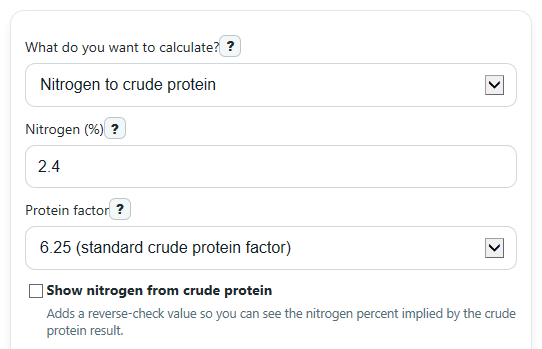
- Choose What do you want to calculate? so the calculator knows whether you are converting Nitrogen (%), Crude protein as-fed (%), or Crude protein on dry matter basis (%).
- Enter the visible value fields only. In nitrogen mode, keep Protein factor at 6.25 unless you were given a different factor, and fill in Custom protein factor only when you selected that option.
- Enter Dry matter (%) for basis-conversion modes. It must be more than 0 and no more than 100.
- Click Calculate, then read Crude protein first and check Result basis so you do not compare an as-fed number to a dry matter number by mistake.
- Use What this means and, if turned on, Nitrogen implied by crude protein as a quick sanity check. In as-fed to dry matter mode, the dry matter result is usually higher than the as-fed value when dry matter is below 100%.
Definitions
Crude protein: A protein estimate based on measured nitrogen, not a direct count of only true protein.
Nitrogen (%): The percent nitrogen measured in the sample. In this calculator, it is used to estimate crude protein.
Protein factor: The number multiplied by nitrogen to estimate crude protein. The common standard is 6.25 because protein is often treated as about 16% nitrogen [3].
As-fed: A feed value with the sample's water still included.
Dry matter: The part of the feed that is not water. Dry matter basis removes water so feeds can be compared more fairly [2].
Dry matter basis: A nutrient value recalculated as if the feed contained no water.
Kjeldahl and Dumas: Lab methods used to measure nitrogen, which can then be converted into crude protein.
Common mistakes and quick fixes
Mistake: Entering a dry matter value like 0, 105, or leaving Dry matter (%) blank in a basis-conversion mode.
Fix: Enter a real dry matter percent greater than 0 and at most 100 before calculating Crude protein .
Mistake: Comparing a result from Crude protein as-fed (%) to a lab report that is on dry matter basis.
Fix: Check Result basis every time and convert both numbers to the same basis before comparing them.
Mistake: Choosing Custom factor in Protein factor but forgetting to enter Custom protein factor .
Fix: Enter a positive custom factor, or switch Protein factor back to 6.25 if that is the standard you want.
Mistake: Typing a negative value for Nitrogen (%) , Crude protein as-fed (%) , or Crude protein on dry matter basis (%) .
Fix: Use nonnegative percentages only. If your source shows a minus sign, recheck the report because these inputs should not be negative here.
Mistake: Expecting Nitrogen implied by crude protein to match a lab nitrogen value when you changed the Protein factor .
Fix: Use the same factor for both directions. The reverse-check only matches when the same protein factor is used both ways.
Mistake: Thinking a much larger dry matter result means the calculator is wrong when Dry matter (%) is low.
Fix: Read What this means . A dry matter basis value can be much higher because water was removed from the comparison, not because protein was added.
Limitations & Key Assumptions / Boundary Conditions
- This calculator estimates crude protein from nitrogen using a selected factor. Crude protein can include nonprotein nitrogen, so it is not the same as true protein.
- The default factor is 6.25, which is a common standard, but some materials or methods may use a different factor.
- Basis conversion assumes the entered Dry matter (%) is correct. If dry matter was measured on a different sample or day, the converted protein value can differ.
- Dry matter (%) must be more than 0 and no more than 100. Values outside that range are not physically valid here.
- Very low dry matter can produce a much higher dry matter basis protein value. The calculator does not cap that result because it can be mathematically valid.
- This tool does not adjust for lab error, sampling error, or differences between nitrogen test methods.
Methodology
How the calculator works
The calculator uses one of three standard conversions, depending on the selected mode. In nitrogen mode, it multiplies measured nitrogen by the chosen protein factor. In basis-conversion modes, it uses dry matter as the bridge between as-fed and dry matter values.
Formulas used
CP percent = N percent x factor
CP on dry matter basis percent = CP as-fed percent / (DM percent / 100)
CP as-fed percent = CP on dry matter basis percent x (DM percent / 100)
N percent = CP percent / factor
What the factor means
The standard crude protein factor is 6.25. That comes from the common approximation that protein is about 16% nitrogen, so 100 divided by 16 equals 6.25 [3]. Crude protein is an estimate from nitrogen, and it may include nonprotein nitrogen rather than only true protein [4].
Mini examples
If Nitrogen (%) is 2.4 and the factor is 6.25, then crude protein is 2.4 x 6.25 = 15.0%.
If Crude protein as-fed (%) is 12 and Dry matter (%) is 90, then dry matter basis crude protein is 12 / 0.90 = 13.33%.
If Crude protein on dry matter basis (%) is 18 and Dry matter (%) is 35, then as-fed crude protein is 18 x 0.35 = 6.3%.
How to interpret the result
Use Result basis to make sure you compare like with like. A dry matter basis number is usually higher than the as-fed number when moisture is present, because water has been removed from the comparison [2].
Assumptions behind the math
The calculation assumes the selected factor is appropriate for your material, the active input values are valid percentages, and the dry matter percent belongs to the same feed sample as the crude protein value. Results can differ from lab reports if the report used a different factor, a different sample basis, or a different test context.