
Use this Young-Laplace equation calculator to find pressure difference, surface tension, or curvature radius for drops, bubbles, and general curved surfaces.
Advanced options
How to use our Young-Laplace Equation Calculator
- Choose Find to decide whether you want Calculated value to be pressure difference, surface tension, or curvature radius.
- Pick the correct Shape type: use a sphere option for one radius, use General curved surface when the surface bends with two main radii, and use the soap bubble film option when there are two liquid-air surfaces.
- Enter the known values in Surface tension (N/m), Curvature radius (m), and Pressure difference, inside minus outside (Pa); if needed, open Advanced options to change units or enter Main bend radius 1 (m) and Main bend radius 2 (m).
- Click Calculate, then check Geometry note and Curvature term (1/m) to make sure the calculator used the shape you intended.
- Sanity-check the answer: for the same Surface tension (N/m), a smaller radius should give a larger Pressure difference (Pa), and a soap bubble film should give about twice the pressure jump of a spherical drop with the same radius.
Definitions
Pressure difference, inside minus outside (Pa): The pressure on the inside minus the pressure on the outside of the surface. Positive means the inside pressure is higher.
Surface tension (N/m): The pulling effect along a liquid surface. Larger surface tension gives a larger pressure jump for the same curvature.
Curvature radius (m): The radius used for the spherical shape options. Smaller radius means a more strongly curved surface.
Main bend radius 1 (m) and Main bend radius 2 (m): The two principal radii of curvature, meaning the two main ways the surface bends at one point [1][2].
Curvature term (1/m): The quantity 1/R1 + 1/R2. For a sphere, it becomes 2/R.
Geometry note: A short explanation of which Young-Laplace form the calculator applied, so you can confirm the shape choice.
Common mistakes and quick fixes
Mistake: Picking Sphere: liquid drop when the object is really a soap bubble film.
Fix: Change Shape type to the soap bubble option so Calculated value uses the 4gamma/R form instead of 2gamma/R.
Mistake: Entering Main bend radius 1 (m) and Main bend radius 2 (m) but forgetting to switch Shape type to General curved surface .
Fix: Select General curved surface or those two radius fields will not control Curvature term (1/m) .
Mistake: Typing a value in millimeters into Curvature radius (m) while leaving Length unit set to meters.
Fix: Either convert the number to meters first or change Length unit so the radius is interpreted correctly.
Mistake: Treating Pressure difference, inside minus outside (Pa) as outside minus inside.
Fix: Use the stated sign convention: positive Pressure difference (Pa) means inside pressure is higher than outside pressure.
Mistake: Using 0 or a negative value for Curvature radius (m) , Main bend radius 1 (m) , or Main bend radius 2 (m) in a case that should be a normal sphere.
Fix: Enter a radius greater than 0; only advanced general-curvature cases should use signed opposite bends, and you should confirm that with Geometry note .
Mistake: Solving for Surface tension (N/m) with a nearly zero Curvature term (1/m) .
Fix: Recheck the geometry and radius inputs, because a zero curvature term makes the surface-tension calculation invalid.
Limitations & Key Assumptions / Boundary Conditions
- This calculator applies the static Young-Laplace relation, so it does not include flow, viscosity, gravity-driven shape changes, or time-dependent effects.
- For spherical modes, it assumes one radius describes the whole interface. Real drops and bubbles can deviate from a perfect sphere.
- The soap bubble film option assumes two liquid-air surfaces, which doubles the spherical pressure jump compared with a single interface.
- In General curved surface mode, results depend on the sign and size of both bend radii. Opposite-signed radii can produce a smaller or even negative net curvature term.
- Radius values must not be zero, and solving for spherical radius requires a nonzero pressure difference.
- At extremely small length scales, especially nanoscale inputs, continuum assumptions behind the Young-Laplace equation may be less reliable.
Methodology
Equation used
The calculator uses the Young-Laplace relation between pressure jump, surface tension, and curvature [1][2].
ΔP = γ(1/R1 + 1/R2)
Here, ΔP is pressure difference across the interface, γ is surface tension, and R1 and R2 are the two main bend radii.
How each shape type is handled
For Sphere: liquid drop and Sphere: gas bubble in liquid, the surface is treated as spherical, so both bend radii are the same.
ΔP = 2γ/R
For Sphere: soap bubble film, the film has two liquid-air surfaces, so the spherical pressure jump is doubled.
ΔP = 4γ/R
For General curved surface, the calculator uses the full two-radius form.
Curvature term = 1/R1 + 1/R2
ΔP = γ x Curvature term
Rearranged forms for solving
When you choose Find = Surface tension, the calculator rearranges the equation to solve for surface tension.
γ = ΔP / (1/R1 + 1/R2)
In spherical modes, that becomes:
γ = ΔP x R / 2
γ = ΔP x R / 4 for a soap bubble film
When you choose Find = Curvature radius, the calculator solves only for spherical modes.
R = factor x γ / ΔP
factor = 2 for a spherical drop or gas bubble in liquid
factor = 4 for a soap bubble film
Unit handling
The calculator converts all entries to base SI units before solving, then converts pressure back to your chosen display unit.
1 mN/m = 0.001 N/m
1 dyn/cm = 0.001 N/m
1 kPa = 1000 Pa
1 bar = 100000 Pa
1 psi = 6894.757293 Pa
Mini example
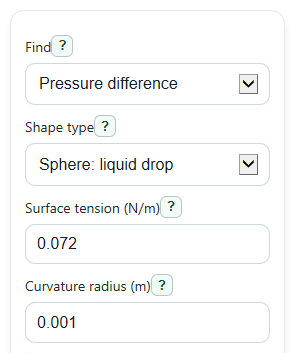
Suppose you choose Sphere: liquid drop, enter γ = 0.072 N/m, and enter R = 0.001 m.
ΔP = 2 x 0.072 / 0.001 = 144 Pa
So Calculated value is 144 Pa when solving for pressure difference, and the Curvature term (1/m) is 2/0.001 = 2000 1/m.
Interpretation and assumptions
A larger positive pressure difference means the inside pressure is higher than the outside pressure by more. For the same surface tension, smaller radius or larger curvature gives a larger pressure jump.
This tool assumes a static interface and the chosen geometry. If the real surface is not spherical, is changing quickly, or is strongly affected by gravity or other forces, actual measured values can differ.