
Use this livestock calculator to estimate due date, daily weight gain, feed needed, or take-home meat with simple species-based starting values.
Advanced options
Feed planning
Meat yield
Number display
How to use our Livestock Calculator
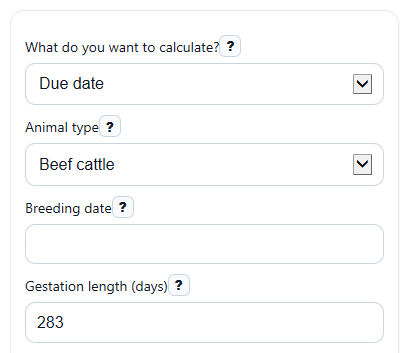
- Pick an option under "What do you want to calculate?" and choose the "Animal type" that best matches your animal.
- Enter the visible fields for that mode only, such as "Breeding date," "Starting weight (lb)," or "Live weight (lb)."
- If needed, open "Advanced options" to adjust "Gestation length (days)," feed percentages, waste, or yield percentages instead of using the suggested starting values.
- Click "Calculate" to see the main answer first, then read the supporting details like total gain, feed per day, hanging weight, or days remaining.
- Sanity-check the result before using it: make sure your weights, days, and percentages match real records and that the answer is in the unit you expected, such as lb/day, lb, or a calendar date.
Definitions
Gestation length (days): The number of days from breeding to the expected birth date.
Average daily gain: The change in weight per day, shown in lb/day. A negative value means weight loss.
Feed each day (% of body weight, dry matter basis): A planning rate that estimates how many pounds of feed dry matter one animal eats each day based on its body weight.
Feed waste (%): Extra feed added to cover losses from spoilage, trampling, sorting, or feeder loss.
Dressing percentage (%): The share of live weight that becomes hanging weight after harvest.
Take-home yield from hanging weight (%): The share of hanging weight that ends up as packaged meat after cutting and trimming.
Hanging weight: Carcass weight before final cutting and packaging.
Take-home meat: The estimated packaged meat weight after the hanging weight is reduced by cutting and trim losses.
Common mistakes and quick fixes
Mistake: Leaving "Breeding date" blank in Due date mode.
Fix: Enter a valid "Breeding date" and check that "Gestation length (days)" matches your herd or flock if you changed it.
Mistake: Typing the same value into "Starting weight (lb)" and "Ending weight (lb)" when you wanted gain over time.
Fix: Recheck both weight entries and make sure "Days between weights (days)" is greater than 0 so the calculator can find "Main answer" correctly.
Mistake: Entering 0 for "Days between weights (days)."
Fix: Use the real number of days between weigh dates. A value of 0 cannot be used to calculate "Main answer" in Daily weight gain mode.
Mistake: Using total herd weight in "Average weight per animal (lb)."
Fix: Put one animal's average weight in "Average weight per animal (lb)" and the herd size in "Number of animals" so "Main answer" for feed is not too high.
Mistake: Entering "Feed each day (% of body weight, dry matter basis)" or "Dressing percentage (%)" as a number over 100.
Fix: Enter percentages on a 0 to 100 scale, such as 2.5 or 62, not 250 or 6200.
Mistake: Treating "Main answer" in Meat yield mode as an exact packaged meat promise.
Fix: Use "Main answer" as an estimate and compare it with "Key supporting detail" and "Extra detail" to see how the percentages you used affect the result.
Limitations & Key Assumptions / Boundary Conditions
- Species values are starting presets, not guarantees. Breed, genetics, age, body condition, management, and local practices can change real results.
- Due date uses simple calendar-day addition from "Breeding date" plus "Gestation length (days)." It does not account for uncertain breeding dates, multiple breedings, or reproductive problems.
- Daily weight gain uses only "Starting weight (lb)," "Ending weight (lb)," and "Days between weights (days)." It does not adjust for gut fill, scale differences, sickness, or weather stress.
- Feed needed is a rough planning estimate based on body weight, a feed-rate percent, days, animal count, and waste. It is not a full ration balancer and does not check nutrients, moisture, protein, energy, minerals, or forage quality.
- Feed percentages and yield percentages must be realistic user inputs. Small changes in these values can cause large changes in total feed or meat estimates.
- Meat yield is only an estimate. Real hanging weight and take-home meat vary with fill, fat cover, trim level, bone-in versus boneless cuts, and processor choices.
- This page is best for quick planning. For breeding issues, detailed ration design, or processing decisions, real-world records and local expert guidance can change the best answer.
Methodology
How each mode is calculated
The calculator reads only the fields that are visible for the chosen mode. Hidden fields are ignored so one mode does not accidentally affect another.
due_date = breed_date + gestation_days
In Due date mode, the estimated due date is found by adding "Gestation length (days)" to the entered "Breeding date." The species choice fills a starting default, but your edited day count is used if you change it.
ADG = (end_weight - start_weight) / days_on_feed
In Daily weight gain mode, "Main answer" is average daily gain in lb/day. "Key supporting detail" is total gain over the period. If the ending weight is lower than the starting weight, the result stays negative to show weight loss.
feed_per_head_day_lb = body_weight * (feed_rate_pct / 100)
total_feed_lb = feed_per_head_day_lb * head_count * feed_days * (1 + waste_pct / 100)
In Feed needed mode, the calculator first estimates pounds of feed per animal per day, then multiplies by the number of animals and feeding days, then adds the waste percentage. A supporting result can also be shown in tons using 2,000 lb per ton.
hanging_weight = live_weight * (dressing_pct / 100)
take_home_weight = hanging_weight * (cut_yield_pct / 100)
In Meat yield mode, the calculator estimates hanging weight first, then multiplies by the take-home yield percentage to estimate packaged meat weight.
Mini examples
If "Starting weight (lb)" is 500, "Ending weight (lb)" is 650, and "Days between weights (days)" is 90, then total gain is 150 lb and average daily gain is 150 divided by 90 = 1.67 lb/day.
If "Average weight per animal (lb)" is 1,200, "Feed each day (% of body weight, dry matter basis)" is 2.5, "Number of animals" is 10, "Feeding period (days)" is 120, and "Feed waste (%)" is 10, then feed per head per day is 30 lb, total planned feed is 39,600 lb, and that is 19.8 tons.
If "Live weight (lb)" is 1,200, "Dressing percentage (%)" is 62, and "Take-home yield from hanging weight (%)" is 67, then hanging weight is 744 lb and take-home meat is 498.48 lb.
Assumptions and limits
This tool uses simple planning formulas, not a full biological or nutrition model. Results can differ from real outcomes because of breed differences, feed moisture, ration quality, processing choices, and record accuracy. Percent inputs are treated as percentages from 0 to 100, and blocked errors should be fixed before using the estimate.