
Use this rat cage calculator to check cage size, compare capacity by volume and floor space, and spot common safety issues like wide bar gaps.
Advanced options
How to use our Rat Cage Calculator
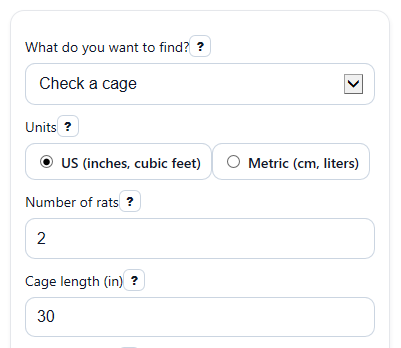
- Choose "What do you want to find?" and pick your "Units" so all cage measurements use the same system.
- Enter "Number of rats" and the inside "Cage length", "Cage width", and "Cage height" for the space your rats can actually use.
- If you want a stricter check, open "Advanced options" and choose a "Space rule", decide whether to "Add full shelf levels to floor space check", and enter "Bar spacing" if you want the escape-risk note.
- Click "Calculate", then read "Main result" first and compare "Recommended cage capacity" with your actual group size.
- Sanity-check the answer by looking at both "Rats the cage can hold by volume" and "Rats the cage can hold by floor space". If one is much lower, that is the limit you should fix first.
Definitions
Main result: The plain-language answer that says whether the cage passes or fails the selected rule, or what size you need.
Space rule: The sizing target used by the calculator. "Bare minimum" is a lower baseline, while "Roomier target" gives more everyday space.
Total cage volume: The full inside space found from cage length x cage width x cage height.
Usable floor space counted: The base floor area, plus 1 or 2 extra full levels only if you choose to count them.
Recommended cage capacity: The practical number of rats the cage supports after comparing both the volume check and the floor-space check.
Space left over or shortfall: The difference between what the cage has and what your group needs. A negative value means the cage is short by that amount.
Bar spacing check: An optional safety note that compares your entered bar gap with a common 0.5 inch target for pet rats, especially smaller rats.
Common mistakes and quick fixes
Mistake: Measuring the outside of the cage instead of the inside for "Cage length", "Cage width", and "Cage height".
Fix: Measure the inside usable space and re-enter those values so "Total cage volume" and "Usable floor space counted" are not overstated.
Mistake: Entering 1 or a decimal in "Number of rats".
Fix: Enter a whole number of 2 or more so the calculator can give a realistic pet-rat result in "Main result".
Mistake: Relying only on "Rats the cage can hold by volume" and ignoring "Rats the cage can hold by floor space".
Fix: Use "Recommended cage capacity" as the practical limit because it uses the lower of the two checks.
Mistake: Counting small ledges or ramps in "Add full shelf levels to floor space check".
Fix: Count only full, solid levels that work like real floor space, or leave it at "Do not add shelves" for a safer estimate.
Mistake: Mixing inches and centimeters after choosing "Units".
Fix: Keep every measurement in the same unit system so "Minimum total volume needed" and "Minimum floor space needed" match your inputs.
Mistake: Skipping "Bar spacing" when comparing cages for young or small rats.
Fix: Enter the gap to get the "Bar spacing check" note, especially if you are worried about squeezing through wide bars.
Limitations & Key Assumptions / Boundary Conditions
- This calculator uses planning rules for pet-rat cage shopping and quick checks. They are not legal housing standards or a guarantee that a cage will feel roomy in daily use.
- Passing volume alone is not enough. A tall but narrow cage can still fail because floor space is too small.
- Shelves are counted only when you choose full levels. Partial shelves, ramps, and tiny ledges are not treated as full living space.
- The result depends on inside usable measurements, not outside product-box dimensions.
- The bar-gap note is a simple safety check, not a full escape-proof guarantee. Age, size, and body shape of the rats still matter.
- In "Find minimum cage size," the calculator gives needed volume and floor area plus an example based on your entered height. Many length-and-width combinations could also work.
Methodology
How the calculator works
This calculator checks two things: total cage volume and counted floor space. A cage should meet both checks, so the practical answer uses the lower capacity.
V = L x W x H
A = L x W
V_req = rats x v_per_rat
A_req = rats x a_per_rat
capacity_volume = floor(V / v_per_rat)
capacity_floor = floor(A_counted / a_per_rat)
capacity_recommended = min(capacity_volume, capacity_floor)
Rules used
For the "Bare minimum" rule, the calculator uses 2.0 cubic feet per rat and 1.5 square feet per rat. For the "Roomier target," it uses 2.5 cubic feet per rat and 2.0 square feet per rat. If you count 1 or 2 full levels, each full level adds one more base floor area to the floor-space check.
US inputs are first calculated in cubic inches and square inches, then converted using 1 cubic foot = 1728 cubic inches and 1 square foot = 144 square inches. Metric inputs are first calculated in cubic centimeters and square centimeters, then shown in liters and square centimeters using 1 liter = 1000 cubic centimeters.
Mini example
Suppose you enter 30 inches for "Cage length", 18 inches for "Cage width", 24 inches for "Cage height", and 2 for "Number of rats" with the "Bare minimum" rule.
V = 30 x 18 x 24 = 12,960 cubic inches = 7.5 cubic feet
A = 30 x 18 = 540 square inches = 3.75 square feet
V_req = 2 x 2.0 = 4.0 cubic feet
A_req = 2 x 1.5 = 3.0 square feet
capacity_volume = floor(7.5 / 2.0) = 3
capacity_floor = floor(3.75 / 1.5) = 2
The cage passes for 2 rats because both needed amounts are met, and the recommended capacity is 2 rats because the lower check sets the practical limit.
Bar spacing note
If you enter "Bar spacing," the calculator compares it with 0.5 inch, or the metric equivalent. This is shown as a simple caution check because smaller or younger rats may slip through wider gaps more easily.
Assumptions in the results
The calculator assumes a rectangular cage shape and uses inside usable dimensions. It does not score layout quality, ventilation, door size, fall risk, wheel fit, or how well shelves connect. Real comfort can differ even when a cage passes the size math.