
Paste your bill rows and normal degree days to compare annual home energy use after weather is adjusted.
Advanced options
Table of contents
How to use our Weather Normalized Home Energy Calculator
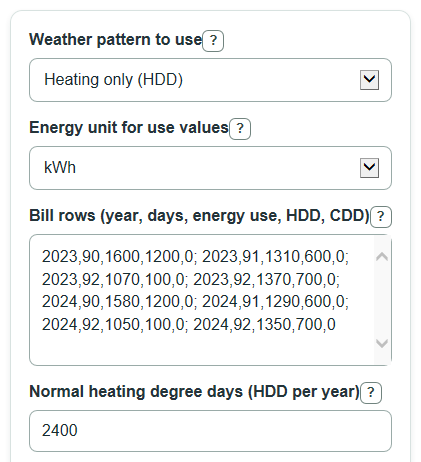
- Choose the Weather pattern to use: Heating only (HDD), Cooling only (CDD), or Heating and cooling (HDD and CDD).
- Choose the Energy unit for use values, then paste Bill rows (year, days, energy use, HDD, CDD) with one bill period per row or semicolons between rows.
- Enter Normal heating degree days and Normal cooling degree days for your location, using the same degree-day base as your bill rows.
- Use Advanced options only if you want a different Number display or Decimal places for plain numbers, then click Calculate.
- Sanity-check the output: Latest actual annual use should match the total use for the newest year in your rows, and the Data check note should be read before trusting a low Weather fit score.
Definitions
HDD: Heating degree days are a count of how much and how long outdoor temperatures were below a heating base temperature, often 65F.
CDD: Cooling degree days are a count of how much and how long outdoor temperatures were above a cooling base temperature, often 65F.
Normal heating degree days: A typical yearly HDD total for your location. A weather normal usually describes typical conditions over a set reference period [2].
Normal cooling degree days: A typical yearly CDD total for your location, entered in the same degree-day base as your bill rows.
Latest weather-normalized annual use: The newest year's energy use adjusted to a normal-weather year, using the selected weather pattern.
Weather fit score: The percent of bill-to-bill energy variation explained by bill days and the selected weather terms.
Energy added per heating degree day: The fitted amount of energy tied to one extra HDD in the bill rows.
Energy added per cooling degree day: The fitted amount of energy tied to one extra CDD in the bill rows.
Common mistakes and quick fixes
Mistake: Mixing kWh and therms in Energy unit for use values.
Fix: Use one meter and one unit for every Bill rows (year, days, energy use, HDD, CDD) entry.
Mistake: Entering Bill rows (year, days, energy use, HDD, CDD) with missing CDD values because the Weather pattern to use is Heating only (HDD).
Fix: Still enter five values per row; use 0 for unused CDD if needed.
Mistake: Using Normal heating degree days from a 65F base while the HDD in Bill rows (year, days, energy use, HDD, CDD) uses a different base.
Fix: Keep the same base temperature for the bill-row HDD and Normal heating degree days.
Mistake: Comparing only one year and expecting Change from previous year after weather.
Fix: Include at least two year labels in Bill rows (year, days, energy use, HDD, CDD).
Mistake: Treating a positive Weather adjustment for latest year as an input error.
Fix: A positive Weather adjustment for latest year can be valid; it means normal weather would raise the latest year's estimated use.
Limitations & Key Assumptions / Boundary Conditions
- The calculator does not look up weather. HDD and CDD must come from the same dates as the bill periods.
- Rows are grouped by the numeric year in the first column. A bill that crosses December and January must be assigned to the year you want to compare.
- The model assumes a straight-line relationship between energy use, bill days, and the selected degree-day terms. Large equipment changes, vacancies, fuel switching, or behavior changes can reduce accuracy.
- Heating only ignores CDD, and Cooling only ignores HDD. Choose Heating and cooling (HDD and CDD) only when the same meter clearly responds to both weather types.
- The 365-day year adjustment standardizes totals to a non-leap year. Real billing calendars may have 364, 365, 366, or more days depending on meter-read timing.
- A low Weather fit score or a Data check note means the normalized change is less steady. Add more bill periods or better-matched degree-day data before using the result for a savings claim.
Methodology
How the bill rows are fitted
The calculator reads each Bill rows (year, days, energy use, HDD, CDD) entry, checks that it has five nonnegative numeric values, and groups rows by the year value. It then fits a simple ordinary least squares model, a standard regression method for finding the line that minimizes squared errors. Weather normalization is commonly used to compare building energy use after weather differences are removed [1].
energy_i = intercept + beta_days * days_i + beta_hdd * HDD_i + beta_cdd * CDD_i + error_i
Heating only uses the intercept, days, and HDD columns. Cooling only uses the intercept, days, and CDD columns. Heating and cooling uses all listed columns.
beta = inverse(transpose(X) * X) * transpose(X) * y
How annual use is normalized
For each year, the calculator first totals the entered energy use, bill days, HDD, and CDD. The largest year number is the latest year. The next largest year number is the previous year.
actual_year = add energy_i for rows in that year
normalized_year = actual_year + beta_days * (365 - days_year) + beta_hdd * (normal_HDD - HDD_year) + beta_cdd * (normal_CDD - CDD_year)
Only the selected weather terms are used. In Heating only mode, the CDD term is omitted. In Cooling only mode, the HDD term is omitted.
How the year-over-year change is calculated
The weather adjustment is the signed difference between the latest normalized use and the latest actual use. The year-over-year change is also signed, so a negative value means the latest year used less energy after weather adjustment.
latest_weather_adjustment = latest_normalized_use - latest_actual_use
normalized_change_units = latest_normalized_use - previous_normalized_use
normalized_change_percent = 100 * normalized_change_units / previous_normalized_use
If previous weather-normalized annual use is zero, the percent change is shown as N/A, but the unit change is still shown.
Weather fit score
The Weather fit score is R2, shown as a percent when it can be calculated. It compares the fitted errors with the total spread in the entered energy use values.
R2 = 1 - SSE / SST
SSE is the sum of squared fitted errors. SST is the sum of squared differences from the average energy use. If SST is zero, the fit score is shown as N/A.
Mini-example
Suppose the latest year has 5,270 kWh actual use, 365 bill days, and 2,600 HDD. The fitted heating link is 0.5 kWh per HDD, and Normal heating degree days is 2,400. In Heating only mode, the weather adjustment is 0.5 * (2,400 - 2,600), or -100 kWh. Latest weather-normalized annual use is 5,270 - 100 = 5,170 kWh. If the previous weather-normalized annual use is 5,250 kWh, the Change from previous year after weather is -80 kWh, and the Percent change from previous year after weather is about -1.52%.