
Calculate watts, amps, or volts from two known electrical values, with options for DC, single-phase AC, and three-phase AC.
Table of contents
How to use our Watts Amps Volts Calculator
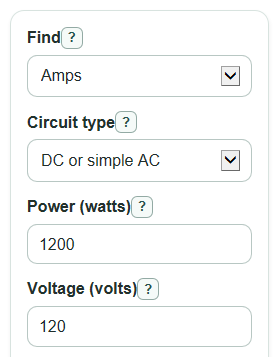
- Choose what you want in the Find box: Amps, Watts, or Volts.
- Pick the correct Circuit type. Use DC or simple AC for batteries and basic school problems, and use an AC choice for motors, generators, or building power.
- Enter the two visible known values, such as Power (watts) and Voltage (volts). The value you are finding is hidden so it does not affect the answer.
- Open Advanced options for AC loads if you know Power factor (percent), and choose For three-phase, the voltage is when using three-phase AC.
- After you calculate, sanity-check the Calculated answer, Volts times amps, and Formula used. If the result looks far too high or low, check the circuit type, power factor, and voltage style first.
Definitions
Power (watts): How fast electrical energy is used or delivered. In a basic circuit, power in watts equals volts times amps [1].
Current (amps): The rate of electric charge flow through a circuit.
Voltage (volts): The electrical push between two points in a circuit.
Power factor (percent): For AC loads, the percent of volts times amps that becomes real power in watts. A value of 100 means watts and volt-amps are the same.
Volts times amps: Apparent power, shown in VA. For AC with power factor below 100 percent, VA is larger than watts.
Estimated resistance: A simple estimate in ohms found from volts divided by amps. This follows Ohm's law for simple circuits [2].
Line-to-line voltage: Three-phase voltage measured between two hot wires.
Line-to-neutral voltage: Three-phase voltage measured from one hot wire to neutral.
Common mistakes and quick fixes
Mistake: Leaving Power (watts) , Current (amps) , or Voltage (volts) blank when that value is needed.
Fix: Enter a number greater than 0 in each visible required box before you calculate.
Mistake: Using DC or simple AC in Circuit type for a motor or other AC load with a known power factor.
Fix: Choose Single-phase AC or Three-phase AC , then enter Power factor (percent) .
Mistake: Typing 0, 120, or a decimal like 0.8 in Power factor (percent) .
Fix: Enter a percent from 1 to 100, so 80 percent is entered as 80.
Mistake: Choosing the wrong value in For three-phase, the voltage is when using three-phase equipment.
Fix: Use Line-to-line voltage for most nameplate voltages, and use Line-to-neutral voltage only when that is what you measured or were given.
Mistake: Reading Estimated resistance as a full equipment rating for AC motors or three-phase systems.
Fix: Treat Estimated resistance as a simple DC or single-phase check only; it is hidden for three-phase because volts divided by amps can mislead.
Mistake: Ignoring Formula used after changing Find or Circuit type .
Fix: Check Formula used to confirm the calculator used the formula that matches your problem.
Limitations & Key Assumptions / Boundary Conditions
- This calculator is for basic electrical math, not breaker sizing, wire sizing, code compliance, heat rise, or equipment safety approval.
- DC or simple AC uses a power factor of 100 percent, even if Power factor (percent) is changed in Advanced options.
- For AC loads, the answer depends on the power factor you enter. If the actual power factor changes with load, the real current can differ.
- Three-phase results assume a balanced three-phase load. Unbalanced phase currents need a more detailed phase-by-phase calculation.
- For three-phase, the voltage is matters. Line-to-line and line-to-neutral voltage use different multipliers, so the current or voltage answer can change a lot.
- Estimated resistance is shown only for DC or single-phase simple loads. It is not shown for three-phase because a simple volts divided by amps value is not a good model for many three-phase loads.
- All visible required electrical values must be greater than 0. Negative power, regenerative power flow, and phase angle details are outside this calculator.
Methodology
Core relationships
The calculator uses the standard power relationship for basic circuits: watts equals volts times amps [1]. For simple resistance, it uses Ohm's law rearranged as resistance equals volts divided by amps [1].
watts = m * volts * amps * pf
amps = watts / (m * volts * pf)
volts = watts / (m * amps * pf)
apparent_power_va = m * volts * amps
equivalent_resistance_ohms = volts / amps
Power factor and phase multiplier
For DC or simple AC, the calculator sets power factor to 1 and uses a phase multiplier of 1. For Single-phase AC, it uses the entered Power factor (percent) divided by 100 and keeps the phase multiplier at 1.
pf = power_factor_percent / 100 for AC
pf = 1 for DC or simple AC
For Three-phase AC, the phase multiplier depends on the voltage style selected in For three-phase, the voltage is.
m = 1 for DC or single-phase AC
m = sqrt(3) for three-phase line-to-line voltage
m = 3 for three-phase line-to-neutral voltage
How the selected answer is handled
The Find choice decides which input row is hidden and which formula is rearranged. The hidden target value is not read, so an old number in that box cannot change the new result.
If Find is Amps, the calculator divides watts by phase multiplier, volts, and power factor. If Find is Watts, it multiplies the known values. If Find is Volts, it divides watts by phase multiplier, amps, and power factor.
Mini example
Suppose you choose Three-phase AC, find Amps, enter 10000 for Power (watts), 208 for Voltage (volts), 90 for Power factor (percent), and choose Line-to-line voltage. The calculator uses pf = 0.90 and m = sqrt(3), then computes:
amps = 10000 / (sqrt(3) * 208 * 0.90)
amps = 30.8413605336
It also computes volts times amps before power factor:
apparent_power_va = sqrt(3) * 208 * 30.8413605336
apparent_power_va = 11111.1111111 VA
Input checks
The calculator removes commas and spaces before reading numbers, so 1,200 and 1 200 are treated as 1200. It blocks blank visible required values, zero or negative values, and AC power factor values outside 1 to 100 percent. If a denominator would be 0, it shows an error instead of returning Infinity or NaN.