
Compare two written transmission quotes by parts, labor, added charges, core refunds, warranties, and optional vehicle value.
Option B quote
Advanced options
Option A added charges and core terms
Option B added charges and core terms
Option A warranty
Option B warranty
Vehicle value check
Calculation details
Table of contents
How to use our Transmission Repair vs Rebuild vs Replace Cost Calculator
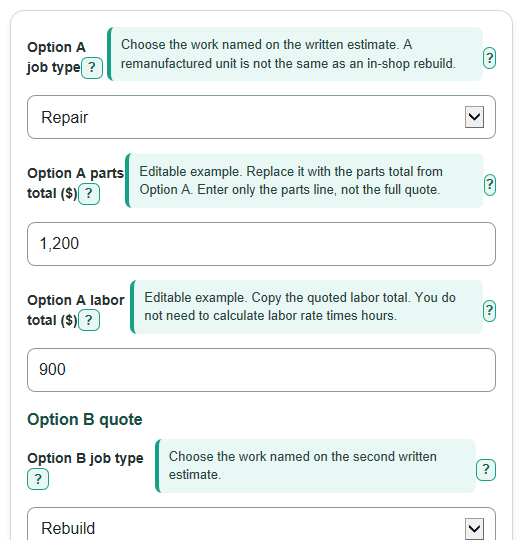
- Choose the job named in each estimate under Option A job type and Option B job type.
- Copy the parts and labor lines into Option A parts total ($), Option A labor total ($), Option B parts total ($), and Option B labor total ($).
- Open Advanced options to add separate diagnostic, fluid, tax, shop-fee, core, warranty, and vehicle-value details only when they appear on the quote.
- Select Calculate, then compare upfront cash due with expected cost after core refund for both options.
- Sanity-check that both quotes include the same scope, such as programming, fluids, tax, and warranty labor, before treating the lower expected net cost as the better choice.
Definitions
Repair: Work on a specific transmission problem without rebuilding or replacing the whole unit.
Rebuild: Taking the transmission apart, replacing worn or failed internal parts, and putting it back together.
Used replacement: A transmission removed from another vehicle and installed in yours.
Remanufactured replacement: A replacement transmission rebuilt to the remanufacturer's process rather than rebuilt by the installing shop.
Core deposit: An upfront charge for the old transmission unit. It may be refunded only if the returned unit meets the seller's rules.
Expected core refund: The refund you reasonably expect after returning an eligible old unit by the required deadline.
Upfront cash due: The entered quote charges plus any core deposit, before a possible later core refund.
Warranty mileage limit: The maximum miles allowed under a warranty, which can end coverage before or after its time limit.
Common mistakes and quick fixes
Mistake: Entering a full quote total in Option A parts total ($) and then also entering Option A labor total ($).
Fix: Enter only the separate parts line and labor line, then add other listed charges in their matching fields.
Mistake: Treating Option B core deposit due today ($) as a permanent cost even though the old unit will be returned.
Fix: Enter the deposit for upfront cash due and enter Option B expected core refund ($) only if the refund is expected under the written terms.
Mistake: Entering a core refund larger than Option A core deposit due today ($).
Fix: Check the estimate and enter a refund no greater than the matching deposit; otherwise the calculator stops with an error.
Mistake: Entering a tax rate, such as 7.25, in Option A quoted tax ($).
Fix: Enter the dollar tax amount printed on the quote, or leave the field blank if tax is included or not listed.
Mistake: Assuming Option A warranty time limit (months) tells you everything about coverage.
Fix: Also fill in Option A warranty mileage limit (mi), Option A warranty covers parts, and Option A warranty covers labor when the warranty document states them.
Mistake: Using the original purchase price or loan balance for Current vehicle value ($).
Fix: Use a current appraisal, dealer offer, insurer valuation, or vehicle-value estimate instead.
Limitations & Key Assumptions / Boundary Conditions
- This calculator compares only the dollar lines and warranty details you enter. A blank optional charge is counted as $0, which does not prove the shop includes that item.
- A lower expected net cost is not a diagnosis or a recommendation. Repair, rebuild, used replacement, remanufactured replacement, and new replacement can have different parts, condition, work scope, and risk.
- Core refunds are conditional. The expected cost assumes the entered refund is received; return condition rules, deadlines, freight, and shop handling can change the actual amount.
- Warranty length, mileage, parts coverage, and labor coverage do not show exclusions, deductibles, transfer rules, towing, or the shop's claims process. Read the written warranty.
- Vehicle-value percentages are a decision aid only. They do not include financing, future repairs, fuel costs, taxes outside the quote, vehicle condition, or the value of keeping the vehicle.
- All money figures are quote amounts, not local price estimates. Confirm whether the written estimate includes diagnosis, fluids, programming, tax, disposal, towing, and any required related repairs.
Methodology
Cost calculation
Each option starts with its parts and labor totals. The calculator adds any separately entered diagnostic fee, fluids, supplies, programming, quoted tax, other shop fees, and core deposit. Blank optional dollar fields count as $0.
Option A upfront cash due = A parts + A labor + A diagnostic + A fluids/supplies/programming + A quoted tax + A other shop fees + A core deposit
Option A expected cost after core refund = Option A upfront cash due - A expected core refund
Option B upfront cash due = B parts + B labor + B diagnostic + B fluids/supplies/programming + B quoted tax + B other shop fees + B core deposit
Option B expected cost after core refund = Option B upfront cash due - B expected core refund
The expected core refund cannot exceed its matching core deposit. This keeps a refund from reducing the cost by more than the upfront core charge.
Comparison results
The lower expected net cost is the smaller of the two expected costs after entered core refunds. If they are equal, the calculator reports a tie. The expected net cost gap is the positive difference between the two expected costs.
Expected net cost gap = absolute value of (Option A expected cost after core refund - Option B expected cost after core refund)
If Current vehicle value ($) is entered, each option's expected cost is shown as a percentage of that value.
Option cost as part of vehicle value = option expected cost after core refund / current vehicle value x 100
Worked example
With Option A parts of $1,200 and labor of $900, Option A upfront cash due is $2,100 when no added charges or core deposit are entered. With Option B parts of $3,000 and labor of $1,800, Option B expected cost after core refund is $4,800 when no refund is entered. Option A has the lower expected net cost, and the gap is $2,700.
Warranty display
The warranty comparison lists only the months, mileage cap, parts coverage, and labor coverage that you enter. A blank or not-stated term means the calculator has no written detail for that item, so confirm it before approving work.
Sources
- City of Pasadena - Transmission Repair and Exchange Service Bid - Pasadenatx
- City of Pasadena - Automotive and Light Truck Transmission Repair Bid - Pasadenatx
- Transmission Repair vs Rebuild vs Replacement: What's the Difference? - Gears Transmission - Bnbgears
- Rebuild or Replace Your Transmission. The Real Cost Math - CoreTransmissionParts.com