
Calculate a series-parallel solar panel layout and check voltage, current, wattage, and controller headroom before you buy parts.
Table of contents
How to use our Solar Panel Series and Parallel Calculator
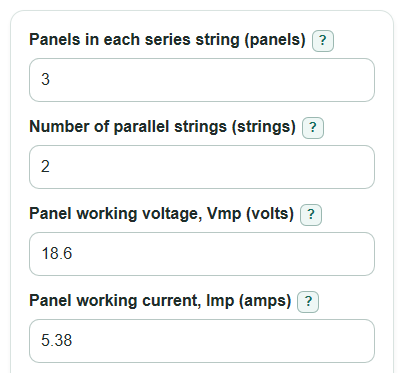
- Enter Panels in each series string and Number of parallel strings for the layout you plan to wire.
- Enter Panel working voltage, Vmp and Panel working current, Imp from one matching panel label or datasheet.
- Open Advanced options if you want the cold voltage and controller checks, then enter Voc, Isc, temperature, and controller limits.
- Click Calculate and read Array working power first, then check Controller fit check and any negative headroom values.
- Sanity-check the results by confirming Total panels equals your planned panel count and that Vmp, Imp, Voc, and Isc came from the same panel model.
Definitions
Series string: Panels connected end-to-end so their voltages add.
Parallel strings: Matching series strings joined side by side so their currents add.
Vmp: Panel working voltage near the panel's best power point.
Imp: Panel working current near the panel's best power point.
Voc: Open-circuit voltage, or panel voltage when it is not powering a load.
Isc: Short-circuit current, used for basic current limit checks.
Headroom: The entered controller limit minus the calculated array value. Positive is under the limit; negative is over the limit.
STC: Standard Test Conditions, the lab rating condition commonly used on solar panel datasheets, with cell temperature at 25 deg C.
Common mistakes and quick fixes
Mistake: Entering total panel count in Panels in each series string.
Fix: Use only the panels connected end-to-end in one string, then use Number of parallel strings for the side-by-side string count.
Mistake: Using Panel open-circuit voltage, Voc in the Panel working voltage, Vmp box.
Fix: Put Vmp in Panel working voltage, Vmp and Voc in Panel open-circuit voltage, Voc so working power and voltage limit checks stay separate.
Mistake: Leaving Voc temperature change as a positive number when the datasheet shows a negative % per deg C value.
Fix: Keep the minus sign in Voc temperature change unless your datasheet truly lists a positive coefficient.
Mistake: Treating a positive Voltage headroom as the only controller check.
Fix: Also review Current headroom and Power headroom if Controller max solar power is entered.
Mistake: Entering a warm air temperature in Coldest panel temperature.
Fix: Use the coldest panel temperature the array may see before sunlight warms it, especially for early morning starts.
Mistake: Assuming Array working power is the power you will always get.
Fix: Read Array working power as a rating-based estimate; shade, heat, wiring loss, and sun angle can lower real output.
Limitations & Key Assumptions / Boundary Conditions
- The calculator assumes all panels are the same model and all strings have the same number of panels.
- Mixed panels can change real voltage, current, and power because a weaker panel or mismatched string can limit the array.
- The cold Voc check depends on the temperature you enter. A colder actual panel temperature can raise voltage more.
- Controller fit is only as accurate as the controller limits you enter from the manual.
- The current check uses array Isc before any extra code, fuse, wire, connector, or manufacturer safety multiplier.
- Real power can be lower than Array working power because of shade, dirt, heat, sun angle, wiring loss, and controller behavior.
- This calculator does not size fuses, breakers, wires, disconnects, grounding, or code-required protection.
Methodology
How the array math works
Solar cells and modules can be connected in series and parallel to produce higher voltage, current, and power levels [1]. For identical panels, series wiring adds voltage, while parallel wiring adds current.
total_panels = series_panels * parallel_strings
array_vmp = series_panels * panel_vmp
array_imp = parallel_strings * panel_imp
array_watts = array_vmp * array_imp
Cold voltage and current checks
The calculator converts the entered cold temperature from deg F to deg C because the Voc temperature change is entered per deg C. It then adjusts Voc from the 25 deg C reference point.
cold_temp_c = (cold_temp_f - 32) * 5 / 9
cold_string_voc = series_panels * panel_voc * (1 + (voc_temp_coeff / 100) * (cold_temp_c - 25))
array_isc = parallel_strings * panel_isc
Signed headroom values are kept as signed numbers. A negative headroom means the planned layout exceeds the entered controller limit.
voltage_headroom = max_pv_voltage - max(array_vmp, cold_string_voc)
current_headroom = max_pv_current - array_isc
power_headroom = max_pv_power - array_watts
Mini example
For 3 panels in each series string, 2 parallel strings, Vmp 18.6 V, and Imp 5.38 A, the working voltage is 3 * 18.6 = 55.8 V and the working current is 2 * 5.38 = 10.76 A. Array working power is 55.8 * 10.76 = 600.408 W. If Voc is 22.3 V, Voc temperature change is -0.28% per deg C, and cold temperature is 14 deg F, the cold temperature is -10 deg C and cold open-circuit voltage per string is 73.4562 V. With a 100 V controller limit, Voltage headroom is 26.5438 V, so the entered voltage limit is not exceeded.