
Use this resuspension calculator to find the volume, concentration, or amount for a dry reagent or DNA/RNA oligo.
Advanced options
Bench-friendly warnings
Display
How to use our Resuspension Calculator
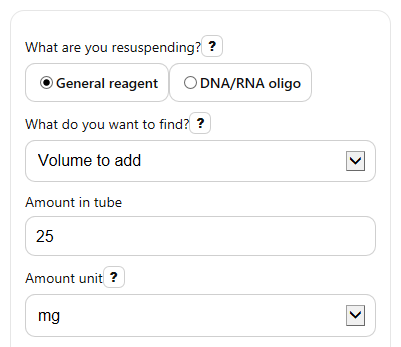
- Choose What are you resuspending? and then pick the missing value under What do you want to find?.
- Enter the visible required fields: Amount in tube, the matching unit, and either Target concentration or Final volume. In general reagent mode, also enter Molecular weight (g/mol).
- If needed, open Advanced options to set Smallest practical volume warning (uL), a Suggested stock concentration for tiny volumes (uM), and how to Round displayed volume to.
- Click Calculate, then compare Calculated result with Exact unrounded result and Same result in another unit to make sure the scale makes sense for your lab work.
- If you see an Easier volume option or a Bench note, use it to decide whether the exact math result is too small or awkward to pipette comfortably.
Definitions
Amount in tube: The dry material you start with. In general reagent mode this is mass, and in oligo mode this is delivered amount in nmol or umol.
Target concentration: The concentration you want after resuspension.
Final volume: The total solution volume after you add solvent, not just the volume you pipette in one step.
Molecular weight (g/mol): The mass of 1 mole of a compound. It lets the calculator convert grams or milligrams into moles.
Molarity: Concentration written as moles per liter, such as uM, mM, or M.
uM: Micromolar, a common unit for oligo stocks. For oligos, 1 uM equals 1 pmol per uL.
Bench note: A short warning when a mathematically correct result may still be inconvenient in real pipetting, such as a very tiny volume.
Common mistakes and quick fixes
Mistake: Leaving Concentration unit at M when you meant uM or mM.
Fix: Check that Target concentration and Concentration unit match the stock you actually want before reading the Calculated result .
Mistake: Using nmol or umol in general reagent mode.
Fix: In What are you resuspending? , choose the correct mode. General reagent uses mass in Amount in tube , while oligo mode uses nmol or umol.
Mistake: Forgetting to enter Molecular weight for a dry chemical.
Fix: In general reagent mode, enter Molecular weight (g/mol) exactly as listed for the compound, or the concentration and volume math will be wrong.
Mistake: Entering a very small Final volume and trusting the number without a bench check.
Fix: Read the Bench note and compare Calculated result with Same result in another unit so you can spot tiny, hard-to-pipette volumes.
Mistake: Mixing up delivered oligo amount with target stock concentration.
Fix: Put the shipped amount in Amount in tube and your desired stock in Target concentration ; then check the Formula used if the answer looks off.
Mistake: Rounding too early and losing precision on small volumes.
Fix: Use Exact unrounded result for records, and use Round displayed volume to only as a bench-friendly display choice.
Limitations & Key Assumptions / Boundary Conditions
- The calculator assumes the dry material amount is accurate and fully recovered when you resuspend it.
- General reagent mode uses standard molarity math and requires a correct Molecular weight (g/mol); hydrates, salts, or purity corrections are not added automatically.
- Oligo mode uses the standard nmol and uM relationship and treats the entered amount as total delivered oligo available for resuspension.
- The bench-friendly warning is only a practical guide. A volume below your chosen Smallest practical volume warning (uL) may still be possible with specialized pipetting methods.
- The suggested easier option uses your entered Suggested stock concentration for tiny volumes. It does not decide whether that stock concentration is best for your assay or storage plan.
- Displayed rounding can make the main answer look slightly different from the raw math. Use Exact unrounded result when you need full precision.
- The calculator does not model density changes, partial dissolution, solvent evaporation, buffer effects, or degradation during storage and handling.
Methodology
Core relationships
In general reagent mode, the calculator first converts mass to grams and volume to liters, then applies standard molarity equations.
C = m / (MW * V)
V = m / (MW * C)
m = C * V * MW
Here, C is concentration in mol/L, m is mass in g, MW is molecular weight in g/mol, and V is final volume in L.
Oligo relationships
In DNA/RNA oligo mode, the calculator converts amount to nmol and uses the standard shortcut that 1 uM equals 1 pmol/uL [1]. That makes oligo resuspension especially convenient in uL and uM.
V_uL = (n_nmol * 1000) / C_uM
C_uM = (n_nmol * 1000) / V_uL
n_nmol = (C_uM * V_uL) / 1000
Here, n_nmol is amount in nmol, C_uM is concentration in uM, and V_uL is volume in uL.
Unit handling
The calculator normalizes units before solving:
1 mg = 0.001 g, 1 mL = 1000 uL, 1 L = 1000000 uL, 1 umol = 1000 nmol, and 1 M = 1000 mM = 1000000 uM.
After solving, it shows the main answer in a natural unit and also gives Same result in another unit to help you sanity-check the scale.
Bench-friendly warning logic
When you solve for volume, the calculator compares the exact volume with Smallest practical volume warning (uL). If the exact result is smaller, it still shows the exact math result but also shows an Easier volume option using your entered Suggested stock concentration for tiny volumes.
Suggested easier volume (uL) = (amount in nmol * 1000) / preferred stock in uM
This extra result is only a practical suggestion. It does not replace the requested answer.
Mini example
If you have 25 nmol of oligo and want a 100 uM stock, the volume is:
V_uL = (25 * 1000) / 100 = 250 uL
If you have 25 mg of NaCl with molecular weight 58.44 g/mol and want 0.1 M solution, the volume is:
V = 0.025 / (58.44 * 0.1) = 0.0042779 L = 4.2779 mL
Assumptions used by the calculator
The math assumes positive, nonzero inputs and complete dissolution. Hidden inputs are ignored when they are not relevant to the chosen mode or solve target. If a needed value is zero, blank, negative, or not finite, the calculator should stop and ask for a direct fix instead of guessing.