
Estimate your rent-to-own credits, remaining purchase price, and optional mortgage readiness check from the deal terms you enter.
Table of contents
How to use our Rent-to-Own Calculator
- Choose What do you want to check? Use Rent credits only for a quick deal estimate, or choose Rent credits plus mortgage check to test income and debt fit.
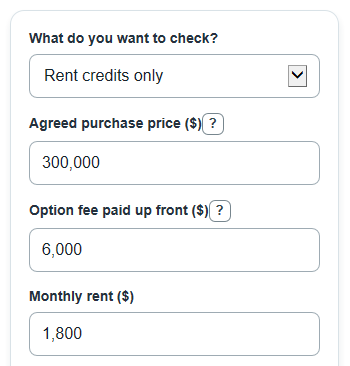
- Enter Agreed purchase price, Option fee paid up front, Monthly rent, Rent credited toward purchase, and Lease-option term from the written agreement.
- If you use the mortgage check, enter Household income before taxes, Other monthly debt payments, Mortgage interest rate, and Mortgage length. Open Advanced options only if you want to change tax, insurance, HOA, closing cost, or DTI targets.
- Click Calculate, then read Purchase price left after option fee and rent credits first. In mortgage mode, also check Estimated monthly mortgage payment with taxes and insurance and Room under target total debt limit.
- Sanity-check the result: if Total credit toward purchase is larger than the Agreed purchase price, or if the rent credit seems higher than the contract allows, fix the inputs before using the numbers to compare deals.
Definitions
Lease-option term: The number of months before you must decide whether to buy under the rent-to-own agreement.
Option fee paid up front: Money paid for the option to buy. This calculator assumes it counts toward the purchase if you buy, but the contract controls that treatment [2].
Rent credited toward purchase: The percent of each rent payment that is counted as a purchase credit, if the agreement allows it [1].
Purchase price left after option fee and rent credits: The agreed price minus the option fee and rent credits. This can be negative if the entered credits are larger than the price.
PITI: Principal, interest, taxes, and insurance. The calculator also adds HOA dues when you enter them.
Debt-to-income ratio: A monthly debt payment divided by monthly income before taxes, shown as a percent.
Room under target total debt limit: The target total debt limit minus the estimated total debt share of income. Positive means under the target; negative means over it.
Common mistakes and quick fixes
Mistake: Entering Rent credited toward purchase as 0.25 when the deal says 25 percent.
Fix: Enter 25 in Rent credited toward purchase, because the calculator treats it as a percent.
Mistake: Using a guessed future market value for Agreed purchase price when the contract names a set price.
Fix: Use the Agreed purchase price from the rent-to-own agreement unless the agreement says the price changes later.
Mistake: Putting the full rent deposit into Option fee paid up front even when only part of it counts toward buying.
Fix: Enter only the amount that the contract says can reduce the purchase price in Option fee paid up front.
Mistake: Choosing Rent credits only and expecting Estimated monthly mortgage payment with taxes and insurance to appear.
Fix: Change What do you want to check? to Rent credits plus mortgage check.
Mistake: Leaving Household income before taxes too low or entering take-home pay instead of gross income.
Fix: Use monthly income before taxes in Household income before taxes so Estimated total debt share of income matches the calculator method.
Mistake: Forgetting car loans, student loans, or credit card minimums in Other monthly debt payments.
Fix: Add required monthly debts to Other monthly debt payments before judging Room under target total debt limit.
Limitations & Key Assumptions / Boundary Conditions
- The calculator depends on the contract details you enter. Rent-to-own agreements can treat option fees, rent credits, missed payments, repairs, and cancellation differently.
- Estimated monthly mortgage payment with taxes and insurance is a planning estimate. It is not a loan approval, loan estimate, or rate quote.
- The mortgage check assumes a fixed-rate, fully amortizing loan with equal monthly principal and interest payments.
- Private mortgage insurance, down payment rules, lender overlays, credit score effects, escrow changes, and local transfer taxes are not included.
- Estimated property tax, Estimated home insurance, HOA dues, and Estimated closing costs can vary by property, lender, location, and time.
- Estimated mortgage amount after credits is floored at $0 because a mortgage principal cannot be negative. Purchase price left after option fee and rent credits is not floored, so it can show a negative value.
- DTI targets are user-entered comparison points. A lender may use different limits or count income and debts differently.
Methodology
Credit calculation
The calculator first turns the rent credit percent into a dollar credit for each month. Then it adds the option fee and all monthly rent credits to estimate the total credit toward purchase.
monthly_rent_credit = monthly_rent * (rent_credit_percent / 100)
total_rent_paid = monthly_rent * lease_term_months
total_credit_toward_purchase = option_fee + monthly_rent_credit * lease_term_months
effective_purchase_price_after_credits = purchase_price - total_credit_toward_purchase
Mini-example: with a $300,000 agreed price, a $6,000 option fee, $1,800 monthly rent, 25 percent rent credit, and 24 months, the monthly rent credit is $450. Total credit is $16,800, total rent paid is $43,200, and the purchase price left after option fee and rent credits is $283,200.
Mortgage check
When mortgage mode is selected, the calculator uses the remaining price after credits as the planned loan amount, but it floors the loan amount at $0 because a mortgage principal cannot be negative.
estimated_loan_amount_after_credits = max(0, effective_purchase_price_after_credits)
For a nonzero annual mortgage interest rate, it uses the standard fixed-payment mortgage formula. The monthly rate is the annual rate divided by 100 and then by 12. The number of loan months is the mortgage length in years times 12.
payment = principal * monthly_rate * (1 + monthly_rate)^months / ((1 + monthly_rate)^months - 1)
If the mortgage interest rate is 0 percent, the calculator avoids division by zero and uses this formula instead.
payment = principal / months
It then adds monthly property tax, monthly home insurance, and HOA dues to estimate the monthly housing payment.
estimated_monthly_piti = payment + annual_property_tax / 12 + annual_home_insurance / 12 + monthly_hoa_dues
Debt checks
The housing debt share compares the estimated monthly housing payment with household income before taxes. The total debt share adds other monthly debt payments first.
front_end_dti_percent = estimated_monthly_piti / monthly_household_income * 100
back_end_dti_percent = (estimated_monthly_piti + other_monthly_debts) / monthly_household_income * 100
back_end_dti_gap_percent_points = target_back_end_dti_percent - back_end_dti_percent
Estimated buyer closing costs are calculated from the agreed purchase price and the closing cost percent you enter.
estimated_cash_needed_at_closing = purchase_price * closing_cost_percent / 100
The readiness message compares the estimated housing debt share with the target housing debt limit and the estimated total debt share with the target total debt limit. If both are at or under their targets, the message says the estimate is within the targets. If either is over, the message names the side that is over so you can adjust price, credits, income, debts, rate, or targets.