
Convert minutes, hours plus minutes, or decimal hours into clear time formats without mixing up decimal and clock-style time.
Advanced options
Decimal-hour display
Time breakdown
Table of contents
How to use our Minutes to Hours and Minutes Converter
- Choose your starting format in What do you want to convert?.
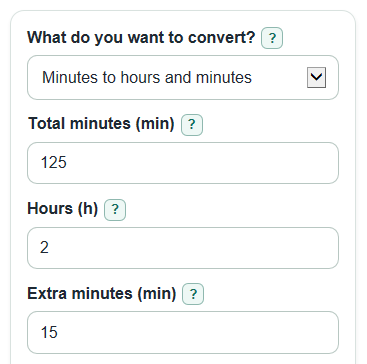
- Fill in the matching field: Total minutes (min), Hours (h) with Extra minutes (min), or Decimal hours (hours).
- Open Advanced options only if you need a different Decimal places for decimal hours, rounding style, seconds, or the optional days line.
- Select Calculate, then read Converted time first for everyday use and Decimal hours for timesheets or spreadsheet math.
- Sanity-check the output by comparing Total minutes with the entered time; for example, 2 hours 15 minutes should show 135 minutes.
Definitions
Total minutes (min): The whole duration written only in minutes. Decimals are allowed, so 90.5 minutes means 90 minutes and 30 seconds.
Decimal hours: Hours written as a decimal number. For example, 1.75 hours means 1 hour and 45 minutes, because 0.75 hour is 45 minutes.
Converted time: The same duration written as whole hours plus leftover minutes, with seconds shown only when selected.
HH:MM style: A compact duration format with hours before the colon and minutes after it. It is not a time of day.
Rounding style for decimal hours: The rule used only to display Decimal hours: standard rounding, round down toward zero, or round up away from zero.
Days, hours, minutes: An optional long-duration breakdown that uses 24 hours per day.
Common mistakes and quick fixes
Mistake: Reading Decimal hours as if it were minutes, such as treating 1.75 as 1 hour 75 minutes.
Fix: Use Converted time for normal reading; Decimal hours is for timesheets and math.
Mistake: Leaving Total minutes (min) blank while What do you want to convert? is set to Minutes to hours and minutes.
Fix: Enter a number in Total minutes (min), such as 125 or 90.5.
Mistake: Thinking Extra minutes (min) must stay below 60.
Fix: Enter the real extra minutes; the converter carries values like 75 into Converted time.
Mistake: Using HH:MM style as a clock time of day.
Fix: Treat HH:MM style as a duration, so 25:00 means 25 hours, not 1:00 AM.
Mistake: Changing Rounding style for decimal hours and expecting Total minutes to change.
Fix: Check Rounding note; rounding affects only Decimal hours, not Total minutes or Converted time.
Mistake: Forgetting Also show days for long times when the time is 24 hours or more.
Fix: Turn on Also show days for long times to see Days, hours, minutes.
Limitations & Key Assumptions / Boundary Conditions
- The converter treats all entries as time lengths, not clock times. HH:MM style is a duration format.
- Decimal hours may be rounded for display, so Decimal hours can look slightly different from the exact fraction behind Total minutes.
- Converted time and Total minutes are based on the exact entered number, not on the rounded Decimal hours display.
- Negative values are allowed. A minus sign means the whole time balance is below zero, such as a deficit or adjustment.
- When Show leftover fractions as is set to Seconds, seconds are rounded to the nearest whole second for display.
- Days, hours, minutes uses 24 hours per day and 60 minutes per hour. It does not account for work shifts, business days, daylight saving time, or calendar dates.
- Very large or very tiny decimal inputs can show normal computer rounding limits, especially after several decimal places.
Methodology
Core conversion
The converter first turns the visible starting format into one exact total-minute value. Time conversion charts for payroll and job aids use the same basic idea of dividing minutes by 60 to get decimal hours [1].
from_minutes: total_minutes = minutes_input
from_parts: total_minutes = hours_input * 60 + minutes_input
from_decimal: total_minutes = decimal_hours_input * 60
Only the inputs for the selected mode are used. Hidden mode inputs do not affect the answer.
Hours and minutes split
The total is split into whole hours and leftover minutes. If the total is negative, the minus sign applies to the whole duration.
sign = total_minutes < 0 ? -1 : 1
abs_minutes = abs(total_minutes)
whole_hours = floor(abs_minutes / 60)
leftover_minutes = abs_minutes - whole_hours * 60
Decimal hours and rounding
Decimal hours are exact before display rounding. The Advanced options change only the displayed Decimal hours card.
decimal_hours_exact = total_minutes / 60
factor = 10 ^ decimal_places
standard = round(decimal_hours_exact * factor) / factor
down = trunc(decimal_hours_exact * factor) / factor
up = sign(decimal_hours_exact) * ceil(abs(decimal_hours_exact) * factor) / factor
Fractional minutes and days
If seconds are selected, leftover fractional minutes are converted to whole seconds for display.
leftover_total_seconds = round(leftover_minutes * 60)
display_minutes = floor(leftover_total_seconds / 60)
display_seconds = leftover_total_seconds - display_minutes * 60
If days are selected, the converter uses 1 day = 24 hours = 1440 minutes.
minutes_per_day = 24 * 60
days = floor(abs_minutes / minutes_per_day)
minutes_after_days = abs_minutes - days * minutes_per_day
hours_after_days = floor(minutes_after_days / 60)
minutes_after_hours = minutes_after_days - hours_after_days * 60
Worked example
For 125 Total minutes (min), the split is floor(125 / 60) = 2 whole hours, with 125 - 2 * 60 = 5 minutes left. The Decimal hours value is 125 / 60 = 2.083333..., which shows as 2.08 when Decimal places for decimal hours is set to 2 with standard rounding. The result is 2 hours 5 minutes, 2.08 decimal hours, HH:MM style 02:05, and Total minutes 125 min.