
Use this calculator to turn a target lux level into lumens for a room, known area, or sphere.
Advanced options
Table of contents
How to use our Lux to Lumens Calculator
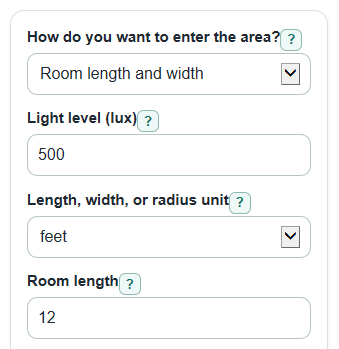
- Choose How do you want to enter the area?: Room length and width, Known area, or Sphere radius.
- Enter Light level (lux), then fill only the shown size fields such as Room length and Room width, Area, or Sphere radius.
- Open Advanced options only if you want fixture planning, then adjust Light reaching the area (0 to 1), Kept brightness over time (0 to 1), or Number format.
- Select Calculate and read Fixture lumens needed first; compare it with Lumens landing on the area to see how the loss factors changed the answer.
- Sanity-check Area used and Method note. If the area method or unit looks wrong, change it before using the lumen value.
Definitions
Lux (lx): The light level on a surface. One lux is one lumen per square meter [1].
Lumen (lm): A measure of total visible light. More lumens means more total light, if the light is spread the same way.
Area used: The selected room, surface, or sphere area converted to square meters for the lux formula.
Fixture lumens needed: The estimated lamp or fixture output after optional loss factors are included.
Lumens landing on the area: The direct lux-to-lumens conversion before optional loss factors.
Light reaching the area (0 to 1): The fraction of fixture light that reaches the target surface. Use 1 for a pure conversion.
Kept brightness over time (0 to 1): The fraction of brightness kept after aging, dirt, or other light losses. Use 1 when you do not want to include these losses.
Foot-candle: A US customary light level unit. The Same light level output converts the entered lux value to foot-candles.
Common mistakes and quick fixes
Mistake: Using Room length in feet while Length, width, or radius unit is set to meters.
Fix: Match Length, width, or radius unit to the units you used for Room length and Room width.
Mistake: Choosing Known area but leaving Area unit set to square feet when your Area is in square meters.
Fix: Set Area unit to the unit that matches the Area number you entered.
Mistake: Using Sphere radius for a normal floor, desk, or wall lighting estimate.
Fix: Use How do you want to enter the area? set to Room length and width or Known area unless the lux is spread over a full spherical surface.
Mistake: Reading Lumens landing on the area as the lamp output you need to buy when Light reaching the area (0 to 1) is less than 1.
Fix: Use Fixture lumens needed for a fixture estimate because it includes Light reaching the area (0 to 1) and Kept brightness over time (0 to 1).
Mistake: Typing 80 into Light reaching the area (0 to 1) to mean 80%.
Fix: Enter 0.8 instead, because Light reaching the area (0 to 1) is a fraction from greater than 0 through 1.
Mistake: Ignoring Area used after changing How do you want to enter the area?.
Fix: Check Area used and Method note to confirm the calculator used the shape and size you intended.
Limitations & Key Assumptions / Boundary Conditions
- The result assumes the chosen lux level is spread evenly over the Area used. It does not model hot spots or dark corners.
- Room length and width are treated as a flat rectangle. Irregular rooms need a separately measured Area.
- Sphere radius uses a full sphere surface. It is not the right choice for a flat work surface or a one-direction beam.
- Fixture lumens needed is an estimate based only on Light reaching the area (0 to 1) and Kept brightness over time (0 to 1). It does not include beam angle, fixture spacing, wall color, ceiling height, glare, or code requirements.
- The optional factors must be greater than 0 and no more than 1. A value of 1 means no extra loss in that factor.
- Very small or very large answers may display in scientific notation when Number format is Auto.
Methodology
Core conversion
Lux is light per square meter, so the direct lumen amount is the light level multiplied by the area in square meters.
lumens_on_area = illuminance_lx * area_m2
Area choices
For Room length and width, the calculator converts each length to meters when needed, then multiplies length by width.
area_m2 = length_m * width_m
For Known area, the calculator uses square meters as entered or converts square feet to square meters. For feet, it uses 1 ft = 0.3048 m, so 1 ft^2 = 0.09290304 m^2 [2].
area_m2 = area_value if area_unit = m2
area_m2 = area_value * 0.09290304 if area_unit = ft2
For Sphere radius, the calculator uses the surface area of a full sphere around the light source.
area_m2 = 4 * pi * radius_m^2
Fixture estimate
Lumens landing on the area is the ideal light on the chosen surface. Fixture lumens needed divides that value by the two optional factors.
fixture_lumens_needed = lumens_on_area / (utilization_factor * light_loss_factor)
If both factors are 1, Fixture lumens needed matches Lumens landing on the area.
Foot-candle conversion
The Same light level output converts lux to foot-candles using the square-foot to square-meter factor.
foot_candles = illuminance_lx * 0.09290304
Worked example
For a 12 ft by 10 ft room at 500 lux, the area is 120 ft^2, or 11.1483648 m^2. The direct light on the area is 500 * 11.1483648 = 5574.1824 lm. With Light reaching the area (0 to 1) = 1 and Kept brightness over time (0 to 1) = 1, Fixture lumens needed is also 5574.1824 lm. If the two factors were 0.8 and 0.9 instead, the fixture estimate would be 5574.1824 / 0.72 = 7741.92 lm.