
Calculate a home's loan-to-value ratio, combined loan-to-value, equity, and target paydown using the value your lender may use.
Advanced options
Table of contents
How to use our Loan-to-Value Calculator
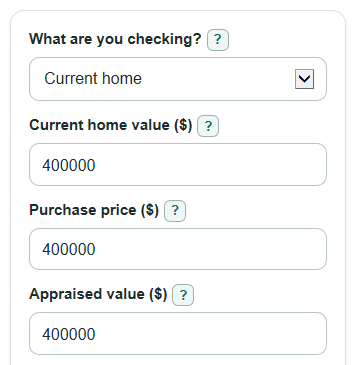
- Choose What are you checking?: Current home for a refinance or PMI-style check, or Buying a home for a purchase.
- Enter the visible value fields, then enter First loan amount or balance ($) and Other home loans or liens ($).
- Open Advanced options if you want to change Target applies to, set Target loan-to-value (percent), or test a change in home value.
- Click Calculate and read Loan-to-value first, then compare it with Combined loan-to-value if other loans are entered.
- Sanity-check the output: if Value used seems wrong, check whether you chose Current home or Buying a home, and make sure the lower appraisal rule matches your situation.
Definitions
Loan-to-value (LTV): The first loan amount divided by the home value used, shown as a percent. It means how much of the home value is covered by the first loan.
Combined loan-to-value (CLTV): The first loan plus other home loans or liens divided by the home value used. Lenders calculate both LTV and CLTV when a first mortgage has subordinate financing [1].
Value used: The dollar value used as the bottom number in the ratio. For Buying a home, this calculator uses the lower of Purchase price ($) and Appraised value ($).
Home equity: The value used minus the first loan and other loans entered. Negative equity means the loans entered are larger than the value used.
Other home loans or liens ($): Second mortgages, HELOC balances, or other loans tied to the home. A second mortgage is also called a junior lien by the CFPB [3].
Target loan-to-value (percent): The percent you want to compare against, such as 80 for an 80% target.
Common mistakes and quick fixes
Mistake: Entering a sale price in Current home value ($) while What are you checking? is set to Current home.
Fix: For a current home, use the current value estimate or appraisal, or switch What are you checking? to Buying a home.
Mistake: Leaving Other home loans or liens ($) blank because there is no second loan.
Fix: Enter 0 so Combined loan-to-value can be calculated clearly.
Mistake: Using the down payment instead of the mortgage in First loan amount or balance ($) .
Fix: Enter the first mortgage amount or current principal balance, not the cash you are paying upfront.
Mistake: Ignoring Appraised value ($) when buying a home.
Fix: Enter both Purchase price ($) and Appraised value ($) ; the calculator uses the lower value for Value used .
Mistake: Setting Target applies to to First loan only when second loans should count.
Fix: Choose Combined loans if Amount to reach target should include Other home loans or liens ($) .
Mistake: Typing 0.80 in Target loan-to-value (percent) when you mean 80%.
Fix: Enter 80 for an 80 percent target.
Limitations & Key Assumptions / Boundary Conditions
- The calculator uses the numbers you enter. A different appraisal, payoff balance, or lien amount will change the result.
- For Buying a home, Value used is the lower of Purchase price ($) and Appraised value ($). Your lender may have extra rules for your loan type.
- What it may mean is a plain-language guide, not a loan approval, interest rate quote, or PMI decision.
- Other home loans or liens ($) is treated as a current balance. The calculator does not model future HELOC draws, interest, closing costs, or payoff fees.
- Amount to reach target is signed. A positive amount means the selected balance is above the target; a negative amount means there is cushion below the target.
- Highest first loan at target is floored at $0 because a first loan cannot be negative. If other loans alone are above a combined target, the calculator cannot make the first-loan limit negative.
- If Test home value change (percent) makes the tested value zero or less, the tested LTV is not meaningful and should not be used.
Methodology
Core value choice
The calculator first chooses the property value used in the ratio. In Current home mode, it uses Current home value ($). In Buying a home mode, it uses the lower of Purchase price ($) and Appraised value ($).
value_used = current_home_value
value_used = min(purchase_price, appraised_value)
Loan ratios and equity
LTV compares the first loan with the value used. CLTV compares all home loans entered with the value used. CLTV is useful when there is a second mortgage, HELOC balance, or other lien [1].
ltv_percent = first_loan_amount / value_used * 100
combined_ltv_percent = (first_loan_amount + other_loans) / value_used * 100
home_equity_amount = value_used - first_loan_amount - other_loans
equity_percent = home_equity_amount / value_used * 100
Target comparison
The target can apply to the first loan only or to combined loans. The calculator compares the selected balance with the target balance allowed by Target loan-to-value (percent).
target_balance_used = first_loan_amount
target_balance_used = first_loan_amount + other_loans
target_gap_amount = target_balance_used - (target_ltv_percent / 100 * value_used)
For Highest first loan at target, other loans are counted first only when the target applies to combined loans.
raw_max_first_loan = target_ltv_percent / 100 * value_used - other_loans_for_target
max_first_loan_at_target = max(0, raw_max_first_loan)
Value change test
The value change test keeps the first loan the same and changes only the value used. This shows how a lower appraisal or higher value estimate can move the LTV.
tested_value = value_used * (1 + value_change_percent / 100)
tested_ltv_percent = first_loan_amount / tested_value * 100
Mini example
If a current home is worth $500,000, the first loan is $360,000, and other loans are $40,000, then LTV is $360,000 / $500,000 * 100 = 72.00%. Combined LTV is ($360,000 + $40,000) / $500,000 * 100 = 80.00%. Home equity is $500,000 - $360,000 - $40,000 = $100,000. If the target is 80% and applies to combined loans, the target balance is $400,000, so the amount to reach target is $0.
Rounding and validation
Percent outputs are rounded to 2 decimal places. Money outputs are rounded to the nearest dollar. Visible required money fields must be nonnegative numbers, Value used must be greater than $0, and Target loan-to-value (percent) must be greater than 0 and no more than 300.