
Add your home value and home-secured loan balances to find your current CLTV and room under a lender limit.
Advanced options
Table of contents
How to use our Combined Loan-to-Value Calculator
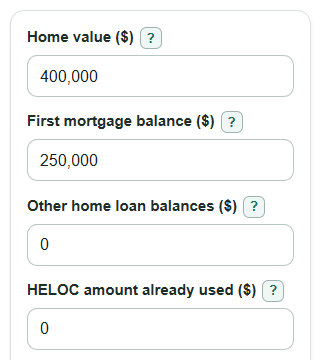
- Enter Home value ($), using a current appraisal or a careful market estimate.
- Enter First mortgage balance ($), Other home loan balances ($), and HELOC amount already used ($). Include only debts secured by the home.
- Enter Lender limit to test (percent). Use the limit you want to compare against, such as 80 or 85, if your lender gave you one.
- Use New loan or credit request ($) to test a planned home equity loan, HELOC draw, or second mortgage. Use Full HELOC credit limit ($) only when you already have a HELOC line and want to see HCLTV.
- Sanity-check the results: Current CLTV should be higher than First mortgage LTV when you entered other home-secured debt, and Home equity before any new request can be negative if balances exceed Home value ($).
Definitions
CLTV: Combined loan-to-value. It is all current home-secured debt divided by Home value ($), shown as a percent.
First mortgage LTV: First mortgage balance ($) divided by Home value ($). It leaves out second mortgages, home equity loans, and HELOC debt.
HELOC amount already used ($): The part of a home equity line of credit that has already been borrowed.
Full HELOC credit limit ($): The total line amount available on a HELOC, even if only part of it has been used.
HCLTV: Home equity combined loan-to-value. In this calculator, it counts the larger of the HELOC amount already used or the Full HELOC credit limit ($), then divides by Home value ($).
Lender limit to test (percent): The maximum CLTV percent you want to compare against. It is a planning input, not an approval rule.
Room under your lender limit: The dollar amount of extra home-secured borrowing that would fit under the selected Lender limit to test (percent), before closing costs and lender-specific rules.
Common mistakes and quick fixes
Mistake: Using the purchase price from years ago for Home value ($).
Fix: Enter a current appraised value or careful market estimate for Home value ($), because CLTV changes when the home value changes.
Mistake: Putting the full HELOC line in HELOC amount already used ($).
Fix: Put only the borrowed amount in HELOC amount already used ($), and put the total line in Full HELOC credit limit ($) if you want HCLTV.
Mistake: Leaving a home equity loan out of Other home loan balances ($).
Fix: Add closed-end second mortgages, home equity loans, seller financing, and other liens secured by the home to Other home loan balances ($).
Mistake: Entering credit cards, car loans, or student loans in Other home loan balances ($).
Fix: Include only home-secured debt in Other home loan balances ($).
Mistake: Treating Room under your lender limit as guaranteed approval.
Fix: Use Lender limit to test (percent) as a planning number only; lenders may also check income, credit, property type, lien position, and appraisal rules.
Mistake: Expecting New loan or credit request ($) to replace an existing loan balance.
Fix: Enter only the added amount in New loan or credit request ($); existing secured balances stay in First mortgage balance ($), Other home loan balances ($), and HELOC amount already used ($).
Limitations & Key Assumptions / Boundary Conditions
- The calculator uses the Home value ($) you enter. A lender may use a new appraisal, an automated value, or the lower of purchase price and appraised value.
- Only home-secured debt belongs in First mortgage balance ($), Other home loan balances ($), HELOC amount already used ($), and New loan or credit request ($). Unsecured debts are not part of CLTV.
- Room under your lender limit does not include closing costs, payoff changes, interest accrual, late fees, escrow shortages, or lender reserve requirements.
- The calculator keeps negative Home equity before any new request and negative Room under your lender limit. Negative values are useful because they show the shortfall instead of hiding it.
- HCLTV if full HELOC line is counted appears only when Full HELOC credit limit ($) is greater than HELOC amount already used ($). If the line limit is equal to or lower than the drawn balance, HCLTV would not add a different number.
- A high CLTV, low CLTV, or positive borrowing room is not loan approval. Lenders may also review credit score, income, debt-to-income ratio, property type, lien position, and program rules.
Methodology
How the calculator adds the balances
The calculator first adds the current debt secured by the home. That includes the first mortgage, other home-secured loans, and the amount already used on a HELOC. This matches the basic CLTV idea of comparing combined home-secured debt with the property value [1].
current_debt = first_mortgage_balance + other_home_loan_balances + heloc_drawn_balance
CLTV and first mortgage LTV
Current CLTV divides current secured debt by Home value ($), then multiplies by 100 to show a percent.
current_cltv_percent = current_debt / property_value * 100
First mortgage LTV uses only First mortgage balance ($). This is why First mortgage LTV can look safe while Current CLTV is higher.
first_mortgage_ltv_percent = first_mortgage_balance / property_value * 100
Equity, borrowing room, and the request test
Home equity before any new request is the home value minus current secured debt. The result is allowed to be negative.
home_equity = property_value - current_debt
Room under your lender limit compares current secured debt with the maximum debt allowed by the Lender limit to test (percent). A negative result means the current debt is already above that selected limit.
target_borrowing_room = property_value * target_cltv_percent / 100 - current_debt
CLTV after your new request adds New loan or credit request ($) to current secured debt before dividing by the home value.
after_request_cltv_percent = (current_debt + requested_new_loan) / property_value * 100
HCLTV when a full HELOC line matters
HCLTV if full HELOC line is counted uses the larger of HELOC amount already used ($) or Full HELOC credit limit ($). This reflects the HCLTV idea of counting the full HELOC line when that is the relevant exposure [2].
hcltv_percent = (first_mortgage_balance + other_home_loan_balances + max(heloc_drawn_balance, heloc_credit_limit)) / property_value * 100
Mini-example
Suppose Home value ($) is $400,000, First mortgage balance ($) is $250,000, Other home loan balances ($) is $0, and HELOC amount already used ($) is $50,000. Current secured debt is $300,000, so Current CLTV is $300,000 / $400,000 * 100 = 75%. If Lender limit to test (percent) is 80, the maximum debt at that limit is $320,000, so Room under your lender limit is $20,000. If Full HELOC credit limit ($) is $75,000, HCLTV is ($250,000 + $0 + $75,000) / $400,000 * 100 = 81.25%.