
Calculate how extra principal payments can shorten a fixed-rate loan and lower the interest you pay.
Advanced options
Table of contents
How to use our Loan Extra Payment Calculator
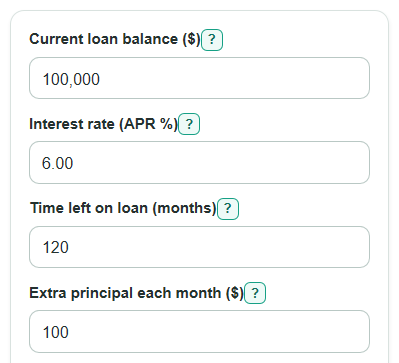
- Enter the Current loan balance ($), Interest rate (APR %), and Time left on loan (months) from your latest statement.
- Enter Extra principal each month ($), then choose the Next payment date so the payoff month is estimated from the right starting point.
- Open Advanced options only if you want to add a One-time extra principal ($), a yearly extra payment, or Use my current monthly P&I payment ($).
- Click Calculate and compare Payoff time with extra payments, Interest saved, Time saved, and Extra principal actually used.
- Sanity-check the result: if the Final payment with extra plan is smaller than a normal payment, that is usually the calculator using only the amount needed to finish the loan.
Definitions
Current loan balance ($): The amount of loan principal still unpaid today.
Interest rate (APR %): The fixed yearly interest rate entered as a percent. The calculator divides it by 12 to estimate monthly interest.
P&I payment: Principal and interest only. For a mortgage, this is not the same as the full monthly payment if taxes, insurance, or escrow are included [1].
Extra principal: Money paid above the required P&I payment that is meant to lower the loan balance faster.
Payoff time with extra payments: The number of monthly payments needed after the extra-payment plan is applied.
Extra principal actually used: The extra principal that fits before the loan is paid off. It can be less than the planned total when the final month needs only a smaller amount.
Final payment with extra plan: The last payment needed to bring the balance to zero, including that month's interest.
Common mistakes and quick fixes
Mistake: Entering the original loan amount in Current loan balance ($).
Fix: Use the amount you still owe now, unless this is a brand-new loan.
Mistake: Typing a monthly rate in Interest rate (APR %) instead of the yearly APR.
Fix: Enter the annual rate, such as 6 for a 6% APR.
Mistake: Putting years in Time left on loan (months).
Fix: Convert years to months first, such as 10 years = 120 months.
Mistake: Including the regular payment inside Extra principal each month ($).
Fix: Enter only the extra amount added on top of the required monthly P&I payment.
Mistake: Filling Use my current monthly P&I payment ($) with a total mortgage payment that includes taxes or insurance.
Fix: Use only principal and interest, or leave it blank so the calculator estimates the P&I payment.
Mistake: Setting One-time extra principal ($) but leaving Apply one-time extra in payment number at the wrong payment.
Fix: Use 1 for the next payment, 12 for about one year from now, and so on.
Limitations & Key Assumptions / Boundary Conditions
- The calculator is for fixed-rate loans with monthly payments. It does not model adjustable rates, daily interest posting, deferment, forbearance, skipped payments, or late fees.
- APR is treated as a simple annual rate converted to a monthly rate by dividing by 12.
- Results use the Next payment date only to estimate the payoff month. The date does not change the interest calculation.
- The Use my current monthly P&I payment ($) field must be principal and interest only. Escrow, taxes, insurance, HOA fees, and service fees are not part of the loan payoff math.
- Some lenders require extra money to be marked as principal-only or additional principal. Check your lender's instructions before sending extra payments.
- If an advanced extra payment is scheduled after the loan is already paid off, that extra payment is not used.
- The payoff loop stops at 1200 months as a safety limit. If a payment cannot pay down the balance, the calculator should show an error instead of a payoff result.
Methodology
Payment used
The calculator first finds the monthly rate from the entered APR. It then uses the calculated regular monthly P&I payment, unless Use my current monthly P&I payment ($) is filled in with a valid amount. P&I means principal and interest only, not a total payment with escrow items [1].
monthly_rate = APR_percent / 100 / 12
if monthly_rate > 0: payment = balance * monthly_rate * (1 + monthly_rate)^months / ((1 + monthly_rate)^months - 1)
if monthly_rate = 0: payment = balance / months
Monthly payoff loop
Each month, interest is added first. The regular P&I payment is applied next. Then the calculator adds Extra principal each month ($), any One-time extra principal ($) due that payment number, and any yearly extra payment due in the selected calendar month. Extra principal is capped at the amount still needed to pay off the loan, so the final payoff month is not overstated.
interest_for_month = current_balance * monthly_rate
amount_due = current_balance + interest_for_month
scheduled_paid = min(regular_payment, amount_due)
planned_extra = monthly_extra + one_time_extra_if_this_month + yearly_extra_if_this_month
extra_paid = min(planned_extra, amount_due - scheduled_paid)
new_balance = amount_due - scheduled_paid - extra_paid
Comparison plan
The regular plan uses the same starting balance, APR, regular P&I payment, and Next payment date, but sets all extra principal to 0. The calculator compares the two loops.
interest_saved = regular_total_interest - extra_total_interest
months_saved = regular_payoff_months - extra_payoff_months
Mini-example
With a $100,000 balance, 6.00% APR, 120 months left, and $100 extra principal each month, the calculated regular monthly P&I payment is about $1,110.21. The extra-payment plan pays off in about 107 months, saves about $3,896.24 in interest, and has a final payment of about $1,046.63 because only the remaining payoff amount is used in the last month.
Calculation choices
Money amounts are rounded for display, but the payoff loop uses unrounded values internally. Extra principal is treated as additional principal in the month it is scheduled; lender posting rules can differ, so the warning reminds users to check how their lender handles extra principal payments [2].
Sources
- On a mortgage, what's the difference between my principal and interest payment and my total monthly payment? | Consumer Financial Protection Bureau - Consumerfinance
- Processing Additional Principal Payments | Fannie Mae - Fanniemae
- Processing Mortgage Loan Payments and Payoffs | Fannie Mae - Fanniemae
- Principal-only mortgage payments | Rocket Mortgage - Rocketmortgage