
Calculate liquid ethylene density from temperature and pressure or from measured mass and volume, with a clear check for whether the state is actually liquid.
Advanced options
How to use our Liquid Ethylene Density Calculator
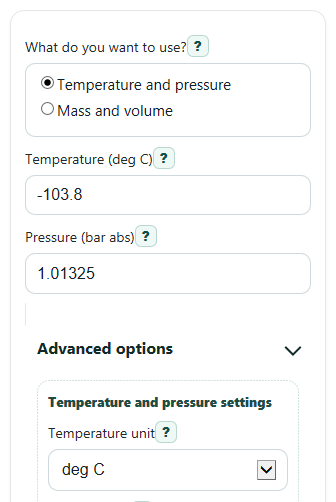
- Choose "What do you want to use?" and pick either "Temperature and pressure" for an estimated liquid value or "Mass and volume" for a measured value.
- If you use temperature and pressure, enter "Temperature (deg C)" and "Pressure (bar abs)" or change the advanced unit settings first so your numbers match the labels you are using.
- If you use measured values, enter "Mass" and "Volume", then choose the matching "Mass unit" and "Volume unit" so the calculator can convert them correctly.
- Open "Advanced options" if needed to set "Pressure type", "Pressure unit", "Temperature unit", "Result density unit", or "Near-saturation tolerance (percent)".
- Click "Calculate", then sanity-check the result by reading "State check" and "Range and assumptions" first; if the state says not liquid, do not use the estimated liquid density as a real liquid value.
Definitions
Liquid density: Mass per unit volume of liquid ethylene. Higher density means the same mass takes up less space.
Specific volume: Volume per unit mass. It is the reciprocal of density, so a smaller specific volume means a denser liquid.
Saturation pressure: The pressure at a given temperature where a pure substance's liquid and vapor can exist in equilibrium [2].
Saturated liquid: A liquid state that is at or very near the saturation pressure for the entered temperature.
Compressed liquid: A liquid at a pressure above the saturation pressure for the same temperature.
Absolute pressure: Pressure measured from zero pressure. This is the pressure needed for thermodynamic state checks.
Gauge pressure: Pressure measured above the surrounding air pressure, so it must be converted to absolute pressure before the calculator checks phase.
Common mistakes and quick fixes
Mistake: Entering gauge pressure into "Pressure (bar abs)" while leaving "Pressure type" on absolute.
Fix: If your pressure is gauge pressure, switch "Pressure type" to gauge so the calculator adds standard atmospheric pressure before the state check.
Mistake: Typing a temperature in K or deg F into "Temperature (deg C)" without changing "Temperature unit".
Fix: Set "Temperature unit" to match your entry, or convert your number to deg C before calculating.
Mistake: Using "Mass" and "Volume" from different unit systems but forgetting to change "Mass unit" or "Volume unit".
Fix: Make sure "Mass unit" and "Volume unit" exactly match what you measured before trusting "Liquid density".
Mistake: Treating "State check" as optional in temperature and pressure mode.
Fix: Read "State check" every time. If it says not liquid, the displayed liquid estimate should not be used as a real liquid property at that condition.
Mistake: Entering zero or negative "Volume" or "Mass" in measured mode.
Fix: Use a positive "Mass" and a "Volume" greater than zero, then recalculate to get a physical "Liquid density" and "Specific volume".
Mistake: Assuming "Saturation pressure at this temperature" is your actual tank pressure.
Fix: Compare your entered pressure to "Saturation pressure at this temperature". That output is the phase-change pressure at the entered temperature, not a measured system pressure.
Limitations & Key Assumptions / Boundary Conditions
- The temperature-and-pressure path is only for liquid ethylene checks within the calculator's supported approximation range near the normal boiling region, not for all possible ethylene conditions.
- If the entered pressure is below the saturation pressure at the entered temperature, pure ethylene is not treated as a stable liquid here, so the liquid-density estimate should not be used.
- Near the critical region, liquid and vapor become harder to separate and small input changes can cause large property changes, so results are more sensitive.
- If you choose gauge pressure, the calculator converts it using standard atmosphere of 1.01325 bar; real local atmospheric pressure can differ slightly.
- The mass-and-volume path gives measured density only. It does not prove the sample is pure ethylene or fully liquid.
- Unit conversions are applied after the core calculation, so wrong unit selections can cause large errors even when the math is correct.
Methodology
Core calculation paths
The calculator uses one of two methods depending on your choice in "What do you want to use?".
ρ (density) = m / V
v (specific volume) = 1 / ρ
In measured mode, mass is first converted to kg and volume to m3, then density is calculated in kg/m3 and converted to the result unit you picked.
In temperature-and-pressure mode, the calculator first converts the entered temperature and pressure to deg C and bar absolute, then checks whether the state is liquid before showing an estimated liquid density.
Pressure conversion and phase check
P_abs = P_gauge + P_atm
if P_abs < P_sat(T), state = not liquid
if |P_abs - P_sat(T)| / P_sat(T) <= tol, state = saturated liquid
if P_abs > P_sat(T), state = compressed liquid
Here, P_atm is standard atmosphere, 1.01325 bar. Saturation pressure means the pressure where a pure substance's liquid and vapor are in equilibrium at a given temperature [2]. The near-saturation tolerance lets the calculator treat tiny rounding differences as saturated liquid instead of compressed liquid.
Temperature-pressure density estimate
For the temperature-and-pressure path, the calculator uses the small-range approximation defined in the contract, anchored near ethylene's normal boiling point.
ρ = ρ0 + slope x (T_c - T_b)
With the default anchor values, T_b = -103.8 deg C and ρ0 = 567.9 kg/m3. This means the default example returns a density close to 567.9 kg/m3 when pressure is about 1.01325 bar absolute and the state check is liquid.
Mini example
If you choose measured mode with 5 kg and 8.8 L, the calculator converts 8.8 L to 0.0088 m3 and then computes density as 5 / 0.0088 = 568.18 kg/m3. Specific volume is then 1 / 568.18 = 0.00176 m3/kg.
Assumptions behind the result
The measured path assumes your mass and volume describe the same sample at the same condition. The temperature-and-pressure path assumes pure ethylene, uses an approximation only over a limited range, and blocks or warns when the state check says the entered condition is not liquid. More advanced property work often relies on reference equations developed over stated temperature and pressure ranges [1], which is why this calculator highlights validity limits instead of pretending one simple formula works everywhere.