
Compare an interest-only mortgage with a regular principal-and-interest mortgage by payment, balance, and interest paid by your chosen year.
Table of contents
How to use our Interest-Only vs Principal-and-Interest Mortgage Calculator
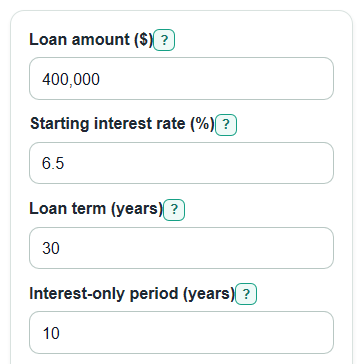
- Enter the Loan amount ($), Starting interest rate (%), Loan term (years), and Interest-only period (years) from the loan estimate you want to compare.
- Enter Compare after (years) for the year you care about, such as the year you might sell, refinance, or check the remaining balance.
- Open Advanced options only if you want to enter Rate after interest-only period (%) or add Property tax ($ per year), Home insurance ($ per year), Mortgage insurance ($ per month), or HOA dues ($ per month).
- Select Calculate and read Extra interest paid by compare year first, then check Less loan paid off by compare year and Payment jump when principal payments start.
- Sanity-check the answer: during the interest-only period, Interest-only loan balance at compare year should stay near the original Loan amount ($), while Principal-and-interest loan balance at compare year should usually be lower.
Definitions
Interest-only period: The first part of the loan when the scheduled payment covers interest but does not pay down the borrowed principal [1].
Principal: The borrowed money still owed on the mortgage.
Principal-and-interest payment: A regular mortgage payment where part pays interest and part pays down principal.
Starting interest rate (%): The yearly loan rate used for the first interest-only payment and the regular principal-and-interest comparison.
Rate after interest-only period (%): The yearly rate used after the interest-only period ends. If it is blank, the calculator uses the Starting interest rate (%).
Compare after (years): The point in the loan when balances and total interest are compared.
Payment jump: The change in the full monthly payment when the loan starts requiring principal payments after the interest-only period.
Common mistakes and quick fixes
Mistake: Entering the home price in Loan amount ($) instead of the borrowed amount.
Fix: Use the mortgage balance after the down payment, such as purchase price minus down payment.
Mistake: Typing APR with fees into Starting interest rate (%) when you only want the note-rate payment math.
Fix: Enter the yearly loan interest rate used for the monthly payment quote.
Mistake: Setting Interest-only period (years) equal to or longer than Loan term (years).
Fix: Make Interest-only period (years) shorter than the full Loan term (years), so there are months left to pay principal.
Mistake: Using Compare after (years) only at the end of the loan and missing the year you may sell or refinance.
Fix: Enter the planned hold period so Extra interest paid by compare year and Less loan paid off by compare year match your decision date.
Mistake: Leaving Rate after interest-only period (%) blank when your loan quote says the later rate changes.
Fix: Enter the later rate in Rate after interest-only period (%); leave it blank only when it should match Starting interest rate (%).
Mistake: Treating Added housing costs included each month as part of loan payoff.
Fix: Use Property tax ($ per year), Home insurance ($ per year), Mortgage insurance ($ per month), and HOA dues ($ per month) for budget totals only; they do not reduce the loan balance.
Limitations & Key Assumptions / Boundary Conditions
- The model assumes payments are made monthly and on time.
- The interest-only path does not include extra principal payments during the Interest-only period (years).
- Rate after interest-only period (%) is treated as one fixed later rate, not as repeated adjustable-rate changes.
- Property tax ($ per year), Home insurance ($ per year), Mortgage insurance ($ per month), and HOA dues ($ per month) are added for monthly budgeting only. They do not affect interest, principal, or balances.
- The calculator does not include closing costs, points, lender fees, prepayment penalties, escrow changes, tax deductions, or investment returns from lower early payments.
- Compare after (years) must land on a whole month and cannot be after Loan term (years).
- Small rounding differences can happen because real lenders may round each monthly payment and interest charge differently.
Methodology
Payment math
The calculator first changes yearly rates into monthly rates and loan years into months.
monthly_rate = annual_rate_percent / 100 / 12
n = loan_term_years * 12
For the regular mortgage, the calculator uses the standard fixed-payment loan formula. P is Loan amount ($), r is the monthly rate, and n is the total number of months.
payment = P * r * (1 + r)^n / ((1 + r)^n - 1)
if r = 0, payment = P / n
The interest-only payment covers interest only during the first phase, so the starting loan balance does not go down in that phase.
io_payment = P * r_start
if r_start = 0, io_payment = 0
After the interest-only period, the unchanged balance is paid over the remaining months. If Rate after interest-only period (%) is blank, the calculator uses Starting interest rate (%).
remaining_months = loan_term_years * 12 - interest_only_years * 12
post_io_payment = P * r_post * (1 + r_post)^remaining_months / ((1 + r_post)^remaining_months - 1)
if r_post = 0, post_io_payment = P / remaining_months
Balances and interest by the compare year
For a principal-and-interest loan, the balance after k months is calculated from the original principal, monthly rate, and fixed monthly payment.
balance = P * (1 + r)^k - payment * (((1 + r)^k - 1) / r)
if r = 0, balance = P - payment * k
Interest paid in an amortizing phase is the payments made minus the principal paid down.
interest_paid = payment * k - (starting_balance - ending_balance)
For the interest-only path, months inside the interest-only period use interest-only interest. Months after that use the post-interest-only amortizing payment and balance formula.
monthly_extra_costs = annual_property_tax / 12 + annual_home_insurance / 12 + monthly_mortgage_insurance + monthly_hoa_dues
extra_interest_by_compare_year = io_path_interest_paid - pi_path_interest_paid
less_principal_paid_by_compare_year = io_balance_at_compare_year - pi_balance_at_compare_year
payment_jump_after_io = post_io_full_monthly_payment - io_full_monthly_payment_during_first_phase
Mini-example
With a $400,000 loan, 6.5% Starting interest rate (%), 30-year Loan term (years), 10-year Interest-only period (years), and Compare after (years) of 7, the interest-only loan payment is about $2,166.67 per month. The regular principal-and-interest payment is about $2,528.27 per month, so the early loan payment is lower by about $361.61 per month.
At year 7, the interest-only balance is still $400,000. The regular mortgage balance is about $361,664.98. That means the interest-only path has about $38,335.02 less loan paid off and about $7,960.16 extra interest paid by the compare year.
Nontraditional mortgages such as interest-only mortgages can create payment shock when the payment later changes or principal payments begin [2]. This calculator shows that jump directly so the lower first payment is not the only number considered.