
Compare a fixed mortgage and an ARM using your loan amount, rates, ARM caps, and planned compare date.
Table of contents
How to use our ARM vs Fixed Mortgage Calculator
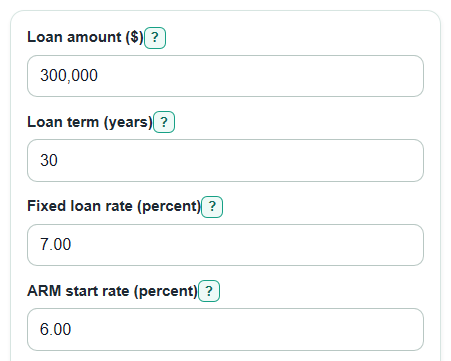
- Enter the Loan amount ($), Loan term (years), Fixed loan rate (percent), ARM start rate (percent), and ARM fixed period (years) from your loan quotes.
- Open Advanced options if you want to change Compare through (months), the Expected ARM rate after first change (percent), or the ARM cap inputs.
- Click Calculate and read Lower-cost loan by your compare date first, then check ARM total payment advantage by compare date to see the dollar gap.
- Use Break-even ARM rate after first change and Highest allowed ARM payment by compare date to judge reset risk, not just the starting payment.
- Sanity-check the result: if Compare through (months) is before the ARM first change, the ARM reset outputs should not drive the choice.
Definitions
Fixed-rate mortgage: A home loan where the interest rate stays the same for the loan term, so the principal-and-interest payment does not change [1].
ARM: An adjustable-rate mortgage. It starts with a set rate for an introductory period, then the rate can change after that period [1].
ARM fixed period: The number of years before the ARM rate can first change. For a 5/1 ARM, this period is 5 years.
Rate cap: A limit on how much an ARM interest rate can rise at a change date or over the life of the loan [3].
Percentage points: The direct difference between two rates. A move from 6 percent to 8 percent is 2 percentage points.
Compare through: The month where the calculator stops adding payments for the side-by-side total.
Principal and interest: The loan repayment part of a mortgage payment. It does not include taxes, homeowners insurance, mortgage insurance, or HOA dues.
Common mistakes and quick fixes
Mistake: Entering the home price in Loan amount ($).
Fix: Use the mortgage balance after your down payment, because the payment formulas use the borrowed amount.
Mistake: Putting 0.07 in Fixed loan rate (percent) or ARM start rate (percent).
Fix: Enter percent form, such as 7.00 for 7 percent.
Mistake: Treating ARM fixed period (years) as the full loan term.
Fix: For a 5/1 ARM enter 5, then keep Loan term (years) as the full payoff term, such as 30.
Mistake: Leaving Compare through (months) at a value that does not match your plan.
Fix: Enter the number of months you expect to keep the loan before selling, paying it off, or refinancing.
Mistake: Reading ARM total payment advantage by compare date as always positive.
Fix: Positive means the ARM costs less by that date; negative means the fixed loan costs less.
Mistake: Ignoring ARM cap note when Expected ARM rate after first change (percent) is above a cap.
Fix: Use the capped result shown by the calculator, because First change cap (percentage points) and Lifetime cap above start rate (percentage points) limit the tested reset rate.
Limitations & Key Assumptions / Boundary Conditions
- The calculator compares principal-and-interest payments only. It does not include taxes, insurance, mortgage insurance, HOA dues, points, closing costs, lender credits, refinance costs, or prepayment penalties.
- ARM results depend on the Expected ARM rate after first change (percent) and the cap inputs you enter. Real ARM rates usually depend on an index plus a margin after the introductory period [2].
- Break-even ARM rate after first change is a simplified sensitivity check. It tests one first-reset rate that stays in place through the compare date, subject to the cap range used by the calculator.
- If Compare through (months) is before or at the end of ARM fixed period (years), later ARM reset rates do not affect the payment total through that date.
- The calculator does not predict whether you will be able to sell or refinance before a reset. Market rates, home value, credit, income, and lender rules can change.
- Inputs must be valid numbers within the calculator rules: positive Loan amount ($), whole-year Loan term (years), nonnegative rates and caps, and Compare through (months) no longer than the full loan term.
Methodology
Payment math
The calculator uses the standard amortizing loan payment formula. It converts annual percent rates to monthly decimal rates by dividing by 100 and then by 12.
monthly_rate = annual_rate_percent / 100 / 12
payment = principal * monthly_rate / (1 - (1 + monthly_rate)^(-months_left))
if monthly_rate = 0, payment = principal / months_left
Fixed loan monthly payment uses the starting Loan amount ($), Fixed loan rate (percent), and the full Loan term (years). ARM starting monthly payment uses the same loan amount and term, but uses ARM start rate (percent).
Balance and totals
For each month, interest is added first and the rest of the scheduled payment reduces the loan balance.
interest = balance_before * monthly_rate
principal_paid = payment - interest
balance_after = balance_before - principal_paid
ARM total payment advantage by compare date = Fixed loan paid by compare date - Expected ARM paid by compare date
A positive advantage means the ARM has lower total principal-and-interest payments by the compare month. A negative advantage means the fixed loan has lower total payments by that date.
ARM reset and caps
At the first ARM change, the tested rate is limited by the expected rate, the First change cap (percentage points), and the Lifetime cap above start rate (percentage points).
first_reset_rate = min(expected_rate_after_intro, arm_start_rate + first_change_cap, arm_start_rate + lifetime_cap)
Expected ARM payment after first change is recalculated from the ARM balance at that time and the remaining loan months. Highest allowed ARM payment by compare date uses the cap rules and the ARM changes every (months) timing to test the largest payment allowed by the compare date.
Break-even reset rate
The break-even rate is found with a bounded numeric search. The search looks for the first reset rate that makes ARM total payments match fixed-loan total payments through Compare through (months).
arm_payments_before_first_change + payment(balance_at_first_change, r, remaining_loan_months) * months_after_first_change_to_compare = fixed_total_paid_by_compare_date
If the compare month is before the first ARM change, the calculator gives a note instead of treating a reset payment as part of the comparison.
Mini-example
For a $300,000 loan over 30 years, with a 7.00 percent fixed loan and a 6.00 percent ARM fixed for 5 years, the fixed payment is about $1,995.91 per month and the ARM starting payment is about $1,798.65 per month. If Compare through (months) is 84 and the expected first reset is capped to 8.00 percent, the fixed loan paid by compare date is about $167,656.23, the expected ARM paid by compare date is about $159,630.12, and the ARM total payment advantage by compare date is about $8,026.11. In that same setup, the break-even ARM rate after first change is about 9.57 percent, so a lower capped reset rate keeps the ARM ahead in this simplified test.
Sources
- What is the difference between a fixed-rate and adjustable-rate mortgage (ARM) loan? | Consumer Financial Protection Bureau - Consumerfinance
- For an adjustable-rate mortgage (ARM), what are the index and margin, and how do they work? | Consumer Financial Protection Bureau - Consumerfinance
- What are rate caps with an adjustable-rate mortgage (ARM), and how do they work? | Consumer Financial Protection Bureau - Consumerfinance