
Convert a blower door CFM50 result to ACH50 and see the airflow target for your home's size.
Table of contents
How to use our Home Air Leakage Calculator
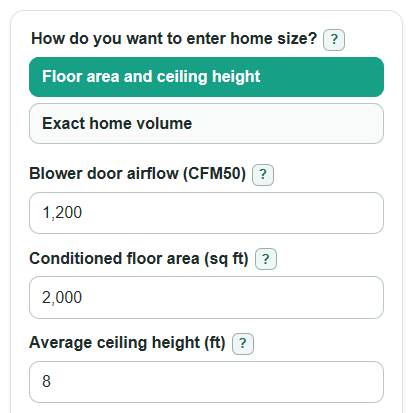
- Choose how you want to enter home size: use Floor area and ceiling height if you do not know the exact air volume, or choose Exact home volume if your report lists it.
- Enter Blower door airflow (CFM50), then fill in either Conditioned floor area (sq ft) and Average ceiling height (ft), or Home air volume (cu ft).
- Enter your Target leakiness (ACH50). Use the target from your code office, energy program, project plan, or blower door report.
- Use Advanced options only when you need a ceiling correction or have an After-sealing airflow (CFM50) number to compare.
- After calculating, sanity-check Home volume used. If it seems too small or too large for the house, fix the size inputs before trusting Current leakiness.
Definitions
Blower door airflow (CFM50): The air movement measured in cubic feet per minute during a blower door test at a 50 pascal pressure difference. A blower door is used to help find how much air enters or escapes a home [1].
ACH50: Air changes per hour at 50 pascals. It estimates how many times the home's air volume would be replaced in one hour at the test pressure.
Conditioned floor area (sq ft): The heated and cooled floor area used to build the home volume. Do not include areas outside the home's conditioned space.
Home air volume (cu ft): The conditioned air space inside the home, in cubic feet. In the simple method, it is floor area times average ceiling height, plus any ceiling correction.
Target leakiness (ACH50): The ACH50 goal you want to compare against, usually from a code requirement, program rule, project goal, or energy report.
CFM50 over target: Current CFM50 minus the CFM50 that would match your target. Positive means airflow needs to drop. Negative means the home is already below the target.
Common mistakes and quick fixes
Mistake: Entering total house area instead of Conditioned floor area (sq ft) .
Fix: Use only heated and cooled floor area inside the air barrier, not an open porch or unconditioned garage.
Mistake: Using a single room height for Average ceiling height (ft) when part of the house is vaulted or lowered.
Fix: Enter the best whole-home average, or use Area with taller or shorter ceiling (sq ft) and Extra height for that area (ft) .
Mistake: Typing ACH50 into Blower door airflow (CFM50) .
Fix: Enter the blower door airflow in CFM50, then read Current leakiness for the ACH50 result.
Mistake: Choosing Exact home volume but leaving Home air volume (cu ft) at a guess.
Fix: Use exact volume only when a report, plans, or a reliable calculation gives the conditioned air volume.
Mistake: Reading a negative CFM50 over target as an error.
Fix: Negative means the current airflow is already below Airflow that matches your target .
Mistake: Comparing After-sealing leakiness to the first test after changing the home volume inputs.
Fix: Keep the same Home volume used so Airflow cut after sealing is a fair before-and-after comparison.
Limitations & Key Assumptions / Boundary Conditions
- This calculator uses blower door airflow at 50 pascals. It does not estimate natural air leakage on a normal weather day.
- Results depend heavily on the volume input. A wrong Conditioned floor area (sq ft), Average ceiling height (ft), or Home air volume (cu ft) can make ACH50 look too high or too low.
- The ceiling correction is a simple add-on volume. It works best when one clearly defined area is taller or shorter than the average ceiling height.
- Hidden size inputs are ignored. If you choose exact volume, floor area, ceiling height, and ceiling correction do not affect the result.
- The calculator does not judge whether a home is safe, healthy, or properly ventilated. A tight home may still need a designed ventilation system.
- Blower door reports can use setup details such as test direction, baseline pressure, fan ring, and building preparation. Those details can change the reported CFM50.
Methodology
How the main result is calculated
The calculator first finds the conditioned home volume. If you enter floor area and ceiling height, it uses the simple volume method. If you also enter both ceiling correction fields, it adjusts the volume for the taller or shorter area.
volume_cuft = floor_area_sqft * ceiling_height_ft
volume_cuft = floor_area_sqft * ceiling_height_ft + extra_area_sqft * extra_height_ft
If you choose exact home volume, the calculator uses that value directly and ignores the hidden floor-height inputs.
volume_cuft = exact_volume_cuft
Then it converts blower door airflow from cubic feet per minute to cubic feet per hour by multiplying by 60 minutes per hour, and divides by the home volume.
ach50 = cfm50 * 60 / volume_cuft
How the target comparison works
The target CFM50 is the blower door airflow that would equal your chosen target ACH50 for the same home volume.
target_cfm50 = target_ach50 * volume_cuft / 60
The calculator keeps signed differences. A positive difference means the current CFM50 is above the target. A negative difference means the current CFM50 is already below the target.
cfm50_over_target = cfm50 - target_cfm50
percent_change_needed = (cfm50_over_target / cfm50) * 100
After-sealing comparison
If you enter an after-sealing CFM50, the calculator uses the same home volume to compute after-sealing ACH50 and the signed airflow change from the first test.
after_ach50 = after_cfm50 * 60 / volume_cuft
after_improvement_percent = ((cfm50 - after_cfm50) / cfm50) * 100
Worked example
Suppose Blower door airflow (CFM50) is 1200, Conditioned floor area (sq ft) is 2000, Average ceiling height (ft) is 8, and Target leakiness (ACH50) is 3. The home volume is 2000 * 8 = 16000 cu ft. Current leakiness is 1200 * 60 / 16000 = 4.5 ACH50. The target airflow is 3 * 16000 / 60 = 800 CFM50. The home is 400 CFM50 over target, so airflow would need to drop by about 33.3% of the current CFM50.
Calculation notes
Required airflow, volume, floor area, ceiling height, and target ACH50 must be greater than 0. The extra height field may be negative because a lower ceiling area can reduce volume. If only one ceiling correction field is entered, the calculator stops and asks for both fields so it does not guess the missing value.