
Calculate daily or total growing degree units from high and low temperatures using the method, crop preset, and temperature scale you need.
Advanced options
How to use our Growing Degree Units Calculator
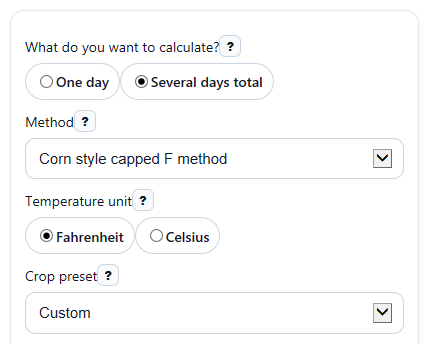
- Choose What do you want to calculate? as One day or Several days total, then pick your Method and Temperature unit.
- Pick a Crop preset if you want common defaults, or leave it on Custom and enter your own Base temperature.
- For one day, enter Daily high temperature and Daily low temperature. For several days, enter the Daily temperature list with one day per line as high, low.
- If needed, open the advanced section and adjust Upper temperature cap, Lower temperature floor for lows, or Rounding to match your class, crop guide, or record-keeping rule.
- Click Calculate, then sanity-check the result by confirming Method used, Days added, and Input note match what you intended before using the Growing degree units total.
Definitions
Growing degree units: Heat units that estimate how much warmth a plant gets for development over one day or many days.
Base temperature: The threshold below which growth is treated as too slow to count in the formula.
Upper temperature cap: A highest temperature limit used by some methods so extra heat above that point does not add more units.
Lower temperature floor for lows: A lowest value used for the daily low before averaging in some capped methods.
Simple average minus base: A method that averages the daily high and low, subtracts the base temperature, and sets negative results to 0.
Floor-only method: A method that raises the daily low to the base temperature if needed, then calculates heat units without an upper cap.
Days added: The number of valid daily entries included in the total.
Average heat units per day: The total growing degree units divided by the number of days counted.
Common mistakes and quick fixes
Mistake: Entering temperatures in Celsius while Temperature unit is set to Fahrenheit, or the other way around.
Fix: Make sure Temperature unit , Daily high temperature , Daily low temperature , and Base temperature all use the same scale.
Mistake: Typing the Daily temperature list in the wrong format, such as 86-60 or 86 60.
Fix: Enter one day per line as high, low, like 86,60.
Mistake: Putting the low above the high, such as Daily high temperature = 60 and Daily low temperature = 86.
Fix: Swap the values so Daily high temperature is greater than or equal to Daily low temperature .
Mistake: Using the wrong Method for your crop guide or assignment.
Fix: Check Method used after calculating and change Method if your source expects capped, simple average, or floor-only rules.
Mistake: Forgetting that some methods use Upper temperature cap or Lower temperature floor for lows .
Fix: If your source calls for caps or floors, open the advanced settings and verify those exact labels before you calculate.
Mistake: Expecting Growing degree units to rise on a cool day below the threshold.
Fix: Check Base temperature ; if the average temperature is not above that threshold, the daily heat units can be 0.
Limitations & Key Assumptions / Boundary Conditions
- Results depend on the method you choose. Different crops, schools, and extension guides may use different base temperatures, caps, or floors.
- The calculator uses only the temperatures you enter. It does not adjust for sun, soil moisture, planting depth, variety differences, or stress.
- In several-days mode, every non-blank line in Daily temperature list must be entered as high, low. A malformed line should be fixed before using the total.
- If a day has unusual but numeric temperatures, the calculator can still compute a result, but the Input note may flag that the values look unrealistic.
- Changing Rounding can change totals slightly, especially over many days. Use the same rounding rule your class or record system expects.
- Growing degree units are a useful development indicator, but real crop progress can still differ from the estimate because weather and field conditions vary [1][3].
Methodology
How the calculator works
Growing degree units estimate plant-development heat from daily temperatures. In one-day mode, the calculator finds the heat units for that day. In several-days mode, it calculates each day first and then adds them into one total [1].
Formulas used
Simple average minus base: GDU_day = max(((T_high + T_low) / 2) - T_base, 0)
Corn style capped F method: T_high_adj = min(T_high, T_upper); T_low_adj = max(T_low, T_lower); GDU_day = max(((T_high_adj + T_low_adj) / 2) - T_base, 0)
Floor-only method: T_low_adj = max(T_low, T_base); GDU_day = max(((T_high + T_low_adj) / 2) - T_base, 0)
Accumulated total: GDU_total = sum of all daily GDU values
Here, T_high is the daily high temperature, T_low is the daily low temperature, T_base is the base temperature, T_upper is the upper cap, and T_lower is the lower floor for lows.
Method choices
Simple average minus base uses the plain mean of the daily high and low, then subtracts the base temperature. If the result is negative, it becomes 0.
Corn style capped F method first limits the high to the upper cap and raises the low to the lower floor, then averages those adjusted values and subtracts the base. A common corn setup is base 50 F, upper cap 86 F, and lower floor 50 F.
Floor-only method raises only the low temperature to the base when needed, then uses the average-minus-base formula with no upper cap.
Rounding
If you choose Show decimals, the calculator keeps full precision for display. If you choose Round final result to nearest whole number, it adds daily values first and rounds the final total. If you choose Round each day, then add, it rounds each daily value before summing, which can change the total slightly.
Mini-example
Suppose you use the corn style capped method in Fahrenheit with Daily high temperature 90, Daily low temperature 60, Base temperature 50, Upper temperature cap 86, and Lower temperature floor for lows 50.
T_high_adj = min(90, 86) = 86
T_low_adj = max(60, 50) = 60
GDU_day = ((86 + 60) / 2) - 50 = 73 - 50 = 23
So the day contributes 23 degree-days.
Assumptions and limits
The calculator assumes your entered high and low temperatures represent the day correctly and are all in the same scale. Blank lines in the multi-day list are ignored, but malformed non-blank lines should be corrected. Extreme values can still be calculated, though they may trigger an input note. Different references may define crop-specific settings differently, so always match the method, base, and caps to your source [3].