
Convert grams to mL or mL to grams using an ingredient preset or your own density so you can see exactly what assumption the answer uses.
Advanced options
Table of contents
How to use our Grams to mL Converter
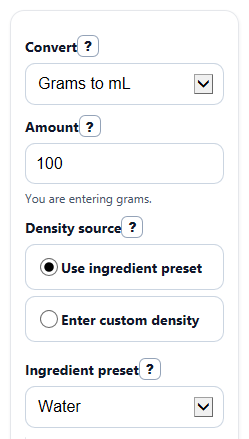
- Choose a direction in Convert: either Grams to mL or mL to grams.
- Enter your value in Amount, then choose a Density source: Use ingredient preset or Enter custom density.
- If you use a preset, pick the closest option in Ingredient preset. If you use custom data, type it into Density (g/mL).
- Optional: change Decimal places if you want a more rounded or more exact display, then click Calculate.
- Check Density used and Assumption note before trusting Converted amount. If the density is not right for your ingredient, label, temperature, or packing, the conversion will not be right either.
Definitions
Density (g/mL): How heavy something is for its size. It tells you how many grams fit into 1 mL.
Ingredient preset: A saved estimated density for a common ingredient such as water, milk, or honey.
Custom density: A density value you type yourself when you want to use a label, lab sheet, or another known value.
g/mL: Grams per milliliter, a density unit.
g/cm^3: Grams per cubic centimeter. For this converter, it is equal to g/mL because 1 mL = 1 cm^3 [2].
Converted amount: The answer in the other unit: mL if you start with grams, or grams if you start with mL.
Common mistakes and quick fixes
Mistake: Entering a value in Amount but forgetting that it changes meaning with Convert .
Fix: If Convert is set to Grams to mL , Amount means grams. If it is set to mL to grams , Amount means milliliters.
Mistake: Assuming grams always equal mL.
Fix: Look at Density used and Water note . Grams and mL are only numerically the same when density is about 1 g/mL.
Mistake: Leaving Density source on Use ingredient preset when you actually have a product label or lab value.
Fix: Switch Density source to Enter custom density and type the value into Density (g/mL) .
Mistake: Treating Ingredient preset as exact for every brand or every scoop.
Fix: Read Assumption note . Presets are estimates, so custom density is better when moisture, packing, or temperature matters.
Mistake: Typing 0 or a negative number into Amount or Density (g/mL) .
Fix: Use a value greater than 0. The converter needs a positive amount, and density must also be greater than 0.
Mistake: Copying only Converted amount without checking the math rule.
Fix: Review Formula used to confirm whether the calculator divided by density or multiplied by density for your chosen direction.
Limitations & Key Assumptions / Boundary Conditions
- Preset ingredient values are estimates, not exact lab measurements.
- Real density can change with brand, temperature, moisture, and how tightly a powder is packed.
- The converter assumes one density value for the whole ingredient amount.
- Results are only as accurate as the selected Ingredient preset or entered Density (g/mL).
- The simple water note applies only to water-like substances near 1 g/mL, not to every liquid or solid.
- The tool converts between mass and volume only; it does not account for recipe tricks like sifted flour versus scooped flour unless the density already reflects that condition.
Methodology
How the calculator works
The converter uses density to move between mass and volume. Density means mass per unit volume, so once density is known, the math is direct [2].
mL = g / ρ (ρ means density in g/mL)
g = mL x ρ (ρ means density in g/mL)
1 g/mL = 1 g/cm^3 because 1 mL = 1 cm^3 [2]
Which density the result uses
If Density source is set to a preset, the calculator uses the density tied to the chosen Ingredient preset. If Density source is set to custom, it uses only the typed Density (g/mL) and ignores the hidden preset value.
Worked example
Suppose you convert 100 grams of honey using a density of 1.4 g/mL.
mL = 100 / 1.4 = 71.428571...
If Decimal places is 2, the displayed Converted amount is 71.43 mL.
For the reverse direction, 50 mL of olive oil with density 0.92 g/mL gives:
g = 50 x 0.92 = 46
So the displayed Converted amount is 46 g.
Water check note
Water is a special reference case because its density is about 1 g/mL near room temperature [1]. When density is 1 g/mL, grams and mL are numerically the same, but that shortcut should not be used for every ingredient.
Assumptions used
This tool assumes the entered amount is positive, the density is positive, and one density value is appropriate for the whole sample. Small differences can happen in real life when the actual ingredient density changes with temperature, brand, moisture, or packing.