
Use this DSCR Loan Calculator to compare rent, loan payment, property costs, and target DSCR for a rental loan.
Table of contents
How to use our DSCR Loan Calculator
- Choose the DSCR style that matches the ratio you want to use: loan-style for rent over full payment, or NOI-style for net income over loan payment.
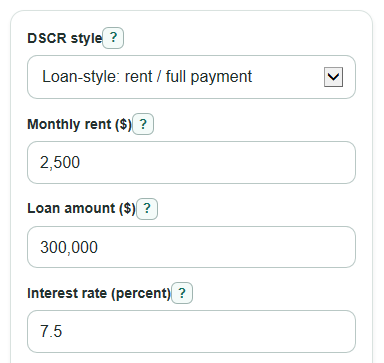
- Enter Monthly rent ($), Loan amount ($), Interest rate (percent), Loan term (years), and Yearly fixed property costs ($).
- Open Advanced options if you want to change Target DSCR, Payment type, Vacancy and missed rent (percent of rent), Management cost (percent of rent), or Repairs and upkeep (percent of rent).
- Click Calculate, then read Selected DSCR, Target check, Monthly rent needed for target, Largest loan at target, and Loan room at target in that order.
- Sanity-check the result by comparing Loan-style DSCR with NOI-style DSCR; if they are far apart, make sure you are using the same method your lender or worksheet uses.
Definitions
DSCR: Debt service coverage ratio. It tells how many times the selected income amount covers the selected debt payment amount.
Loan-style DSCR: Monthly rent divided by monthly loan payment plus one month of fixed property costs.
NOI-style DSCR: Net operating income divided by loan payment. The classic DSCR idea compares property income after operating costs with debt service [2].
Net operating income: Rent after vacancy, management, repairs, upkeep, and fixed property costs, before loan payment.
Debt service: The loan payment used in the DSCR formula. In this calculator, it is the Monthly loan payment.
Target DSCR: The ratio you want the property to reach, such as 1.00, 1.20, or 1.25.
Payment type: Amortizing payment includes principal and interest. Interest-only payment includes interest only and does not reduce the loan balance.
Loan room at target: Largest loan at target minus Loan amount ($). A negative value means the entered loan is above the estimated target-supported loan.
Common mistakes and quick fixes
Mistake: Entering purchase price in Loan amount ($) instead of the borrowed amount.
Fix: Use the actual loan balance or planned mortgage amount in Loan amount ($).
Mistake: Putting monthly taxes or insurance into Yearly fixed property costs ($).
Fix: Enter the yearly total for taxes, insurance, HOA, and similar fixed costs in Yearly fixed property costs ($).
Mistake: Mixing DSCR style with a lender quote and then trusting Selected DSCR.
Fix: Set DSCR style to the method you need, then compare Loan-style DSCR and NOI-style DSCR before using the number.
Mistake: Leaving Vacancy and missed rent (percent of rent), Management cost (percent of rent), and Repairs and upkeep (percent of rent) at defaults when they do not fit the property.
Fix: Change those percent inputs to match your estimate, especially when using NOI-style DSCR.
Mistake: Reading Loan room at target ($) as guaranteed borrowing capacity.
Fix: Treat Loan room at target ($) as a math estimate only, then check lender rules, loan-to-value limits, credit, reserves, and property type.
Limitations & Key Assumptions / Boundary Conditions
- Different DSCR lenders can use different underwriting rules. This calculator shows loan-style and NOI-style math, but it is not a loan approval.
- Yearly fixed property costs ($) is treated as taxes, insurance, HOA, and similar recurring fixed costs. It does not include the loan payment.
- Vacancy and missed rent (percent of rent), Management cost (percent of rent), and Repairs and upkeep (percent of rent) are simple percent-of-rent estimates, not a full property budget.
- Largest loan at target ($) assumes the entered rate, term, Payment type, and DSCR style stay the same as loan size changes.
- Interest-only payment at a 0 percent rate creates zero loan debt service, so ratios that divide by that payment cannot be meaningful.
- Monthly cash flow is before income tax, depreciation, closing costs, reserves, capital improvements, and one-time repairs.
- Rounding is for display only. Small differences can happen compared with lender software that rounds each payment step or uses different escrow rules.
Methodology
Core payment math
The calculator first turns Interest rate (percent) into a monthly decimal rate and Loan term (years) into months. For an amortizing loan, it uses the standard fixed monthly principal-and-interest payment method described by the CFPB [1].
monthly_rate = interest_rate_percent / 100 / 12
number_of_payments = loan_term_years * 12
monthly_payment = loan_amount * (monthly_rate * (1 + monthly_rate)^number_of_payments) / ((1 + monthly_rate)^number_of_payments - 1)
If the monthly rate is 0 for an amortizing loan, the payment is spread evenly across the loan term.
monthly_payment = loan_amount / number_of_payments
For an interest-only loan, the calculator uses interest only.
monthly_payment = loan_amount * monthly_rate
DSCR formulas
Loan-style DSCR compares gross rent with the monthly loan payment plus one month of fixed property costs.
loan_style_dscr = monthly_rent / (monthly_loan_payment + annual_property_costs / 12)
NOI-style DSCR first estimates monthly net operating income, then divides that by the monthly loan payment.
total_percent_cost_rate = (vacancy_percent + management_percent + repair_percent) / 100
monthly_noi = monthly_rent * (1 - total_percent_cost_rate) - annual_property_costs / 12
noi_style_dscr = monthly_noi / monthly_loan_payment
Selected DSCR is the loan-style ratio when DSCR style is Loan-style: rent / full payment. It is the NOI-style ratio when DSCR style is NOI-style: net income / loan payment.
Target rent and loan size
Monthly rent needed for target uses the selected DSCR style. For loan-style, rent must cover the full payment measure at the target ratio.
required_rent = target_dscr * (monthly_loan_payment + annual_property_costs / 12)
For NOI-style, rent must be high enough after percent-based costs and fixed property costs to cover the loan payment at the target ratio.
required_rent = (target_dscr * monthly_loan_payment + annual_property_costs / 12) / (1 - total_percent_cost_rate)
Largest loan at target converts the maximum allowed monthly payment into a loan amount using the payment factor for the chosen rate, term, and Payment type.
max_loan_at_target = max_monthly_payment_at_target / payment_factor
loan_room_at_target = max_loan_at_target - loan_amount
monthly_cash_flow = monthly_rent - monthly_loan_payment - annual_property_costs / 12 - monthly_rent * total_percent_cost_rate
Mini example
Suppose Monthly rent ($) is 2500, Loan amount ($) is 300000, Interest rate (percent) is 7.5, Loan term (years) is 30, and Yearly fixed property costs ($) is 6000. With an amortizing payment, the monthly loan payment is about $2097.64. Fixed costs are $500 per month. Loan-style DSCR is 2500 / (2097.64 + 500), or about 0.96. If vacancy is 5 percent, management is 8 percent, and repairs are 5 percent, monthly NOI is 2500 * 0.82 - 500, or $1550. NOI-style DSCR is 1550 / 2097.64, or about 0.74.