
Calculate debt service coverage ratio (DSCR) from annual net operating income (NOI), annual debt payments, and your target coverage level.
Table of contents
How to use our Debt Service Coverage Ratio Calculator
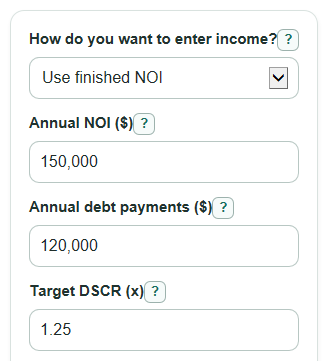
- Choose How do you want to enter income?: Use finished NOI if you already have Annual NOI ($), or Build NOI from rent and costs if you want the calculator to compute NOI.
- Enter the annual income and cost fields shown for your choice, then enter Annual debt payments ($) for the same year.
- Enter Target DSCR (x), such as 1.25, to check the deal against your own coverage goal.
- Select Calculate and read Debt service coverage ratio first, then check NOI above or below target and Highest debt payments at target.
- Sanity-check the output by confirming that monthly figures were converted to annual amounts and that Annual operating costs ($) does not include debt payments.
Definitions
Debt service coverage ratio (DSCR): Annual NOI divided by annual debt payments. It shows how many dollars of operating income are available for each $1 of debt service.
Net operating income (NOI): Income left after normal operating costs, before debt payments.
Annual debt payments: Total required principal and interest payments for the year used in the calculation.
Target DSCR: The coverage ratio you want to test against. A target of 1.25x means $1.25 of NOI for each $1.00 of annual debt payments.
Vacancy loss: The percent of possible rent and other property income expected to be lost from empty units or nonpayment.
NOI above or below target: Computed NOI minus the NOI needed for your Target DSCR (x). Positive means a surplus; negative means a shortfall.
Highest debt payments at target: The largest annual debt payments that would fit the chosen Target DSCR (x), based on the NOI used.
Common mistakes and quick fixes
Mistake: Entering monthly figures in Annual NOI ($) or Annual debt payments ($).
Fix: Multiply monthly amounts by 12 before entering them, so both fields cover the same year.
Mistake: Including loan payments inside Annual operating costs ($).
Fix: Put principal and interest only in Annual debt payments ($), not in operating costs.
Mistake: Using Vacancy loss (percent) as a dollar amount.
Fix: Enter a percent from 0 to 100, such as 5 for a five percent vacancy loss.
Mistake: Leaving Target DSCR (x) at a number that does not match your lender or deal goal.
Fix: Change Target DSCR (x) to the coverage level you actually want to test.
Mistake: Expecting Annual NOI ($) to affect results after choosing Build NOI from rent and costs.
Fix: In build mode, use Annual rent income ($), Other annual property income ($), Vacancy loss (percent), and Annual operating costs ($); Annual NOI ($) is ignored.
Limitations & Key Assumptions / Boundary Conditions
- The calculator uses annual amounts. If your source numbers are monthly, convert them to annual amounts before entering them.
- DSCR rules can vary by lender, loan type, property type, and underwriting policy. This tool does not decide loan approval.
- Build mode applies Vacancy loss (percent) to Annual rent income ($) plus Other annual property income ($), then subtracts Annual operating costs ($).
- Annual operating costs ($) should exclude debt payments. Some lender worksheets may also treat taxes, insurance, reserves, management fees, owner pay, or one-time costs differently.
- Target outputs are simple algebra based on your Target DSCR (x). They do not estimate interest rate, loan size, amortization, closing costs, or refinance terms.
- If income and costs produce negative NOI, the DSCR and Highest debt payments at target can be negative mathematical results. That means the operating inputs show a loss before debt service.
Methodology
Core calculation
Debt service coverage ratio is calculated as net operating income divided by total debt service for the same period [3]. This calculator uses annual NOI and annual debt payments.
computed_noi = annual_noi
This formula is used when How do you want to enter income? is set to Use finished NOI.
computed_noi = annual_rental_income + annual_other_income - ((annual_rental_income + annual_other_income) x vacancy_rate / 100) - annual_operating_expenses
This formula is used when How do you want to enter income? is set to Build NOI from rent and costs.
dscr_ratio = computed_noi / annual_debt_service
The displayed Debt service coverage ratio is rounded to 2 decimal places, but the dollar outputs use the unrounded computed values.
Target check
The target check shows how far the entered deal is from the chosen Target DSCR (x).
noi_needed_for_target = target_dscr x annual_debt_service
target_gap = computed_noi - noi_needed_for_target
max_debt_service_at_target = computed_noi / target_dscr
cash_after_debt = computed_noi - annual_debt_service
Coverage check says income is below debt payments when DSCR is below 1.00x. It says the deal covers debt but misses the target when DSCR is at least 1.00x and below Target DSCR (x). It says the deal meets the target when DSCR is at least Target DSCR (x).
Mini example
Suppose Annual rent income ($) is 180,000, Other annual property income ($) is 12,000, Vacancy loss (percent) is 5, Annual operating costs ($) is 62,000, Annual debt payments ($) is 90,000, and Target DSCR (x) is 1.20.
computed_noi = 180000 + 12000 - ((180000 + 12000) x 5 / 100) - 62000 = 120400
dscr_ratio = 120400 / 90000 = 1.337777...
The calculator displays a DSCR of 1.34x. The NOI needed for the 1.20x target is $108,000, so NOI above or below target is $12,400. Highest debt payments at target is about $100,333 per year.