
Calculate annual net operating income from rent, vacancy, other income, and operating expenses before financing costs.
Table of contents
How to use our Net Operating Income Calculator
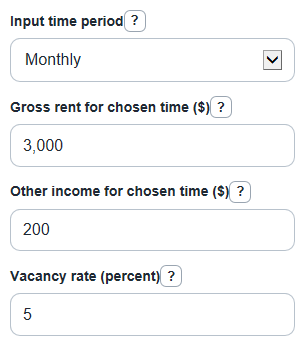
- Choose the Input time period, then enter Gross rent for chosen time ($), Other income for chosen time ($), Vacancy rate (percent), and Operating expenses for chosen time ($).
- Open Advanced options only if you want valuation or comparison outputs, then fill Property price or value ($), Target cap rate (percent), Number of units, or Rentable area (sq ft) as needed.
- Click Calculate and read Annual net operating income first, then check Average monthly NOI, Effective gross income, Vacancy loss, and Operating expenses.
- Sanity-check the result by confirming that Operating expenses for chosen time ($) does not include mortgage payments, income taxes, depreciation, or major upgrades.
- If you entered valuation inputs, compare Estimated value at target cap rate with Property price or value ($); a negative Value gap vs entered price means the cap-rate estimate is below the entered price.
Definitions
Gross rent for chosen time ($): Rent before subtracting vacancy or unpaid rent. For several units, use the total rent for all units.
Other income for chosen time ($): Regular property income outside base rent, such as parking, laundry, storage, pet rent, or reimbursements.
Vacancy rate (percent): The expected share of gross rent lost to empty units or unpaid rent.
Operating expenses for chosen time ($): Regular property costs used to run the property, such as property taxes, insurance, repairs, owner-paid utilities, and management.
Effective gross income: Annual gross rent after vacancy loss, plus annual other income.
Annual net operating income: Effective gross income minus operating expenses. It is before mortgage payments, income taxes, depreciation, and major upgrades.
Cap rate: Annual NOI divided by property value, shown as a percent. Investors use it as a quick income-based comparison.
Value gap vs entered price: Estimated value at target cap rate minus Property price or value ($). Positive means the estimate is above the entered price; negative means it is below.
Common mistakes and quick fixes
Mistake: Putting mortgage payments in Operating expenses for chosen time ($).
Fix: Remove loan payments from Operating expenses for chosen time ($); NOI is before financing.
Mistake: Choosing Monthly in Input time period but entering annual Gross rent for chosen time ($).
Fix: Match all main dollar inputs to Input time period, or change Input time period to Annual.
Mistake: Typing Vacancy rate (percent) as 0.05 when you mean 5 percent.
Fix: Enter 5 in Vacancy rate (percent), not 0.05.
Mistake: Leaving Other income for chosen time ($) blank because the property has no other income.
Fix: Enter 0 in Other income for chosen time ($) so the required field is clear.
Mistake: Entering Target cap rate (percent) without Property price or value ($) and expecting Value gap vs entered price.
Fix: Fill both Target cap rate (percent) and Property price or value ($) to see Value gap vs entered price.
Mistake: Using total building size in Rentable area (sq ft) when some space cannot be rented.
Fix: Use rentable space only in Rentable area (sq ft) for NOI per square foot.
Limitations & Key Assumptions / Boundary Conditions
- The calculator is for real estate NOI screening, not a formal appraisal, tax return, or lender underwriting decision.
- Vacancy rate (percent) is applied to Gross rent for chosen time ($) only. Other income for chosen time ($) is not reduced by vacancy in this calculator.
- Operating expenses for chosen time ($) should exclude mortgage payments, income taxes, depreciation, owner draws, and capital improvements such as a new roof or major renovation.
- Monthly inputs are multiplied by 12. If the property has seasonal rent, one-time income, or uneven repairs, annual inputs may be more accurate.
- Expense share of effective income and NOI share of effective income are shown as N/A if Effective gross income is zero or negative, because the percent would not be useful.
- Estimated value at target cap rate uses NOI divided by the target cap rate. Market value can differ because of location, lease quality, financing, risk, and buyer demand.
- Negative Annual net operating income is kept negative. It means operating expenses are higher than effective income before debt service.
Methodology
Core calculation
The calculator first converts the rent, other income, and expenses to annual amounts. If Input time period is Monthly, it uses 12 months per year. If Input time period is Annual, it uses 1.
period_multiplier = 12 if input_period = monthly, otherwise 1
annual_gross_rent = gross_rent * period_multiplier
annual_other_income = other_income * period_multiplier
Vacancy loss is taken from gross rent, then other income is added to get Effective gross income.
vacancy_loss_annual = annual_gross_rent * vacancy_rate / 100
effective_gross_income_annual = annual_gross_rent - vacancy_loss_annual + annual_other_income
Annual net operating income is Effective gross income minus annual Operating expenses. This matches the standard NOI idea of property income after vacancy and operating expenses, before debt service and income taxes [3].
operating_expenses_annual = operating_expenses * period_multiplier
annual_noi = effective_gross_income_annual - operating_expenses_annual
monthly_noi = annual_noi / 12
Ratios and optional checks
The expense and NOI shares use Effective gross income as the base. If Effective gross income is zero or negative, the calculator shows N/A instead of dividing by zero or a negative income base.
expense_ratio = operating_expenses_annual / effective_gross_income_annual * 100
noi_margin = annual_noi / effective_gross_income_annual * 100
When Property price or value ($) is entered, the calculator can show the cap rate at that price. When Target cap rate (percent) is entered, it can estimate a value from NOI. When both are entered, it keeps the signed gap so above-price and below-price results are clear.
cap_rate_at_entered_price = annual_noi / property_value * 100
estimated_value_at_target_cap_rate = annual_noi / (target_cap_rate / 100)
value_gap_vs_entered_price = estimated_value_at_target_cap_rate - property_value
If Number of units or Rentable area (sq ft) is entered, the calculator divides annual NOI by that amount.
noi_per_unit = annual_noi / unit_count
noi_per_sqft = annual_noi / rentable_sqft
Mini-example
Suppose Input time period is Monthly, Gross rent for chosen time ($) is $3,000, Other income for chosen time ($) is $200, Vacancy rate (percent) is 5, and Operating expenses for chosen time ($) is $1,000. Annual gross rent is $36,000, annual other income is $2,400, vacancy loss is $1,800, and Effective gross income is $36,600. Annual operating expenses are $12,000, so Annual net operating income is $24,600 and Average monthly NOI is $2,050. With a 6 percent Target cap rate (percent), Estimated value at target cap rate is $410,000. If Property price or value ($) is $400,000, Value gap vs entered price is $10,000.