
Estimate your dog's daily calories, treat budget, and main food portions using current or target weight and the calorie info on the label.
Advanced options
How to use our Dog Nutrition Calculator
- Choose Weight to use, pick the Weight unit, and enter Current weight. If you picked target weight, also enter Target weight.
- Select the best Dog profile and enter Treats from daily calories (%) to reserve part of the plan for treats, chews, toppers, or scraps.
- Choose a Food label format. If you want a portion result, enter Food calories from the label. If you only want calories, choose the calories-only option.
- Open Advanced options if you want to split food by Meals per day or replace the profile with Use custom maintenance factor.
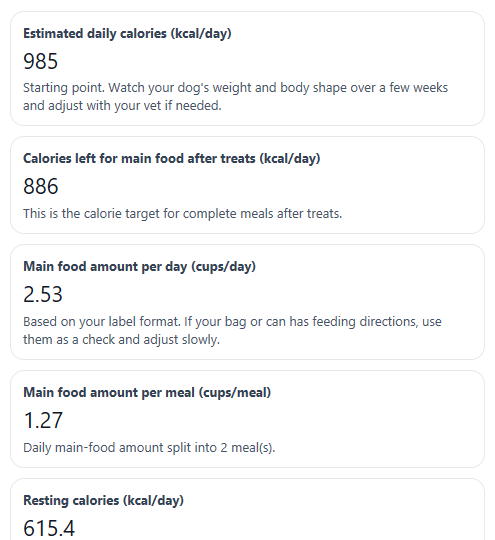
- Click Calculate, then sanity-check the result: compare Estimated daily calories and Main food amount per day with your dog's current intake and body condition, and adjust with your vet if weight is trending the wrong way.
Definitions
Weight to use: The body weight used in the math. Use current weight for most healthy dogs, or target weight when planning weight loss with a known goal.
Dog profile: The life stage or activity group that sets the maintenance factor used to turn resting calories into a daily estimate.
Resting calories: Also called RER. This is the base energy estimate for a dog at rest before activity, growth, or work is added.
Maintenance factor used: The multiplier applied to resting calories. A bigger factor means a higher daily calorie target.
Treat calorie budget: The part of daily calories reserved for treats and extras. A common planning cap is 10% of daily calories [2].
Food label format: How the pet food label lists calories, such as kcal per cup, gram, can, or piece.
Main food amount per day: The amount of complete food left after treat calories are set aside.
Common mistakes and quick fixes
Mistake: Picking Use target weight in Weight to use but leaving Target weight blank or at the wrong value.
Fix: Enter a real goal in Target weight . If you do not have a goal weight, switch Weight to use back to current.
Mistake: Entering pounds while Weight unit is set to kilograms, or the other way around.
Fix: Make sure Weight unit matches the number you typed in Current weight and Target weight .
Mistake: Leaving Treats from daily calories (%) blank or setting it so high that almost no calories are left for meals.
Fix: Enter a number from 0 to less than 100. If Calories left for main food after treats is too low, lower the treat percent.
Mistake: Choosing the wrong Food label format , such as selecting cups when the label shows kcal per can.
Fix: Match Food label format to the exact way calories are printed, then enter that number in Food calories .
Mistake: Typing a total bag or case calorie number into Food calories instead of calories per cup, gram, can, or piece.
Fix: Enter calories for one unit only, so Main food amount per day and Main food amount per meal come out correctly.
Mistake: Entering Use custom maintenance factor without realizing it replaces Dog profile .
Fix: Leave Use custom maintenance factor blank unless you want to override the profile factor on purpose.
Limitations & Key Assumptions / Boundary Conditions
- This calculator gives a starting feeding estimate, not a guaranteed perfect portion. Real needs can change with body condition, breed, age, weather, health status, and actual activity.
- The calorie math depends heavily on choosing the right Dog profile or entering a sensible Use custom maintenance factor.
- For weight-loss planning, results are most useful when Weight to use is set to target and the goal weight is realistic.
- Main food amount per day is only as accurate as the calorie number entered in Food calories and the matching Food label format.
- The treat budget is a planning tool. Some dogs may need less than the common 10% treat cap, especially if treats are large or unbalanced [1].
- Homemade diets, prescription diets, and dogs with medical problems may need a vet or veterinary nutritionist to set the final plan.
Methodology
How the calculator works
The calculator first decides which weight to use in the math. If Weight to use is current, it uses Current weight. If it is target, it uses Target weight. Pounds are converted to kilograms before the energy equation is applied.
kg = lb * 0.45359237
Next it estimates Resting calories, also called RER.
RER = 70 * kg^0.75
Then it applies a maintenance factor based on Dog profile, unless Use custom maintenance factor is filled in. A custom factor overrides the profile factor.
Daily kcal = RER * factor
After that, the calculator reserves calories for treats.
Treat kcal = Daily kcal * treat_share / 100
The calories left for complete meals are:
Main food kcal = Daily kcal - Treat kcal
If you enter label calories, the calculator converts those meal calories into a food portion.
Amount per day = Main food kcal / food_kcal_per_unit
Amount per meal = Amount per day / meals_per_day
Profile factors used
The built-in factors are: adult neutered 1.6, adult intact 1.8, inactive or weight-prone adult 1.2, active adult 2.0, weight loss 1.0, weight gain 1.2, puppy 0 to 4 months 3.0, puppy over 4 months 2.0, working dog light 2.0, working dog moderate 3.0, and working dog heavy 6.0. These are planning multipliers, not promises of exact need.
Mini example
Suppose a neutered adult dog weighs 40 lb, treats are set to 10%, and the food has 350 kcal per cup. First convert weight:
40 lb x 0.45359237 = 18.14 kg. Then RER is about 394.1 kcal/day. Using factor 1.6 gives about 630.5 kcal/day. Ten percent for treats is about 63.1 kcal/day, leaving about 567.4 kcal/day for main food. Divide by 350 kcal per cup to get about 1.62 cups per day. If fed twice daily, that is about 0.81 cups per meal.
Assumptions used
This method assumes the food calorie label is correct, the chosen profile fits the dog reasonably well, and treats stay within the entered percent. The 10% treat cap is a common feeding guideline so that most calories still come from complete and balanced food [1]. When your dog's weight trend or body condition does not match the estimate, real-world adjustment is needed.