
Enter your debts and monthly payment plan to estimate payoff time, interest, and avalanche versus snowball savings.
Table of contents
How to use our Debt Reduction Calculator
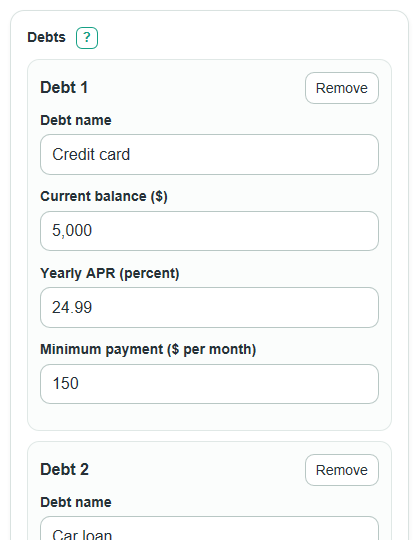
- Add each item in Debts with its name, current balance, APR, and required monthly payment.
- Choose How do you want to enter your monthly payment? so the calculator knows whether your amount is extra money above minimums or the full debt budget.
- Enter either Extra monthly payment or Total monthly debt budget, then choose Payoff order to use first.
- Select Calculate and read Months until all debts are paid off, Estimated debt-free month, and Total interest paid first.
- Sanity-check the answer by comparing Monthly payment used in the plan with what you can really pay each month and by checking any Payment check message.
Definitions
Debt balance: The current amount owed on one debt before this calculator adds any new interest.
APR: Annual percentage rate. In this calculator, it is the yearly interest rate used to estimate monthly interest [1].
Minimum payment: The required monthly payment for one debt. The calculator pays each active minimum before sending extra money to the target debt.
Extra monthly payment: Money paid in addition to all required minimum payments.
Total monthly debt budget: The full monthly amount available for all listed debts, including required minimum payments.
Debt avalanche: A payoff order that targets the active debt with the highest APR first [2].
Debt snowball: A payoff order that targets the active debt with the smallest balance first [3].
Principal: The original debt amount owed, not counting new interest added during the payoff plan.
Common mistakes and quick fixes
Mistake: Treating Extra monthly payment as your whole monthly debt payment.
Fix: Use Extra monthly payment only for money above all minimums, or switch How do you want to enter your monthly payment? to total budget.
Mistake: Entering only one card or loan in Debts when the plan is meant to cover several debts.
Fix: Add every debt that will share the same payoff money so Starting total debt and comparison results are based on the full plan.
Mistake: Typing the monthly interest rate in the APR column inside Debts .
Fix: Enter APR as the yearly rate, such as 24.99 for a card with 24.99% APR.
Mistake: Setting Total monthly debt budget below the total required minimum payments.
Fix: Raise Total monthly debt budget until it is at least the sum of all minimum payments in Debts .
Mistake: Reading Interest saved compared with the other order as total interest paid.
Fix: Use Total interest paid for the estimated interest cost of the selected plan.
Mistake: Ignoring Payment check when a minimum payment is smaller than first-month interest.
Fix: Review the listed debt, APR, and minimum payment because that balance may grow until it becomes the target debt.
Limitations & Key Assumptions / Boundary Conditions
- The estimate adds interest once per month. Real lenders may use daily interest, statement cycles, fees, penalty APRs, or changing rates.
- The plan assumes the same planned monthly payment is available each month until the final payment.
- The calculator uses the entered minimum payments as fixed required payments. It does not model lender rules that lower minimum payments as balances fall.
- If Total monthly debt budget is below the starting total minimum payments, the calculator blocks the result because the plan is not feasible.
- Balances at or below $0.005 are treated as paid because dollar results are shown to cents.
- The payoff loop stops at 1200 months, or 100 years, to avoid showing a misleading result for an extremely slow or non-paying plan.
- The estimate is for debt payoff planning only. It does not include taxes, credit score effects, hardship programs, balance transfers, or new borrowing.
Methodology
How the payoff plan is built
The calculator first totals the starting balances and the starting minimum payments from Debts. If you choose extra-payment mode, the fixed plan payment is the starting total of minimum payments plus Extra monthly payment. If you choose total-budget mode, the fixed plan payment is Total monthly debt budget.
monthly_interest = current_balance * (apr_percent / 100) / 12
planned_monthly_payment = starting_sum_of_minimum_payments + extra_monthly_payment
planned_monthly_payment = total_monthly_budget
Monthly payoff loop
For each simulated month, interest is added to every active debt. The calculator then pays each active minimum payment, capped so a final payment does not overpay a debt. Any unused part of the fixed monthly payment goes to the next target debt in the selected payoff order.
remaining_budget = planned_monthly_payment - minimums_actually_paid
With the avalanche order, the target is the active debt with the highest APR. Ties go to the smaller balance, then the earlier row. With the snowball order, the target is the active debt with the smallest balance. Ties go to the higher APR, then the earlier row.
avalanche_target = active_debt_with_highest_apr
snowball_target = active_debt_with_smallest_balance
Comparison math
The calculator runs the same monthly loop twice: once for the selected order and once for the other order. Both runs use the same starting debts and the same fixed monthly payment, so the comparison is fair.
comparison_interest_savings = other_method_total_interest - selected_method_total_interest
comparison_month_savings = other_method_months - selected_method_months
A positive savings number means the selected payoff order did better than the other order. A negative number means the selected order cost more interest or took longer.
Mini-example
Suppose one card has a $1,200 balance, 12% APR, a $100 minimum payment, and a $200 total monthly debt budget. The monthly rate is 1%, so the first month adds $12 of interest. The balance becomes $1,212, then the $200 payment lowers it to $1,012. Repeating the same monthly process pays the debt off in 7 months with about $43.86 of total interest.
Dates and stopping rules
Estimated debt-free month is found by adding Months until all debts are paid off to the current month. First debt paid off after is the first simulated month when any entered debt reaches the payoff threshold. If the loop reaches 1200 months without paying all debts, the calculator stops and shows an unsupported-state message instead of continuing forever.