
Enter your debts, monthly extra amount, and future one-time payments to estimate your debt-free month and interest saved.
Table of contents
How to use our Debt Payoff with Irregular Payments Calculator
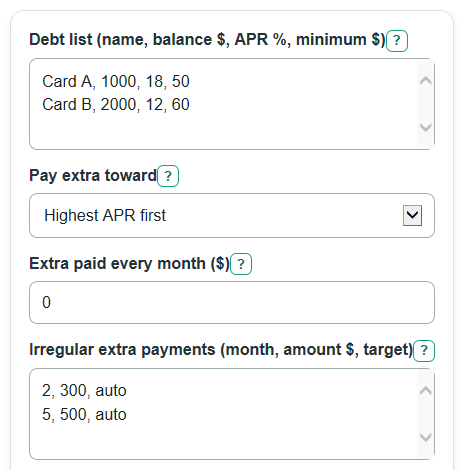
- In Debt list (name, balance $, APR %, minimum $), enter one debt per line in the shown order, such as
Card A, 1000, 18, 50. - Choose Pay extra toward: highest APR first for the avalanche method, or smallest balance first for the snowball method.
- Enter Extra paid every month ($), then list planned uneven payments in Irregular extra payments (month, amount $, target); use
autoor leave the target blank to follow your strategy. - Set Use paid-off minimums on other debts to Yes if you will keep the same total debt budget after each payoff, or No if that old minimum will stop.
- Click Calculate, then sanity-check the results: Total paid with this plan should be close to starting balances plus Total interest paid with this plan, and the final month payment may be smaller than your usual budget.
Definitions
APR: The yearly interest rate entered for a debt. The calculator divides APR by 12 to estimate one monthly interest rate [1].
Minimum payment: The required monthly payment for a debt. The calculator pays active debts at least their listed minimum when the budget allows.
Irregular extra payment: Extra money paid in a specific future month, such as a bonus, tax refund, gift, or side job payment.
Month number: The count of monthly payment cycles from now. Month 1 means the first month in the simulation.
Highest APR first: A payoff strategy often called debt avalanche. Extra money goes to the active debt with the highest APR first [2].
Smallest balance first: A payoff strategy often called debt snowball. Extra money goes to the active debt with the lowest current balance first [2].
Rollover: Using the minimum payment from a paid-off debt on the remaining debts instead of removing it from the debt budget.
Common mistakes and quick fixes
Mistake: Entering Debt list (name, balance $, APR %, minimum $) rows in a different order, such as putting APR before balance.
Fix: Use one line per debt in this order: name, balance $, APR %, minimum $.
Mistake: Leaving the APR part blank in Debt list (name, balance $, APR %, minimum $) because the debt has 0% interest.
Fix: Enter 0 for APR when the debt is interest-free; blank APR text is an error.
Mistake: Treating Extra paid every month ($) as a one-time payment.
Fix: Put only the amount you can pay every month in that box, and put one-time amounts in Irregular extra payments (month, amount $, target) .
Mistake: Using calendar dates in Irregular extra payments (month, amount $, target) , such as June or 6/15.
Fix: Use month numbers from now, where month 1 is the first monthly cycle, month 2 is the next cycle, and so on.
Mistake: Choosing the wrong setting for Use paid-off minimums on other debts .
Fix: Choose Yes if paid-off minimums will roll into other debts; choose No if that money will leave your debt budget.
Mistake: Reading Months saved by irregular extra payments as total payoff time.
Fix: Use Months until debt-free with this plan for the full payoff time, and use months saved only as the comparison against the no-irregular-payment plan.
Limitations & Key Assumptions / Boundary Conditions
- The calculator uses a month-by-month estimate. Real lenders may add interest daily, use different billing dates, or round cents differently.
- APR is treated as a fixed yearly rate and converted to a monthly rate by dividing by 12. Variable-rate debt, promotional rates, and penalty APR changes are not modeled.
- The simulation applies interest before that month's payments. If your lender applies payments at a different time, real interest can differ.
- Fees, late charges, balance transfers, new purchases, and credit limit effects are not included.
- If a targeted irregular payment names a debt that is already paid off or not found, the calculator applies that payment by the selected strategy instead of dropping it.
- The calculator stops at 600 months. If debts remain after that, the payoff warning tells you the plan may not pay off under the entered payments.
Methodology
Monthly rate
Each debt's APR is changed into a monthly rate because the payoff is simulated one month at a time.
monthly_rate = apr_percent / 100 / 12
Monthly debt update
For each active debt, interest is added first. Then the calculator applies payments for that month. Minimum payments are handled before extra money, subject to the remaining total budget.
balance_after_interest = balance_start * (1 + monthly_rate)
interest_this_month = balance_start * monthly_rate
Monthly payment budget
If Use paid-off minimums on other debts is Yes, the starting minimum payments stay in the monthly budget after a debt is paid off. If it is No, only minimum payments for active debts stay in the budget.
month_budget_with_rollover = sum(original_minimum_payments) + regular_extra_payment + irregular_extra_for_month
month_budget_without_rollover = sum(active_minimum_payments) + regular_extra_payment + irregular_extra_for_month
Where extra payments go
After minimum payments, targeted irregular payments go to the named debt if it is active. Any leftover amount, any auto-targeted irregular amount, and the regular extra amount follow Pay extra toward. Highest APR first chooses the active debt with the highest APR. Smallest balance first chooses the active debt with the lowest current balance. Ties use the order entered in the debt list.
Comparison calculation
The calculator runs the same debts twice. The plan run includes the irregular extra payment list. The baseline run uses the same debt list, strategy, regular extra payment, and rollover setting, but removes the irregular extra payments.
months_saved = baseline_months - plan_months
interest_saved = baseline_interest - plan_interest
total_paid = starting_principal + total_interest_paid
Mini-example
Suppose one debt starts at $1,000 with 12% APR and a $100 minimum payment. The monthly rate is 12 / 100 / 12 = 0.01, or 1% per month. In month 1, interest is $10, so the balance becomes $1,010 before payments. With a $100 normal payment and a $200 irregular extra payment in month 1, the month 1 payment is $300 and the balance becomes $710. The simulation repeats this process until the final payment is capped at the remaining balance.