
Estimate a card's first-year and ongoing reward value after fees, usable perks, category rewards, and a reachable welcome bonus.
Table of contents
How to use our Credit Card Rewards Calculator
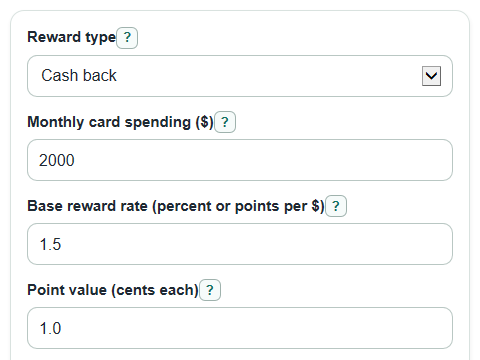
- Choose Reward type, then enter Monthly card spending, Base reward rate, Annual fee, and Perks you will use each year.
- If you choose points or miles, enter Point value in cents each so the calculator can turn points into dollars.
- Open Advanced options if part of your spending earns a higher rate or if the card has a Welcome bonus value with a spending rule.
- Click Calculate and read First-year value after fee first, then compare it with Yearly value after the first year.
- Sanity-check the result by making sure Monthly bonus-category spending is not more than total spending and that the welcome bonus is counted only when your spending can meet the required amount in time.
Definitions
Reward type: Cash back means the rate is a percent of spending. Points or miles means the card earns a number of points or miles for each $1 spent.
Base reward rate: The regular earning rate on spending that is not in a higher bonus category.
Point value: How many cents one point or mile is worth when you redeem it. A value of 1.25 means 1 point is worth 1.25 cents.
Perks you will use each year: The yearly dollar value of credits or benefits you expect to use, not the full advertised value of benefits you would skip.
Welcome bonus: A one-time reward that may require a set amount of spending within a set number of months.
Net return on your spending: Yearly value after rewards, usable perks, and the annual fee, shown as a percent of your yearly card spending.
Common mistakes and quick fixes
Mistake: Entering total household spending in Monthly card spending when only part of it will go on this card.
Fix: Use only the amount you expect to charge to this card each month.
Mistake: Using a cash back percent in Base reward rate after choosing points or miles for Reward type.
Fix: For points or miles, enter points earned per $1 spent, then set Point value in cents.
Mistake: Counting every credit in Perks you will use each year, even perks you would not normally use.
Fix: Enter only the dollar value you expect to actually use during the year.
Mistake: Setting Monthly bonus-category spending higher than Monthly card spending.
Fix: Keep Monthly bonus-category spending equal to or below total monthly card spending.
Mistake: Adding a Welcome bonus value without checking Spending needed for welcome bonus and Months allowed for welcome bonus.
Fix: Enter the bonus rule so Welcome bonus counted shows $0 when the spending target is not reachable.
Limitations & Key Assumptions / Boundary Conditions
- The calculator estimates reward value from the rates and point value you enter. It does not look up real card terms, caps, exclusions, or changing redemption values.
- It treats Monthly card spending as steady each month. A large one-time purchase can make the welcome bonus easier to earn than the estimate shows.
- It assumes bonus-category spending earns the Bonus-category reward rate and the rest earns the Base reward rate.
- It does not include interest, late fees, balance transfer fees, foreign transaction fees, taxes, or the value of purchase protections.
- The welcome bonus check uses planned spending only. Issuers may have extra rules for eligibility, timing, account status, or promotional rewards.
- Break-even spending can show N/A if the card earns no reward value per dollar and there is still an annual fee left after counted perks.
Methodology
How rewards are valued
The calculator first finds the estimated reward value earned in one month. For cash back, rates are treated as percents. For points or miles, points are converted to dollars using Point value in cents.
cash back monthly_rewards_value = ((monthly_spend - bonus_monthly_spend) * base_rate / 100) + (bonus_monthly_spend * bonus_rate / 100)
points monthly_points = ((monthly_spend - bonus_monthly_spend) * base_rate) + (bonus_monthly_spend * bonus_rate)
points monthly_rewards_value = monthly_points * point_value_cents / 100
Yearly and first-year values
Monthly reward value is multiplied by 12. The regular yearly value adds usable perks and subtracts the annual fee. The first-year value then adds the welcome bonus only if the spending check passes.
annual_rewards_value = monthly_rewards_value * 12
regular_year_net_value = annual_rewards_value + annual_perks_used - annual_fee
bonus_can_be_earned = (welcome_spend_needed <= 0) or (monthly_spend * welcome_months >= welcome_spend_needed)
welcome_bonus_included = welcome_bonus_value if bonus_can_be_earned, otherwise 0
first_year_net_value = regular_year_net_value + welcome_bonus_included
Return rate and break-even spending
Net return on spending compares the regular yearly value with yearly card spending. Break-even spending finds the monthly spending needed for rewards to cover the annual fee after counted perks.
effective_reward_rate_percent = regular_year_net_value / (monthly_spend * 12) * 100
blended_monthly_rate = monthly_rewards_value / monthly_spend
amount_to_cover = annual_fee - annual_perks_used
if amount_to_cover <= 0, break_even_monthly_spend = 0
otherwise break_even_monthly_spend = amount_to_cover / (12 * blended_monthly_rate)
Mini example
Suppose a cash back card has $2,000 in Monthly card spending, a 1.5 Base reward rate, $500 in Monthly bonus-category spending at a 3 Bonus-category reward rate, a $95 Annual fee, $50 in perks, and a $200 welcome bonus that needs $1,000 of spending in 3 months. Monthly rewards are (($2,000 - $500) * 1.5 / 100) + ($500 * 3 / 100), or $37.50. Annual rewards are $450. The regular yearly value is $450 + $50 - $95 = $405. The spending check passes because $2,000 * 3 = $6,000, which is at least $1,000, so first-year value is $405 + $200 = $605.
Calculation choices
Negative values are kept for First-year value after fee, Yearly value after the first year, and Net return on your spending. A negative value means the counted rewards and perks are smaller than the annual fee. If the welcome bonus spending rule fails, the calculator shows Welcome bonus counted as $0 and leaves the regular yearly value unchanged.
Sources
- Issue Spotlight: Public Benefits Delivery & Consumer Protection | Consumer Financial Protection Bureau - Consumerfinance
- CFPB: credit card rewards issue spotlight PDF - Consumerfinance
- Consumer Financial Protection Circular 2024-07: Design, marketing, and administration of credit card rewards programs | Consumer Financial Protection Bureau - Consumerfinance