
Estimate a car quote's out-the-door price and separate dealer charges from tax, title, registration, credits, and add-ons.
Table of contents
How to use our Car Dealer Fee Calculator
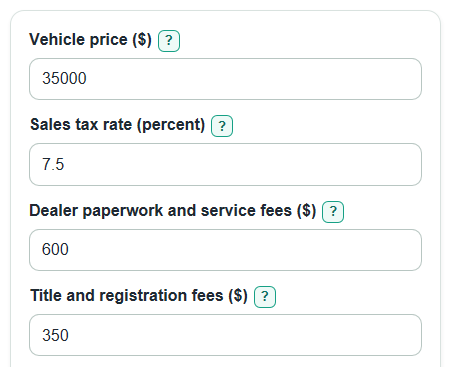
- Enter the Vehicle price ($), Sales tax rate (percent), Dealer paperwork and service fees ($), Title and registration fees ($), and Dealer add-ons ($) from the quote.
- Open Advanced options if you have a Trade-in value ($), Rebates and incentives ($), or need to match the quote's tax treatment for trade-ins, rebates, dealer fees, or add-ons.
- If you saw an online listing, enter Advertised price to compare ($) to see Extra added before trade-in and rebates.
- Click Calculate and compare Estimated out-the-door price across dealers, not just the monthly payment.
- Sanity-check the output: Amount used for sales tax should match the tax switches you picked, and Dealer-controlled charges should equal Dealer paperwork and service fees ($) plus Dealer add-ons ($).
Definitions
Estimated out-the-door price: The estimated amount due before any loan down payment. It includes price, sales tax, fees, add-ons, trade-in credit, and rebates.
Vehicle price ($): The negotiated selling price before taxes and fees. If the destination charge is not already included, add it here.
Dealer paperwork and service fees ($): Dealer-charged fees such as documentation, processing, prep, or electronic filing. This calculator groups them as dealer-controlled charges.
Title and registration fees ($): Government-style charges for title, registration, plate, tag, or similar items.
Dealer add-ons ($): Extra products or services added to the deal, such as paint protection, VIN etching, nitrogen tires, service contracts, or warranties. Advertised prices may not include added fees or add-ons [1].
Amount used for sales tax: The taxable base after the selected rules for trade-ins, rebates, dealer fees, and add-ons. It is floored at $0 for tax math.
Trade-in and rebate credits: The combined Trade-in value ($) and Rebates and incentives ($). These lower the amount due, but they may not always lower the taxable amount.
Common mistakes and quick fixes
Mistake: Putting the down payment in Vehicle price ($).
Fix: Use the selling price before financing; this calculator estimates the quote before any loan down payment.
Mistake: Entering Sales tax rate (percent) as 0.075 instead of 7.5.
Fix: Type the percent number shown on the quote, such as 7.5 for 7.5 percent.
Mistake: Mixing Dealer paperwork and service fees ($) with Title and registration fees ($).
Fix: Put doc, processing, prep, and electronic filing charges in Dealer paperwork and service fees ($); put DMV-style title, plate, tag, and registration charges in Title and registration fees ($).
Mistake: Leaving Dealer add-ons ($) out because they are optional.
Fix: If the quote includes tint, paint protection, VIN etching, a warranty, or another add-on you agreed to buy, include it in Dealer add-ons ($).
Mistake: Guessing on Does the trade-in lower the taxable amount? or Do rebates lower the taxable amount?.
Fix: Match the dealer worksheet or your state rule, because these choices can change Amount used for sales tax.
Mistake: Using Advertised price to compare ($) after subtracting Trade-in value ($) or Rebates and incentives ($).
Fix: Enter the advertised listing price before credits so Extra added before trade-in and rebates shows the quote bump clearly.
Limitations & Key Assumptions / Boundary Conditions
- This calculator does not know your exact state, county, city, DMV, or dealer tax rules. Use the tax switches to match your quote or local guidance.
- Sales tax is estimated from Sales tax rate (percent) and Amount used for sales tax. Some places have vehicle-specific tax rules, caps, exemptions, or local fees that are not modeled.
- Title and registration fees ($) are user-entered. The calculator does not look up plate, tag, inspection, lien, tire, battery, or documentation fee limits.
- Dealer-controlled charges are separated for quote checking only. The calculator does not decide whether a charge is legal, required, negotiable, or fair.
- Estimated out-the-door price can be negative if Trade-in value ($) plus Rebates and incentives ($) are larger than the calculated price, tax, and fees. The calculator keeps that signed result.
- Loan interest, loan term, down payment, insurance, service plans paid later, and monthly payment math are not included.
Methodology
How the estimate is built
The calculator starts with the Vehicle price ($), then adds dealer charges, government fees, and sales tax. It subtracts Trade-in value ($) and Rebates and incentives ($) at the end to estimate the out-the-door amount. Out-the-door car prices commonly include the car price plus taxes and fees, and dealer add-ons can raise the final amount [2].
taxable_dealer_fees = dealer_fees if Tax dealer paperwork and service fees? is Yes, otherwise 0
taxable_addons = dealer_addons if Tax dealer add-ons? is Yes, otherwise 0
tax_credit_from_trade = trade_in_value if Does the trade-in lower the taxable amount? is Yes, otherwise 0
tax_credit_from_rebates = rebates if Do rebates lower the taxable amount? is Yes, otherwise 0
taxable_amount = max(0, vehicle_price + taxable_dealer_fees + taxable_addons - tax_credit_from_trade - tax_credit_from_rebates)
Sales tax is found by converting Sales tax rate (percent) to a decimal. For example, 7.5 percent becomes 0.075.
sales_tax = taxable_amount * (sales_tax_rate / 100)
out_the_door_price = vehicle_price + dealer_fees + dealer_addons + title_reg_fees + sales_tax - trade_in_value - rebates
Breakdown outputs
The added-charge outputs help separate what the dealer entered from what is usually tied to tax or government paperwork.
total_fees_and_tax = dealer_fees + dealer_addons + title_reg_fees + sales_tax
dealer_controlled_charges = dealer_fees + dealer_addons
government_charges_and_tax = title_reg_fees + sales_tax
fees_as_percent_of_vehicle_price = (total_fees_and_tax / vehicle_price) * 100
If Advertised price to compare ($) is entered, the calculator compares the quote before credits with that advertised price. This keeps a large trade-in or rebate from hiding added charges.
advertised_price_bump_before_credits = vehicle_price + dealer_fees + dealer_addons + title_reg_fees + sales_tax - advertised_price
Mini-example
Suppose Vehicle price ($) is $35,000, Sales tax rate (percent) is 7.5, Dealer paperwork and service fees ($) is $600, Title and registration fees ($) is $350, and Dealer add-ons ($) is $0. With dealer fees taxed and no credits, Amount used for sales tax is $35,600, Estimated sales tax is $2,670, and Estimated out-the-door price is $38,620.
Calculation choices
Money results are rounded to the nearest cent for display, but the calculation keeps full precision until the end. Amount used for sales tax is floored at $0 because tax is not calculated as a negative number. Estimated out-the-door price is not floored, so a negative value means the credits are larger than the calculated price, tax, and fees.