
Estimate a business loan payment and see if it fits your monthly cash-flow coverage target.
Table of contents
How to use our Business Loan Affordability Calculator
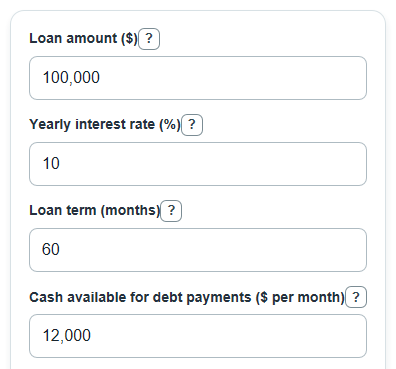
- Enter the Loan amount, Yearly interest rate, and Loan term from the loan offer or scenario you want to test.
- Enter Cash available for debt payments and Existing business debt payments using monthly amounts, not yearly totals.
- Open Advanced options if you want to add Origination fee, Other upfront fees, or change the Cash-flow coverage target.
- Select Calculate and read the affordability results first: Highest loan amount at your coverage target and Monthly room left after the new loan payment.
- Sanity-check the output by comparing Estimated monthly loan payment with your actual lender quote; a large difference usually means the rate, term, fees, or payment frequency was entered differently.
Definitions
Loan amount: The amount you plan to borrow as principal, before any separately paid fees.
Yearly interest rate: The stated annual interest rate used to calculate the monthly payment. It is not the same as APR when upfront fees are charged.
Loan term: The number of monthly payments until the loan is scheduled to be paid off.
Cash available for debt payments: Monthly cash left after normal operating costs, before current business debt and the new loan payment.
Existing business debt payments: Current monthly business payments on loans, leases, and other regular debt.
Cash-flow coverage target: The cushion test used here: cash available for debt payments divided by total monthly debt payments. This is similar to a debt service coverage ratio [2][3].
Fee-inclusive yearly APR: An estimated annual percentage rate that treats upfront fees as part of the borrowing cost. APR is a yearly cost measure [1].
Common mistakes and quick fixes
Mistake: Entering annual cash flow in Cash available for debt payments.
Fix: Use the monthly cash left after normal operating costs and before debt payments.
Mistake: Putting a 5-year loan as 5 in Loan term.
Fix: Enter 60 in Loan term because this calculator uses months.
Mistake: Treating Monthly room left after the new loan payment as extra profit.
Fix: Read it as room versus the Cash-flow coverage target; negative means the requested loan misses that target.
Mistake: Entering personal credit card payments in Existing business debt payments.
Fix: Include only regular business debt payments unless those personal payments are paid by the business cash flow you entered.
Mistake: Leaving Origination fee out when comparing Fee-inclusive yearly APR between offers.
Fix: Add Origination fee and Other upfront fees if the lender charges them separately.
Mistake: Assuming Highest loan amount at your coverage target is a lender approval amount.
Fix: Use it as a cash-flow screen only; lenders may also check credit, collateral, revenue history, industry, and documents.
Limitations & Key Assumptions / Boundary Conditions
- The payment math assumes a fixed rate, level monthly payments, and full scheduled repayment over the entered Loan term.
- The affordability check uses only Cash available for debt payments, Existing business debt payments, and the Cash-flow coverage target. It does not predict approval.
- Real lender decisions can also depend on credit, collateral, revenue history, time in business, industry risk, tax returns, bank statements, and legal documents.
- Fee-inclusive yearly APR is an estimate for comparison. It is not a legal Truth in Lending disclosure and may differ from a lender's official APR.
- Origination fee and Other upfront fees are treated as paid upfront, not added to the loan balance.
- Taxes, late fees, prepayment penalties, variable rates, balloon payments, daily interest accrual, and nonmonthly payment schedules are not included.
- If Cash available for debt payments is low or negative, Highest loan amount at your coverage target may be $0, while Monthly room left after the new loan payment can still show the signed shortfall.
Methodology
Payment math
The calculator first converts the Yearly interest rate to a monthly rate because the payment schedule is monthly.
monthly_rate = annual_interest_rate / 100 / 12
It then finds the fixed-payment factor. The zero-rate case is handled separately so the calculator does not divide by zero.
payment_factor = 1 / loan_term_months, if monthly_rate = 0
payment_factor = monthly_rate / (1 - (1 + monthly_rate)^(-loan_term_months)), if monthly_rate > 0
estimated_monthly_payment = loan_amount * payment_factor
Affordability check
The cash-flow test estimates the largest new monthly payment that fits the selected coverage target after current business debt payments.
max_new_monthly_payment = cash_available_monthly / target_coverage_ratio - existing_debt_payment
max_affordable_loan = max(0, max_new_monthly_payment / payment_factor)
The loan limit is floored at $0 because a negative borrowing limit is not usable. The monthly gap keeps its sign so a shortfall is visible.
monthly_payment_gap = max_new_monthly_payment - estimated_monthly_payment
cash_flow_coverage_after_loan = cash_available_monthly / (existing_debt_payment + estimated_monthly_payment)
Fees and APR estimate
Upfront fees are added to the dollar cost output and used to estimate a fee-inclusive APR. The APR estimate solves for the monthly internal rate that makes the net cash received equal the present value of the scheduled payments.
upfront_fees = loan_amount * origination_fee_pct / 100 + other_upfront_fees
total_interest_and_fees = estimated_monthly_payment * loan_term_months - loan_amount + upfront_fees
net_cash_received = loan_amount - upfront_fees
net_cash_received = estimated_monthly_payment * (1 - (1 + monthly_irr)^(-loan_term_months)) / monthly_irr
fee_inclusive_apr_pct = monthly_irr * 12 * 100
Mini-example
For a $100,000 loan at 10% for 60 months, the monthly rate is 0.10 / 12, and the estimated monthly payment is about $2,124.70. If the business has $12,000 available for debt payments, already pays $2,000 per month in business debt, and uses a 1.25 coverage target, the maximum new monthly payment is $12,000 / 1.25 - $2,000, or $7,600. The monthly room left is $7,600 - $2,124.70, or about $5,475.30, and the highest loan amount at that target is about $357,696.80.