
Calculate the units and sales dollars needed to cover costs, then test how price or per-unit cost changes affect the target.
Advanced options
Table of contents
How to use our Break-Even Point Calculator
- Enter Fixed costs, which are costs that stay about the same even if you sell more or fewer units.
- Enter Selling price per unit and Variable cost per unit for one item, order, or service.
- Enter Expected units sold and a Profit goal if you want profit or loss and target-profit results.
- Open Advanced options to change the Price change step and Variable cost change step used in the price and cost check table.
- Click Calculate, then sanity-check the answer: if Money left after variable cost is small, the Break-even point should be high.
Definitions
Fixed costs: Costs that do not change directly with each unit sold, such as rent or insurance.
Variable cost per unit: The cost that goes with making or delivering one unit, item, order, or service.
Money left after variable cost: Selling price per unit minus variable cost per unit. Accounting texts often call this contribution margin.
Money-left share of price: Money left after variable cost shown as a percent of the selling price. This is also called the contribution margin ratio.
Break-even point: The unit count where total sales equal total fixed and variable costs, so profit is 0 before taxes and costs not entered here.
Price and cost check spread: The difference between the lowest and highest feasible break-even unit counts in the sensitivity table.
Common mistakes and quick fixes
Mistake: Putting total costs into Variable cost per unit .
Fix: Use only the cost tied to one unit sold, and put rent, insurance, or base payroll in Fixed costs .
Mistake: Entering a Selling price per unit that is less than or equal to Variable cost per unit .
Fix: Raise the price, lower the variable cost, or accept that the calculator will show no break-even because each sale loses money before fixed costs.
Mistake: Treating Expected units sold as the same thing as Break-even point .
Fix: Use Expected units sold for a profit or loss estimate, and use Break-even point as the minimum unit target to cover costs.
Mistake: Using a negative Profit goal to test a loss.
Fix: Keep Profit goal at 0 for break-even or enter a positive goal; use Profit or loss at expected units to see a possible loss.
Mistake: Setting Price change step or Variable cost change step so high that many price and cost check cells have no break-even.
Fix: Use a smaller percent step if you want the Price and cost check table to compare realistic nearby scenarios.
Limitations & Key Assumptions / Boundary Conditions
- The calculator uses one average Selling price per unit and one average Variable cost per unit. It does not model discounts, product mixes, refunds, or tiered costs.
- Fixed costs are treated as fixed over the sales range you are testing. Real fixed costs can jump when you add equipment, space, or staff.
- If Variable cost per unit is greater than or equal to Selling price per unit, break-even is not possible because each unit leaves no money to cover fixed costs.
- Break-even point can be a decimal unit. If you sell only whole units, round up for planning.
- Profit or loss at expected units is before taxes, financing costs, owner draws, and any costs not included in the inputs.
- The Price and cost check table changes only price and variable cost by the selected steps. It does not change fixed costs or expected units.
Methodology
Core formulas
The calculator uses the standard break-even method based on fixed costs, selling price per unit, and variable cost per unit [1]. First it finds the money left from each sale after the per-unit variable cost.
money_left_after_variable_cost = selling_price_per_unit - variable_cost_per_unit
money_left_share_of_price = (money_left_after_variable_cost / selling_price_per_unit) * 100
When money left after variable cost is positive, the break-even point is fixed costs divided by that per-unit amount.
break_even_point = fixed_costs / money_left_after_variable_cost
sales_needed_to_break_even = break_even_point * selling_price_per_unit
The expected-sales and profit-goal outputs use the same money-left amount.
profit_or_loss_at_expected_units = (expected_units_sold * money_left_after_variable_cost) - fixed_costs
units_needed_for_profit_goal = (fixed_costs + profit_goal) / money_left_after_variable_cost
sales_needed_for_profit_goal = units_needed_for_profit_goal * selling_price_per_unit
Price and cost check
The sensitivity table tests lower, entered, and higher price values against lower, entered, and higher variable cost values. The percent steps are divided by 100 before they are used.
cell_units = fixed_costs / ((selling_price_per_unit * price_factor) - (variable_cost_per_unit * variable_cost_factor))
If an adjusted cell has variable cost greater than or equal to price, that cell is marked no break-even and is left out of the lowest, highest, and spread calculations.
price_and_cost_check_spread = highest_feasible_cell_units - lowest_feasible_cell_units
Mini-example
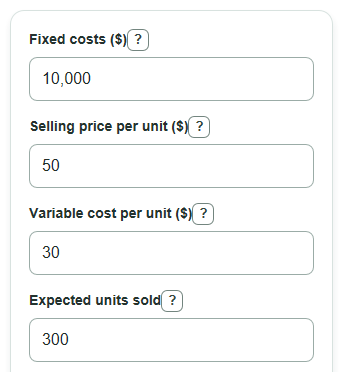
With fixed costs of $10,000, a selling price of $50, and a variable cost of $30, the money left after variable cost is $20 per unit.
break_even_point = 10000 / 20 = 500 units
sales_needed_to_break_even = 500 * 50 = $25,000
If expected units sold is 300, the profit or loss is negative because 300 units leave $6,000 after variable costs, which is $4,000 short of fixed costs.
profit_or_loss_at_expected_units = (300 * 20) - 10000 = -$4,000
Sources
- 3.2 Calculate a Break-Even Point in Units and Dollars - Principles of Accounting, Volume 2: Managerial Accounting - Openstax
- Break-even point | U.S. Small Business Administration - SBA
- Alamo Colleges District - Break-Even Analysis PDF - Alamo
- Break-Even Analysis: How to Calculate the Break-Even Point - Corporatefinanceinstitute