
Convert Ah, mAh, Wh, and voltage so you can compare battery labels without mixing up charge and energy.
Table of contents
How to use our Amp Hours to Watt Hours Calculator
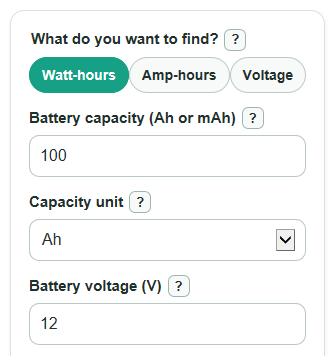
- Choose what you want to find: Watt-hours, Amp-hours, or Voltage.
- Enter the two values you already know, using the battery label for Battery capacity, Capacity unit, Battery voltage, or Energy.
- Open Advanced options only if you want to change Usable amount, Number display, Energy result unit, or the Lithium battery travel note.
- Select Calculate and read Calculated answer first, then check Usable energy and Same energy in another unit if shown.
- Sanity-check the result: a 100 Ah, 12 V battery should be about 1200 Wh, and a 30000 mAh, 3.7 V power bank should be about 111 Wh before losses.
Definitions
Amp-hour (Ah): A battery charge capacity rating. It says how much electric charge the battery can deliver over time, but it is not energy by itself.
Milliamp-hour (mAh): A smaller battery capacity unit often printed on power banks and small cells. 1000 mAh equals 1 Ah.
Watt-hour (Wh): An energy rating. For battery labels, it is the capacity in Ah multiplied by the battery voltage in V.
Kilowatt-hour (kWh): A larger energy unit. 1000 Wh equals 1 kWh.
Battery voltage (V): The nominal battery voltage used for the conversion. Real battery voltage changes while the battery charges and discharges.
Usable amount: The percent of rated energy you want to count for planning. It does not prove the battery will deliver that amount in real use.
Lithium battery travel note: An optional check that compares the calculated Wh with common US air travel watt-hour tiers for lithium batteries.
Common mistakes and quick fixes
Mistake: Typing a mAh label into Battery capacity but leaving Capacity unit set to Ah.
Fix: Set Capacity unit to mAh when the label says mAh, such as 30000 mAh.
Mistake: Using amps or watts in Battery capacity instead of amp-hours.
Fix: Battery capacity needs Ah or mAh, not A, W, or a charger output rating.
Mistake: Entering a charger voltage for Battery voltage instead of the battery's nominal voltage.
Fix: Use the battery label voltage, such as 3.7 V, 12 V, 24 V, or 48 V.
Mistake: Solving for Amp-hours with Energy entered as kWh.
Fix: Energy must be in Wh, so enter 1200 for 1.2 kWh.
Mistake: Setting Usable amount to a number over 100 because you expect extra runtime.
Fix: Usable amount must be from 0 to 100 percent; use 100 for the full rated energy.
Mistake: Turning on Lithium battery travel note for a non-lithium battery.
Fix: Use Lithium battery travel note only for lithium-ion batteries, power banks, and similar rechargeable packs.
Limitations & Key Assumptions / Boundary Conditions
- The conversion uses nominal Battery voltage. Real voltage changes during use, so measured energy can differ.
- The result is a label-based estimate. Battery age, temperature, discharge rate, and built-in electronics can reduce real usable energy.
- Energy must be entered in Wh. If you have kWh, multiply by 1000 before entering Energy.
- Usable amount is only a planning adjustment. It is not a test of battery health or real runtime.
- The Lithium battery travel note is only for lithium batteries and is a quick planning note, not airline approval.
- The calculator does not convert AC inverter losses, charger efficiency, or device power draw into runtime.
- Negative capacity, voltage, and energy are not valid for this calculator. Zero can calculate in some modes, but a real battery label usually has positive energy.
Methodology
Core conversion
The calculator uses the standard battery label relationship between energy, charge capacity, and voltage.
watt_hours = amp_hours * volts
If the capacity is entered in mAh, the calculator first converts it to Ah.
amp_hours = milliamp_hours / 1000
When you choose Amp-hours, it rearranges the same relationship.
amp_hours = watt_hours / volts
When you choose Voltage, it uses watt-hours divided by amp-hours.
volts = watt_hours / amp_hours
Usable energy and larger units
Usable energy applies the selected Usable amount percent to the nominal energy.
usable_watt_hours = nominal_watt_hours * usable_percent / 100
For larger energy amounts, Wh can also be shown as kWh.
kilowatt_hours = watt_hours / 1000
Mini example
A 30000 mAh power bank at 3.7 V is first converted to 30 Ah. Then 30 Ah * 3.7 V = 111 Wh. If Usable amount is 80 percent, usable energy is 111 Wh * 80 / 100 = 88.8 Wh.
Travel note tiers
When the Lithium battery travel note is on, the calculator compares the calculated Wh with common US lithium-ion battery tiers: up to 100 Wh, over 100 through 160 Wh, and over 160 Wh. FAA passenger guidance discusses the 101 to 160 Wh spare lithium-ion battery tier and notes that lithium-ion batteries are allowed based on watt-hours [1][2].
Error handling
The calculator validates complete numbers before removing correctly grouped commas or spaces. It accepts scientific notation, ignores hidden mode fields, blocks negative values and division by zero, and checks that calculated values are representable. Usable amount must be from 0 to 100 percent; leaving it blank uses 100 percent. Very small nonzero results use scientific notation when a regular display would round them to zero.