
Enter matched qPCR Ct or Cq values to calculate relative gene expression in a comparison sample versus its control.
Table of contents
How to use our qPCR Delta Delta Ct Relative Gene Expression Calculator
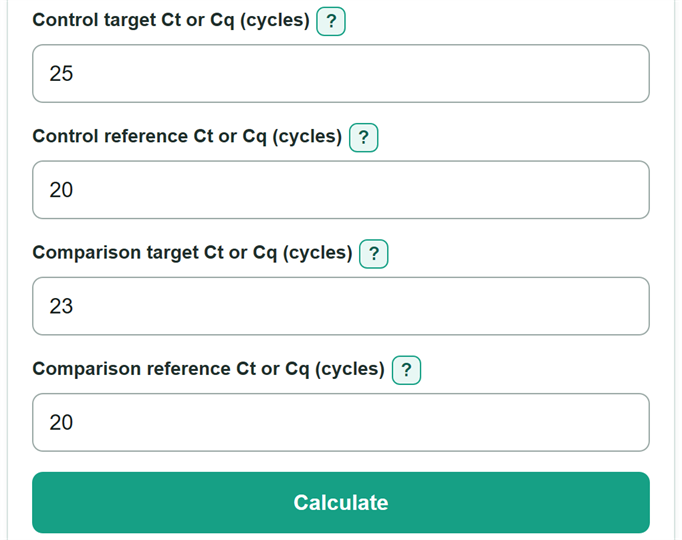
- Enter the target and reference Ct or Cq values for the control condition. These values must come from the same cDNA sample or a correctly matched condition summary.
- Enter the matching target and reference Ct or Cq values for the comparison condition.
- Click Calculate to see relative expression versus control, expression direction, Delta Delta Ct, and the two Delta Ct values.
- Check the subtraction order shown in the results: each Delta Ct is target Ct minus reference Ct, then comparison Delta Ct minus control Delta Ct.
- Sanity-check the direction: a relative expression above 1 is higher than control, while a value below 1 is lower expression, not negative expression.
Definitions
Ct or Cq: The qPCR cycle value at which the measured signal crosses a chosen detection threshold. This calculator treats Ct and Cq as the same type of cycle input.
Target: The gene whose expression you want to compare.
Reference: A gene used to normalize the target measurement. Its expression needs to be stable across the conditions being compared.
Control: The calibrator or baseline condition. Its relative expression is set to 1 x control.
Comparison: The sample or condition measured against the control.
Delta Ct: Target Ct minus reference Ct within one matched sample or condition summary.
Delta Delta Ct: Comparison Delta Ct minus control Delta Ct.
Relative expression: Normalized expression relative to control, calculated as 2 raised to negative Delta Delta Ct.
Log2 relative expression: The base-2 log of relative expression. It equals negative Delta Delta Ct in this method.
Common mistakes and quick fixes
Mistake: Reversing the order in Control target Ct or Cq and Control reference Ct or Cq.
Fix: Enter the raw values in their labeled fields. Control Delta Ct is always target Ct minus reference Ct.
Mistake: Pairing Comparison target Ct or Cq with a Comparison reference Ct or Cq value from a different cDNA sample.
Fix: Use target and reference values from the same sample, or values summarized with the same matching plan.
Mistake: Treating a Relative expression versus control value such as 0.25 as negative expression.
Fix: Read 0.25 as one-quarter of the normalized control expression, which is a 75% lower Normalized expression change.
Mistake: Reversing Delta Delta Ct by subtracting comparison from control.
Fix: Delta Delta Ct is comparison Delta Ct minus control Delta Ct. A negative value produces relative expression above 1.
Mistake: Entering an undetermined well, a range, or a negative number in Comparison target Ct or Cq.
Fix: Enter one finite cycle value at or above 0 only after applying your laboratory's documented rule for undetermined wells.
Limitations & Key Assumptions / Boundary Conditions
- The calculator uses one control and one comparison value for each target and reference input. It does not average technical replicates or analyze biological replicate variation.
- Target and reference Ct or Cq values must be matched to the same cDNA sample, or to correctly matched condition summaries.
- The 2^(-Delta Delta Ct) method assumes the target and reference assays have comparable amplification efficiency. Unequal efficiencies can bias the result.
- The reference gene must be stable for the conditions being compared. A changing reference gene can distort normalization.
- The result is a relative-expression estimate, not a diagnostic conclusion, quality-control decision, outlier check, confidence interval, or statistical significance test.
- Do not replace an undetermined well with a numeric Ct unless your laboratory has a documented method for doing so.
Methodology
Calculation steps
The calculator first normalizes each condition by subtracting its matched reference Ct or Cq from its target Ct or Cq. It then compares the normalized comparison value with the normalized control value.
ΔCt control = control target Ct - control reference Ct
ΔCt comparison = comparison target Ct - comparison reference Ct
ΔΔCt = ΔCt comparison - ΔCt control
Relative expression = 2^(-ΔΔCt)
Log2 relative expression = -ΔΔCt
Normalized expression change = (relative expression - 1) x 100%
Worked example
If the control target Ct is 25 and the control reference Ct is 20, control Delta Ct is 5. If the comparison target Ct is 23 and its reference Ct is 20, comparison Delta Ct is 3. Delta Delta Ct is 3 minus 5, or -2. Relative expression is 2^2, or 4 x control. The normalized expression change is +300%.
Method conditions
This is the standard equal-efficiency Delta Delta Ct calculation. The control is normalized to 1, so values above 1 indicate higher normalized expression and values below 1 indicate lower normalized expression. The method uses target-minus-reference normalization and control-relative comparison. [1]