
Estimate when a similar vehicle group is next due for an oil change and budget its direct service cost for the next 12 months.
Follow the earliest applicable approved trigger. Tied triggers are shown together.
This assumes mileage builds evenly over time.
This covers forecast oil-change invoices only. It excludes fixed overhead and downtime.
Calculation details
Table of contents
How to use our Fleet Oil Change Schedule and Annual Budget Calculator
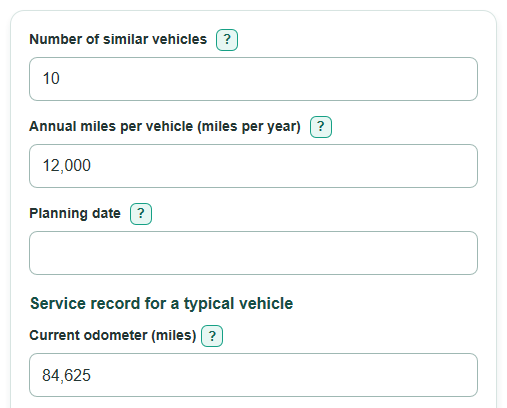
- Enter the Number of similar vehicles only for vehicles with matching usage, service intervals, and typical invoice costs.
- Set the Planning date, then copy the current and last-service mileage and date from fleet records or work orders.
- Enter approved mileage and calendar intervals from the OEM schedule or fleet policy, plus the full Total invoice per oil change.
- Open Advanced options only if engine hours are an active service rule, and fill all four engine-hour fields.
- Check the trigger that makes service due first. If it does not match your records or policy, correct the interval or service record before using the 12-month budget.
Definitions
Similar vehicles: Vehicles grouped together because they have the same expected use, oil-change rules, and typical service cost.
Planning date: The first day of the 12-month forecast.
Current odometer: The mileage reading at the planning date for a typical vehicle in the group.
Oil change interval: The approved distance, calendar-time, or engine-hour limit between oil changes.
Controlling trigger: The active rule that reaches its limit first: mileage, calendar time, or engine hours.
Direct oil-change budget: Forecast oil changes multiplied by the total invoice per service. It does not include fixed overhead or downtime.
Engine hours: Time the engine has operated, measured by an engine-hour meter. This can matter for idling, vocational, and off-road equipment.
Common mistakes and quick fixes
Mistake: Including vehicles with different oil-change rules under Number of similar vehicles.
Fix: Calculate each vehicle class or usage pattern separately, then add the group budgets.
Mistake: Entering total fleet miles in Annual miles per vehicle.
Fix: Enter the expected yearly miles for one typical vehicle in this group.
Mistake: Using the last invoice date as the Planning date.
Fix: Use the date the 12-month forecast starts, usually today.
Mistake: Entering a Last oil change mileage greater than the Current odometer.
Fix: Check the work order and odometer records; the last-service mileage cannot be higher than the current reading.
Mistake: Adding oil, filter, and labor costs on top of Total invoice per oil change.
Fix: Enter the complete per-service invoice once, including only charges already billed for that oil change.
Mistake: Filling only some Current engine hours, Last oil change engine hours, Annual engine hours per vehicle, or Oil change interval fields.
Fix: Complete all four engine-hour fields or clear all four so engine hours do not create an incomplete schedule.
Limitations & Key Assumptions / Boundary Conditions
- The calculation assumes every vehicle in the group has the same service history, annual use, intervals, and invoice cost. Split mixed groups before calculating.
- Mileage and engine hours are treated as accumulating evenly through the year. Actual routes, idling, seasonal work, and downtime can move the due date.
- The earliest entered mileage, calendar, or active engine-hour trigger controls. Follow the vehicle OEM schedule, oil-life system, warranty terms, and approved fleet policy if they differ from the entered values.
- The 12-month budget includes direct per-service invoice costs only. It excludes fixed annual shop costs, software, management, vehicle downtime, and other indirect costs.
- An overdue trigger is shown as due on the Planning date. The calculator does not estimate missed-service damage, penalties, or repair costs.
- Date results use calendar dates and a 365.2425-day year only to translate steady annual mileage or engine-hour forecasts into elapsed days.
Methodology
Schedule calculation
The calculator finds the next limit for each active service rule, then uses the earliest one. Mileage and calendar time are always active. Engine hours are active only when all four engine-hour fields are completed.
next_mileage_due = last_oil_change_mileage + mileage_interval
days_to_mileage = (next_mileage_due - current_odometer) * 365.2425 / annual_miles_per_vehicle
calendar_due_date = add_calendar_months(last_oil_change_date, calendar_interval_months)
days_to_calendar = days_between(planning_date, calendar_due_date)
days_to_hours = (engine_hour_interval - (current_engine_hours - last_oil_change_engine_hours)) * 365.2425 / annual_engine_hours
days_until_next_service = maximum_zero(minimum_active(days_to_mileage, days_to_calendar, days_to_hours))
If a trigger was already reached, time until service is set to zero and the next due date is the Planning date. Tied earliest triggers are all named. The visible due date rounds a positive partial day up so it is never shown early.
12-month forecast and budget
The calculator simulates one vehicle through the next 12 calendar months. At each due event, it resets mileage, calendar time, and active engine-hour clocks, then schedules the next event using the earliest trigger. An event on the final day is included.
fleet_oil_changes = oil_changes_per_vehicle * vehicle_count
annual_direct_budget = fleet_oil_changes * cost_per_oil_change
Mini-example: 10 similar vehicles needing 2 oil changes each during the forecast, at $325 per service, produce 20 fleet oil changes and a $6,500 direct budget.
Calculation choices
Calendar months are added from the recorded last-service date. When the same day does not exist in the target month, the calculation uses that month's last valid day. The due odometer estimates steady mileage accumulation and is displayed as a whole mile. Money is displayed to cents.