
Estimate when your next oil change is due by mileage and time, using your manual interval first.
Advanced options
Table of contents
How to use our Oil Change Interval Calculator
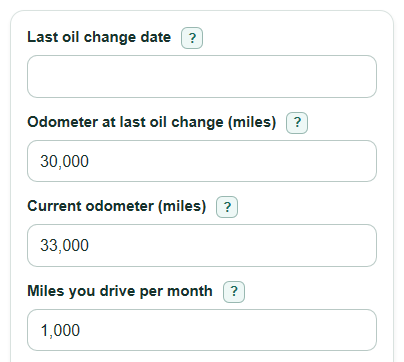
- Enter the Last oil change date, using a receipt, service record, or sticker if you have one.
- Enter Odometer at last oil change (miles) and Current odometer (miles); the current reading must be the same or higher.
- Enter Miles you drive per month and Oil change interval from your manual (miles). Use your owner's manual, service schedule, or oil-life monitor guidance before using a general number.
- Open Advanced options only if you want to change Time limit from your manual (months) or add Shorten the interval by (percent).
- Check the output for common sense: Mileage due point should be higher than the last-change odometer, and negative Days until due or Miles left before the mileage limit means the oil change is already past due.
Definitions
Odometer: The vehicle's mileage counter. It shows the total miles the vehicle has traveled [3].
Oil change interval from your manual (miles): The mileage limit listed by your owner's manual, service schedule, or oil-life monitor guidance.
Time limit from your manual (months): The calendar limit for changing oil, even if you have not driven many miles.
Safety buffer: A user-chosen percent that shortens the entered mileage interval for an earlier reminder.
Mileage due point: The odometer reading where the adjusted mileage interval is used up.
Mileage interval used up: The percent of the adjusted mileage interval already driven since the last oil change.
Common mistakes and quick fixes
Mistake: Using a guess for Oil change interval from your manual (miles) when the owner's manual gives a different interval.
Fix: Enter the manual, service schedule, or oil-life monitor interval for your vehicle and driving conditions.
Mistake: Entering Current odometer (miles) lower than Odometer at last oil change (miles) .
Fix: Recheck both odometer readings and make sure the current reading is at least the last-change reading.
Mistake: Leaving Miles you drive per month at a number that does not match your normal driving.
Fix: Use a typical recent month, because this value moves the estimated mileage-based due date earlier or later.
Mistake: Ignoring Time limit from your manual (months) for a car that does not get many miles.
Fix: Enter the manual's time limit so the calculator can catch an oil change due by date before it is due by mileage.
Mistake: Treating a negative Miles left before the mileage limit as a broken result.
Fix: Read a negative value as miles overdue by the mileage limit.
Mistake: Setting Shorten the interval by (percent) too high by accident.
Fix: Use 0 percent to follow the entered manual interval, or use a small value only if you want an earlier reminder.
Limitations & Key Assumptions / Boundary Conditions
- The calculator follows the interval you enter. It does not know your exact engine, oil specification, warranty terms, driving style, towing use, trip length, climate, or oil condition.
- Your owner's manual, service schedule, oil-life monitor, and warranty rules should override this estimate.
- The mileage-based due date uses Miles you drive per month as a steady average. A road trip, new commute, or seasonal change can make the real date different.
- The time-based due date uses calendar month addition from Last oil change date. If the target month has fewer days, the last valid day of that month is used.
- Shorten the interval by (percent) is only a planning buffer. It is not a manufacturer recommendation.
- The calculator keeps negative Days until due and negative Miles left before the mileage limit because those values show how far past due the estimate is.
Methodology
How the calculator works
The calculator starts with your entered manual mileage interval, not an oil-type guess. It compares the mileage limit and the calendar time limit, then uses whichever due point comes first.
miles_since = current_miles - last_change_miles
effective_interval_miles = manual_interval_miles * (1 - safety_buffer_percent / 100)
miles_remaining = effective_interval_miles - miles_since
next_due_odometer = last_change_miles + effective_interval_miles
mileage_due_days_from_today = miles_remaining / miles_per_month * 30.4375
time_due_date = add_months(last_change_date, manual_interval_months)
next_change_due_date = earlier of mileage_due_date and time_due_date
days_until_next_change = days_between(today, next_change_due_date)
mileage_used_percent = miles_since / effective_interval_miles * 100
Calendar and rounding choices
The mileage date projection uses 30.4375 days per month, which equals 365.25 divided by 12. Odometer outputs are shown to the nearest whole mile. Percent output is rounded for display, but the calculation uses the unrounded values.
Worked example
Suppose today is May 18, 2026, the last oil change was Feb 18, 2026 at 30,000 miles, the current odometer is 33,000 miles, the manual interval is 7,500 miles, the time limit is 12 months, and the driver averages 1,000 miles per month.
miles_since = 33,000 - 30,000 = 3,000 miles
miles_remaining = 7,500 - 3,000 = 4,500 miles
next_due_odometer = 30,000 + 7,500 = 37,500 miles
mileage_due_days_from_today = 4,500 / 1,000 * 30.4375 = 136.97 days
The time due date is Feb 18, 2027. The mileage estimate comes first, so the next oil change is due in about 137 days at about 37,500 miles.