
Estimate how much generator fuel to store and how many cans or propane cylinders to buy for your outage plan.
Table of contents
How to use our Generator Fuel Storage Calculator
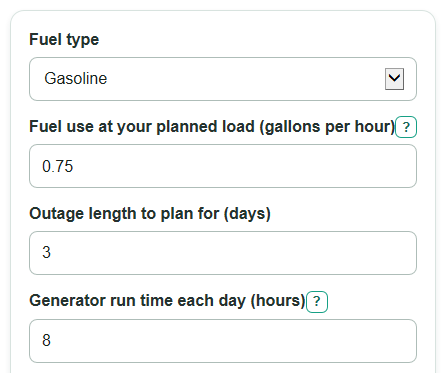
- Choose Fuel type so the calculator uses gallons for gasoline or diesel, or pounds for propane.
- Enter Fuel use at your planned load or Propane use at your planned load from your manual, a test run, or a trusted estimate.
- Enter Outage length to plan for and Generator run time each day, using only the hours you expect the generator to run.
- Pick Fuel can size or Propane cylinder size, then open Advanced options if you want Extra reserve fuel or fuel you already have counted.
- Check whether Planned generator run time and Fuel needed before reserve look realistic before using Containers to buy as a shopping plan.
Definitions
Fuel use at your planned load: The rate your generator burns fuel while powering the loads you expect to use, entered as gallons per hour or pounds per hour.
Outage length to plan for: The number of days you want your fuel plan to cover.
Generator run time each day: The hours per day the generator will actually run, not always 24 hours.
Extra reserve fuel: A percent added above the basic fuel estimate to cover small errors, spills, harder starts, or longer use.
Fuel gap or extra on hand: The target fuel minus fuel already stored. A positive value means buy more fuel. A negative value means you already have extra.
Containers to buy: The number of full fuel cans or propane cylinders needed to cover a positive fuel gap.
Common mistakes and quick fixes
Mistake: Entering full outage time in Generator run time each day when the generator will only run part of the day.
Fix: Use the actual daily run hours, such as 8 hours, and let Planned generator run time show the total.
Mistake: Using the wrong fuel unit for Fuel use at your planned load or Propane use at your planned load.
Fix: Use gallons per hour for gasoline or diesel, and pounds per hour for propane.
Mistake: Forgetting that Extra reserve fuel changes Containers to buy.
Fix: Keep Extra reserve fuel at 0 if you want no buffer, or enter a nonnegative percent for a cushion.
Mistake: Putting propane weight into Fuel already stored.
Fix: For propane, enter the amount in Propane already stored; for gasoline or diesel, use Fuel already stored.
Mistake: Treating Fuel gap or extra on hand as a rounded container count.
Fix: Use Fuel gap or extra on hand to see the signed shortage or surplus, then use Containers to buy for full cans or cylinders.
Limitations & Key Assumptions / Boundary Conditions
- The calculator starts from the fuel burn rate you enter. If that rate is wrong for your generator load, the fuel plan will be wrong too.
- It assumes the same run time and fuel rate for every planned day. Real fuel use can change with load, temperature, maintenance, altitude, and generator condition.
- It does not check local fuel storage laws, building rules, insurance rules, or safe storage limits for gasoline, diesel, or propane containers.
- It treats container size as usable fuel capacity. Actual filled amounts, propane exchange fills, and unusable leftover fuel can differ.
- It does not model fuel shelf life, stabilizer use, rotation dates, fuel delivery, or generator refueling downtime.
- Portable generators can create carbon monoxide and fire hazards. Follow the generator manual and safety guidance for outdoor use, ventilation, fueling, and storage.
Methodology
Calculation method
The calculator uses the fuel type you choose to decide which fuel rate, stored fuel input, and container size apply. Gasoline and diesel are handled in gallons. Propane is handled in pounds.
planned_run_hours = outage_days * run_hours_per_day
base_fuel_needed = planned_run_hours * fuel_rate
total_fuel_to_have = base_fuel_needed * (1 + reserve_percent / 100)
fuel_gap_or_extra = total_fuel_to_have - fuel_already_stored
containers_to_buy = ceil(fuel_gap_or_extra / container_size) when fuel_gap_or_extra is positive; otherwise 0
fuel_after_buying_containers = fuel_already_stored + containers_to_buy * container_size
Worked example
For a gasoline generator using 0.75 gallons per hour, a 3 day outage, and 8 run hours per day, planned run time is 24 hours. Base fuel is 24 * 0.75 = 18 gallons. With 10 percent reserve, total fuel to have is 19.8 gallons. If 4 gallons are already stored, the gap is 15.8 gallons. With 5 gallon cans, the calculator rounds up to 4 containers to buy, giving 24 gallons on hand after buying those cans.
Input checks
The selected fuel rate must be greater than 0, outage days must be greater than 0, and Generator run time each day must be greater than 0 and no more than 24. Extra reserve fuel and stored fuel cannot be negative. Blank Extra reserve fuel is treated as 0, but invalid text is an error. Hidden inputs for the other fuel type are not used. Fuel consumption is commonly estimated with gallons-per-hour style burn rates, but the number should match your generator and load [3].