
Estimate your yearly 401(k) employer match and the contribution rate needed to get the full match.
Table of contents
How to use our 401(k) Match Calculator
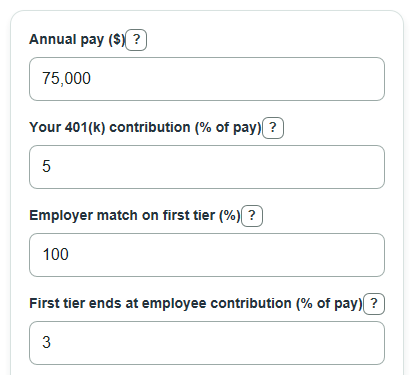
- Enter Annual pay using your yearly pay before taxes and before your 401(k) deduction.
- Enter Your 401(k) contribution as the percent of pay you put in, not including any employer money.
- Enter Employer match on first tier and First tier ends at employee contribution from your plan wording, such as 100% up to 3% of pay.
- Open Advanced options only if your plan has tier 2 or tier 3 wording, then enter both the match percent and the width for each extra tier.
- Check the results by comparing Employee contribution rate for full match with your entered contribution rate; if Employer match left unused is above $0, your rate is below the full-match level.
Definitions
Annual pay: Your pay for one year before taxes and before 401(k) deductions.
Your 401(k) contribution: The percent of pay you choose to put into your 401(k), also called your employee deferral.
Match tier: One step in the employer formula, such as 100% of the first 3% of pay or 50% on the next 2%.
Active tier: A tier that has both a match percent above 0 and a covered pay percent above 0.
Employee contribution rate for full match: The lowest percent of pay that reaches the end of every active tier you entered.
Employer match left unused: The estimated employer money not earned because your contribution rate does not reach all active tiers.
Common mistakes and quick fixes
Mistake: Entering take-home pay in Annual pay.
Fix: Use yearly pay before taxes, insurance, and 401(k) deductions.
Mistake: Putting the employer money into Your 401(k) contribution.
Fix: Enter only the percent of pay you choose to contribute yourself.
Mistake: Mixing up Employer match on first tier with First tier ends at employee contribution.
Fix: For "100% of the first 3%," enter 100 for the match and 3 for the tier ending.
Mistake: Entering Employer match on tier 2 but leaving Tier 2 covers next part of pay at 0.
Fix: Either fill in both tier 2 fields or set both to 0.
Mistake: Treating Annual 401(k) contribution including match as a future account balance.
Fix: Read it as one year of contributions before investment gains, losses, fees, taxes, vesting, or IRS limits.
Limitations & Key Assumptions / Boundary Conditions
- This is a one-year estimate. It assumes your Annual pay and Your 401(k) contribution rate stay the same all year.
- The calculator does not check IRS annual contribution limits, catch-up contribution rules, plan-specific limits, or whether your contribution would stop before year-end.
- It does not model vesting. Some plans require you to work for a certain time before employer match money is fully yours.
- It treats the match as an annual formula. Some employers match each paycheck, and a true-up feature can change the final match if your contribution rate changes during the year.
- Only three match tiers are supported. More complex formulas, safe harbor rules, profit sharing, discretionary matches, or after-tax contributions may need plan documents or payroll help.
- Investment gains, losses, fees, loans, withdrawals, and taxes are not included in Annual 401(k) contribution including match.
Methodology
How the tier math works
The calculator models the employer match in order: tier 1 first, then tier 2, then tier 3. The tier fields match common wording such as 100% of the first 3% of pay plus 50% on the next 2% [1]. A tier is active only when both its match percent and its width are greater than 0.
covered_i = min(max(employee_rate_percent - previous_active_widths_percent, 0), tier_width_percent)
covered_i is the part of your contribution rate that falls inside tier i. For tier 1, the tier width is First tier ends at employee contribution. For tier 2 and tier 3, the tier width is the next part of pay covered by that tier.
Employer match and maximum match
annual_employer_match = annual_salary * sum(covered_i * tier_match_percent_i) / 10000
maximum_annual_employer_match = annual_salary * sum(tier_width_percent_i * tier_match_percent_i) / 10000
The divisor 10000 is used because both the covered employee rate and the employer match rate are entered as percents. For example, 3% times 100% is entered as 3 * 100, then divided by 10000 to convert it to 0.03 of pay.
Full-match rate and unused match
full_match_employee_rate = sum(active_tier_width_percent_i)
missed_employer_match = max(maximum_annual_employer_match - annual_employer_match, 0)
The unused match is floored at $0 because the entered formula has a fixed largest match. If your contribution rate is higher than the full-match rate, the extra employee contribution can increase your own contribution, but it does not increase the employer match from these tiers.
Your contribution and total contribution
annual_employee_contribution = annual_salary * employee_rate_percent / 100
annual_total_contribution_with_match = annual_employee_contribution + annual_employer_match
Worked example
Suppose Annual pay is $80,000, Your 401(k) contribution is 4%, tier 1 is a 100% match through the first 3% of pay, and tier 2 is a 50% match on the next 2% of pay. Tier 1 covers 3% and tier 2 covers 1%, because your 4% contribution reaches only 1% into the second tier.
annual_employer_match = 80000 * ((3 * 100) + (1 * 50)) / 10000 = 2800
maximum_annual_employer_match = 80000 * ((3 * 100) + (2 * 50)) / 10000 = 3200
full_match_employee_rate = 3 + 2 = 5%
missed_employer_match = max(3200 - 2800, 0) = 400
So the estimated Annual employer match with your tiers is $2,800, the Employee contribution rate for full match is 5% of pay, and the Employer match left unused is $400.