
Enter what you own and what you owe to calculate your current net worth and compare it with an earlier snapshot.
Advanced options
Calculating...
| Date | Net worth |
|---|
Table of contents
How to use our Net Worth Calculator
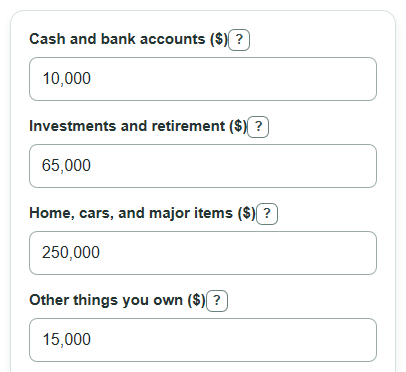
- Enter current values for Cash and bank accounts, Investments and retirement, Home, cars, and major items, and Other things you own.
- Enter Money you owe as the total unpaid balance on debts such as loans, credit cards, and mortgages.
- Open Advanced options only if you want a comparison, then enter Previous net worth, Months since previous snapshot, and the Snapshot date.
- Click Calculate and read Current net worth first, then check Total assets, Total debts, and Debt compared with assets.
- Sanity-check the output by asking if the biggest item, often a home or mortgage, was entered at today's value or balance instead of its original price.
Definitions
Net worth: What is left after debts are subtracted from assets. In this calculator, it is Current net worth.
Assets: Money and things you own that have money value, such as Cash and bank accounts, Investments and retirement, and Home, cars, and major items.
Debts: Money you still owe, such as credit card balances, student loans, car loans, and mortgage balances.
Total assets: The added value of all current asset fields you enter.
Total debts: The unpaid debt balance entered in Money you owe.
Previous net worth: Your net worth from an earlier check. It may be negative if debts were larger than assets.
Debt compared with assets: Total debts divided by Total assets, shown as a percent. It is not shown when Total assets is zero.
Common mistakes and quick fixes
Mistake: Entering the purchase price in Home, cars, and major items instead of what the item could sell for now.
Fix: Use a current estimated resale value for Home, cars, and major items.
Mistake: Putting credit card debt or a mortgage in Other things you own because it is connected to something you bought.
Fix: Put all unpaid balances in Money you owe.
Mistake: Using a negative number in Cash and bank accounts or Money you owe.
Fix: Enter each balance as a nonnegative amount; Current net worth can still be negative after debts are subtracted.
Mistake: Filling in Months since previous snapshot but leaving Previous net worth blank.
Fix: Enter Previous net worth to show Change since previous snapshot, or leave both comparison fields blank.
Mistake: Entering 0 for Months since previous snapshot when Previous net worth is filled in.
Fix: Use a number greater than 0 so Average change per month can be calculated.
Mistake: Treating Debt compared with assets as a score that says whether finances are good or bad.
Fix: Use Debt compared with assets as a simple ratio of Total debts to Total assets, then look at your full situation separately.
Limitations & Key Assumptions / Boundary Conditions
- The calculator uses only the values you enter. It does not connect to bank, loan, or investment accounts.
- Asset values should be current estimated values. Actual sale prices can be lower after fees, taxes, or market changes.
- Money you owe should be the current unpaid balance, not the original loan amount or the next monthly payment.
- Previous snapshot comparison is simple arithmetic. Average change per month is not a forecast.
- Debt compared with assets is not calculated when Total assets is zero because division by zero is not valid.
- The Snapshot date is a label for the snapshot. It does not change the formulas.
- If browser-only tracking is shown or used, saved data stays in that browser unless site data is cleared or the data is exported.
Methodology
Current snapshot math
The calculator first adds the asset categories you enter. Each current asset and debt field must be one nonnegative dollar amount. Commas and a leading dollar sign can be treated as formatting, but ranges and formulas are not valid entries.
total_assets = cash_accounts + investments_and_retirement + property_and_major_items + other_assets
total_debts = debts_owed
net_worth = total_assets - total_debts
Negative net worth is not changed to zero. A negative Current net worth means Total debts are larger than Total assets.
Debt percent
Debt compared with assets shows how large debts are compared with assets for the same snapshot.
debt_to_asset_percent = (total_debts / total_assets) * 100
If Total assets is 0, this percent is shown as not available because the calculation would divide by zero.
Previous snapshot comparison
If Previous net worth is filled in, the calculator compares today's Current net worth with that earlier number. The average monthly value uses Months since previous snapshot, which must be greater than 0.
change_since_previous = net_worth - previous_net_worth
average_monthly_change = change_since_previous / months_since_previous
Mini-example
If Cash and bank accounts is $15,000, Investments and retirement is $85,000, Home, cars, and major items is $320,000, Other things you own is $25,000, and Money you owe is $210,000, then Total assets are $445,000 and Total debts are $210,000.
net_worth = 445000 - 210000 = 235000
If Previous net worth was $200,000 and Months since previous snapshot is 10, then Change since previous snapshot is $35,000 and Average change per month is $3,500 per month.
change_since_previous = 235000 - 200000 = 35000
average_monthly_change = 35000 / 10 = 3500