
Estimate how long your home battery can run backup loads, including reserve charge, inverter losses, battery wear, and a time goal.
Advanced options
Table of contents
How to use our Home Battery Runtime Calculator
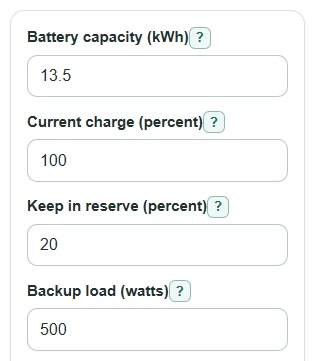
- Enter Battery capacity (kWh), Current charge (percent), Keep in reserve (percent), Backup load (watts), and Inverter efficiency (percent).
- Open Advanced options if you want to set Backup time goal (hours), Battery capacity left (percent), or Inverter idle draw (watts).
- Click Calculate to see Estimated runtime, Backup time check, Time over or short, and Load energy over or short.
- Sanity-check the result by comparing Backup load (watts) with the devices you really plan to run; a heater, air conditioner, or pump can make runtime much shorter.
Definitions
Battery capacity (kWh): The rated energy size of the home battery, measured in kilowatt-hours. Home battery capacity is commonly stated in kWh [1].
Current charge (percent): The battery state of charge at the start of the outage.
Keep in reserve (percent): The charge you choose not to use, so the calculator only counts energy above that level.
Backup load (watts): The average outlet power used by the devices you plan to run.
Inverter efficiency (percent): The share of battery energy that becomes usable outlet power instead of heat loss.
Battery capacity left (percent): A wear adjustment for an older battery that may hold less energy than its label says.
Inverter idle draw (watts): Battery-side power used by the inverter just to stay on.
Usable battery energy before inverter losses: The battery energy available after charge, reserve, and capacity-left adjustments, before conversion losses.
Estimated battery-side power draw: The battery power needed to support the backup load after inverter loss and idle draw.
Load energy over or short: The signed extra or missing outlet energy for your entered load and backup time goal.
Common mistakes and quick fixes
Mistake: Using total house power for Backup load (watts) when only a refrigerator, lights, and Wi-Fi are backed up.
Fix: Enter the average watts for only the loads connected to backup power.
Mistake: Setting Keep in reserve (percent) higher than Current charge (percent).
Fix: Lower Keep in reserve (percent) or raise Current charge (percent) so there is usable charge above the reserve.
Mistake: Leaving Inverter efficiency (percent) at 100 when your system loses energy during conversion.
Fix: Use the inverter or battery system efficiency if you know it, or keep the default estimate if you do not.
Mistake: Treating Battery capacity (kWh) as fully usable on an older battery.
Fix: Use Battery capacity left (percent) to reduce the rated capacity if the battery has aged or tested lower.
Mistake: Ignoring Inverter idle draw (watts) for a very small Backup load (watts).
Fix: Enter the idle draw if you know it, because it can matter when only small devices are running.
Mistake: Reading a negative Time over or short as an error.
Fix: A negative Time over or short means the setup is short of the Backup time goal (hours).
Limitations & Key Assumptions / Boundary Conditions
- The estimate uses a steady average Backup load (watts). Brief startup surge power is not included.
- Solar charging, generator charging, grid charging, and load changes during the outage are not included.
- Cold or hot battery temperature, manufacturer cutoff settings, and battery management rules can change real runtime.
- Battery capacity left (percent) is only an estimate unless it comes from a battery test or system report.
- Inverter idle draw (watts) is treated as battery-side power and is not counted as useful outlet energy.
- The calculator requires Current charge (percent) to be higher than Keep in reserve (percent); otherwise there is no usable charge to run loads.
Methodology
Calculation steps
The core runtime idea is usable energy divided by average power [2]. This calculator first converts Battery capacity (kWh) to watt-hours, then keeps only the charge above Keep in reserve (percent).
available_dc_wh = battery_capacity_kwh * 1000 * max((current_charge_percent - reserve_charge_percent), 0) / 100 * battery_capacity_left_percent / 100
Next it estimates the battery-side power draw. Backup load (watts) is divided by inverter efficiency as a decimal, then Inverter idle draw (watts) is added.
battery_draw_w = backup_load_watts / (inverter_efficiency_percent / 100) + inverter_idle_watts
Estimated runtime is the available battery-side energy divided by battery-side power draw.
runtime_hours = available_dc_wh / battery_draw_w
Estimated outlet energy delivered counts only energy delivered to the backup load, not energy used by inverter idle draw.
ac_energy_delivered_kwh = runtime_hours * backup_load_watts / 1000
The target check keeps the sign, so negative values are useful and are not hidden.
target_time_gap_hours = runtime_hours - target_backup_hours
target_load_energy_gap_kwh = target_time_gap_hours * backup_load_watts / 1000
Mini example
With Battery capacity (kWh) = 13.5, Current charge (percent) = 100, Keep in reserve (percent) = 20, Battery capacity left (percent) = 100, Backup load (watts) = 500, Inverter efficiency (percent) = 92, Inverter idle draw (watts) = 20, and Backup time goal (hours) = 8, usable battery energy is 10.8 kWh. Battery-side draw is about 563.48 W, so Estimated runtime is about 19.17 hours.
Reading the target check
For that example, Time over or short is 19.17 - 8 = 11.17 hours, and Load energy over or short is 11.17 * 500 / 1000 = 5.58 kWh. Positive means extra time and energy for the entered load. Negative means the entered setup is short of the goal.
Sources
- Home Battery Capacities: How Do They Compare? - Energysage
- How Long Will a Home Battery Power Your House During an Outage? - PowerLutions Solar Company - Powerlutions
- Battery Backup Sizing Guide for Homes and Businesses - ElectraKit - Electrakit
- [2605.17723] Residential Battery Pooling Under Backup Commitments - Arxiv