
Find starting cut lengths for common resonant antennas from your target frequency, with trim-long guidance.
Advanced options
Table of contents
How to use our Antenna Length Calculator
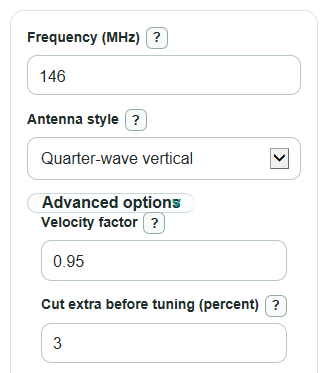
- Enter the target Frequency (MHz), such as the center of the band or the channel you want the antenna to favor.
- Choose Antenna style so the calculator reports the right piece, such as a vertical radiator, dipole sides, loop sides, or J-pole starter sections.
- Open Advanced options only if you want to change Velocity factor or Cut extra before tuning (percent); the defaults are meant to give a practical first cut.
- Click Calculate, then use Start by cutting about for the first cut and trim toward Main piece length while checking tuning.
- Sanity-check the result: a 2 meter quarter-wave antenna should be around 19 inches, while HF wire antennas can be many feet long.
Definitions
Frequency (MHz): The radio frequency the antenna is meant to work best on, entered in megahertz.
Wavelength: The physical length of one complete radio wave at the chosen frequency before antenna shortening is applied.
Velocity factor: A multiplier that shortens the free-space wavelength to a practical starting length for wire, tubing, or similar antenna material.
Cut extra before tuning (percent): The added length for the first cut, so you can trim shorter instead of starting too short.
Main piece length: The target tuned length for the main radiator, total dipole, end-fed half-wave wire, total loop wire, 5/8-wave radiator, or J-pole long section.
Start by cutting about: The main piece length plus the extra cut percentage.
Each matching piece: A repeated piece length, such as each dipole side, each ground radial, each square loop side, or the short J-pole section.
Build note: A short reminder about how to use the reported pieces and what the calculator does not design.
Common mistakes and quick fixes
Mistake: Entering kHz or Hz in Frequency (MHz) .
Fix: Convert to MHz first, so 146000 kHz becomes 146 MHz and 14,200,000 Hz becomes 14.2 MHz.
Mistake: Leaving Antenna style on Quarter-wave vertical when building a Half-wave dipole.
Fix: Pick the actual style so Main piece length and Each matching piece describe the pieces you will cut.
Mistake: Treating Main piece length as the first cut when you plan to tune by trimming.
Fix: Cut closer to Start by cutting about , then shorten the antenna slowly while measuring tuning.
Mistake: Using a Velocity factor above 1 or guessing one for very different materials.
Fix: Keep Velocity factor from 0.01 to 1, and adjust it if insulated wire, tubing size, or nearby objects shift resonance.
Mistake: Setting Cut extra before tuning (percent) too high and making the first cut awkward to install.
Fix: Use a small value such as 3 percent unless you need extra wire for wrapping, clamps, insulators, or repeated trimming.
Mistake: Reading Each matching piece as an extra piece for every style.
Fix: Use it only when the Build note says it applies, such as each dipole side, each radial, each square loop side, or the short J-pole section.
Limitations & Key Assumptions / Boundary Conditions
- The result is a starting cut length, not a guarantee of perfect standing wave ratio or resonance after installation.
- Nearby metal, ground height, wire insulation, tubing diameter, clamps, bends, and feedline routing can change the final tuned length.
- Velocity factor is user-set. If the material factor is wrong, the calculated length will be wrong by the same percentage.
- The Full-wave loop style reports total wire length and one side of a square loop. Delta loops, rectangles, and other shapes use the same total length differently.
- The J-pole style gives starter long and short section lengths only. It does not calculate feedpoint tap position, spacing, mounting effects, or matching details.
- The 5/8-wave vertical result is only the radiator length. A real 5/8-wave vertical still needs a suitable matching method and ground or counterpoise system.
- Very tiny results under 0.25 inch and very large results over 300 feet are possible mathematically, but they are hard to build or measure accurately with normal tools.
Methodology
How the length is calculated
The calculator first converts Frequency (MHz) to hertz, then finds the free-space wavelength using the speed of light, 299,792,458 meters per second.
wavelength_m = 299792458 / (frequency_mhz * 1000000)
The selected Antenna style sets the wave fraction. The calculator uses 0.25 for a quarter wave, 0.5 for a half wave, 0.625 for a 5/8 wave, 0.75 for the J-pole long section, and 1 for a full-wave loop.
piece_m = wavelength_m * wave_fraction * velocity_factor
Lengths are converted to feet and inches with the exact international foot conversion, 1 ft = 0.3048 m [1].
piece_ft = piece_m / 0.3048
piece_in = piece_ft * 12
The first-cut value adds the selected extra percentage. Cutting a little long is a common wire-antenna practice because the wire can be trimmed shorter during tuning [2].
start_cut_length = piece_length * (1 + extra_cut_percent / 100)
How extra pieces are handled
For a Half-wave dipole, Main piece length is the full half-wave total and Each matching piece is one dipole side.
each_side = half_wave_total / 2
For a Full-wave loop, Main piece length is the total loop wire and Each matching piece is one side of a square loop.
each_side = full_wave_total / 4
For a Quarter-wave vertical, Main piece length is the radiator and Each matching piece is a same-length radial starter if you are using radials. For a J-pole, Main piece length is the 3/4-wave long side and Each matching piece is the 1/4-wave short section.
Mini-example
For 146 MHz, Quarter-wave vertical, Velocity factor 0.95, and Cut extra before tuning 3 percent, the wavelength is about 2.053 m. A quarter wave after the velocity factor is about 0.488 m, which is 1.600 ft or 19.20 in. The cut-long starter is 1.600 ft times 1.03, or about 1.648 ft.
Calculation choices
Blank optional entries use the defaults: Velocity factor 0.95 and Cut extra before tuning 3 percent. Nonblank optional entries must pass their allowed ranges before any result is shown. The calculator strips commas and spaces from numeric entries before parsing.