
Calculate CFM for a room target or a measured duct opening, then compare it with a fan or airflow reading.
Table of contents
How to use our CFM Calculator
- Choose What do you want to calculate?: Room airflow needed for a space target, or Duct or register airflow for a measured opening.
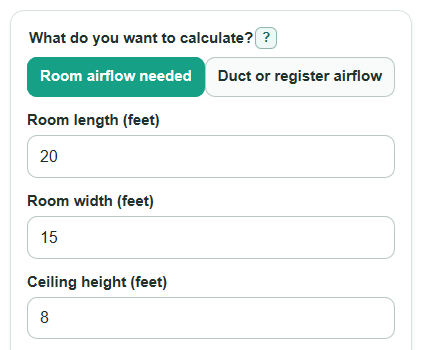
- For room mode, enter Room length, Room width, Ceiling height, and Air changes per hour using the target required for your project.
- For duct mode, choose Duct or opening shape, enter Air speed, then enter Round diameter or Rectangle width and Rectangle height.
- Open Advanced options if you want to enter Airflow to compare or change Round up to next fan size step.
- Check the result for sense: a bigger room, higher Air changes per hour, faster Air speed, or larger Open area should increase Calculated airflow.
Definitions
CFM: Cubic feet per minute, a measure of how much air moves each minute.
Air changes per hour: ACH, meaning how many times the room air is replaced in one hour.
Calculated airflow: The main CFM result. In room mode, it is the airflow needed for the entered ACH. In duct mode, it is the airflow through the opening.
Open area: The cross-section area of the duct or register opening, in square feet.
Air speed: The average air velocity through the opening, in feet per minute.
Airflow extra or short: The entered Airflow to compare minus the Calculated airflow. Positive is extra. Negative is short.
ACH from compared airflow: The air changes per hour that the entered Airflow to compare would deliver in the room.
Common mistakes and quick fixes
Mistake: Using inches in Room length, Room width, or Ceiling height.
Fix: Enter those room dimensions in feet, not inches.
Mistake: Leaving Air changes per hour blank or using a guessed value when a project target applies.
Fix: Enter an Air changes per hour value greater than 0 from your plan, code requirement, or ventilation target.
Mistake: Measuring Air speed at only the fastest spot in the duct or register.
Fix: Use an average Air speed across the opening so Calculated airflow is not too high.
Mistake: Entering the outside duct size for Round diameter, Rectangle width, or Rectangle height.
Fix: Use the inside open size when possible because Open area is based on the air path.
Mistake: Treating a negative Airflow extra or short as an error.
Fix: A negative Airflow extra or short means the Airflow to compare is short by that many CFM.
Mistake: Reading Rounded-up airflow as a required code value.
Fix: Use Rounded-up airflow as a shopping or catalog-size helper, then confirm the required Calculated airflow for the job.
Limitations & Key Assumptions / Boundary Conditions
- The calculator estimates airflow from the values entered. It does not choose the correct Air changes per hour for every room, use, or local code requirement.
- Room mode treats the room as one simple rectangular volume. Open doors, connected rooms, high ceilings with complex shapes, and leakage can change real airflow needs.
- Duct mode assumes Air speed is the average across the opening. Grilles, bends, filters, dampers, and uneven flow can make a single reading less accurate.
- Round diameter, Rectangle width, and Rectangle height should be inside open dimensions. Outside duct dimensions can overstate Open area and CFM.
- Airflow to compare can be a fan rating or a measured value, but rated fan airflow may differ after duct losses, filters, and installation details.
- Rounded-up airflow is only a sizing helper. It is not a substitute for HVAC design, balancing, or a code-required ventilation calculation.
Methodology
Room airflow
Room mode first finds Room volume from the three room dimensions.
room_volume_cuft = room_length_ft * room_width_ft * room_height_ft
It then converts the entered Air changes per hour target into CFM. The common ACH relationship is ACH = CFM * 60 / room volume, so the calculator rearranges it to solve for CFM [2].
calculated_cfm = room_volume_cuft * ach / 60
Duct or register airflow
Duct mode first finds Open area in square feet. For a round opening, diameter is converted from inches to feet before the area calculation.
duct_area_sqft = pi * (duct_diameter_in / 12)^2 / 4
For a rectangle, width and height are each converted from inches to feet.
duct_area_sqft = (duct_width_in / 12) * (duct_height_in / 12)
The airflow is then the measured Air speed times the Open area.
calculated_cfm = air_velocity_fpm * duct_area_sqft
Compare and round
If Airflow to compare is entered, the calculator keeps the sign of the difference.
comparison_cfm = compare_cfm - calculated_cfm
In room mode, the same compared airflow is converted back to delivered ACH.
delivered_ach = compare_cfm * 60 / room_volume_cuft
The fan-size helper rounds up, never down.
rounded_up_cfm = ceil(calculated_cfm / round_up_step_cfm) * round_up_step_cfm
Unit conversions
The metric outputs use fixed conversion factors from CFM.
airflow_lps = calculated_cfm * 0.47194745
airflow_m3h = calculated_cfm * 1.69901082
Mini-example
For a 20 ft by 15 ft room with an 8 ft ceiling, Room volume is 20 * 15 * 8 = 2,400 cubic feet. At 6 ACH, Calculated airflow is 2,400 * 6 / 60 = 240 CFM. If Airflow to compare is 200 CFM, Airflow extra or short is 200 - 240 = -40 CFM, so the compared airflow is 40 CFM short.