
Estimate how much a window AC adds to your electric bill using watts, run time, electricity price, and optional cycling.
Table of contents
How to use our Window AC Running Cost Calculator
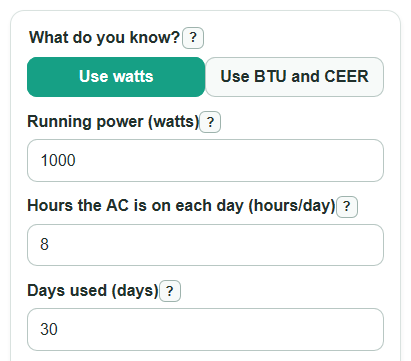
- Choose What do you know?: use Running power if the label lists watts, or use Cooling size and Efficiency rating if you have BTU/h and CEER.
- Enter Hours the AC is on each day, Days used, and Electricity price from your bill or a local estimate.
- Open Advanced options only if you want to adjust Time cooling at full power, Power when not cooling, or Number of matching AC units.
- Select Calculate, then read Estimated cost for the days entered first; use Cost per day used or Cost for each hour the AC is on for quick planning.
- Sanity-check the result by comparing Electricity used for the days entered with your bill's kWh use; a very high value often means watts, hours, or unit count is too large.
Definitions
Running power: The electric power the window AC uses while cooling, measured in watts.
Cooling size: The amount of heat the AC can remove, shown as BTU per hour on many room AC listings.
Efficiency rating: CEER, or Combined Energy Efficiency Ratio, is cooling output in BTU per watt-hour for a room air conditioner [1].
kWh: Kilowatt-hour, the energy unit used on electric bills. One kilowatt-hour is 1,000 watts used for 1 hour.
Time cooling at full power: The percent of on-time when the compressor is cooling instead of cycled off.
Power when not cooling: Optional fan-only or standby power used while the AC is on but the compressor is not cooling.
Common mistakes and quick fixes
Mistake: Using starting watts in Running power.
Fix: Enter the normal running watts from the label or a plug-in meter, not the brief startup surge.
Mistake: Choosing What do you know? as BTU and CEER, then entering BTU/h in Running power.
Fix: Put BTU/h in Cooling size and the CEER number in Efficiency rating, or switch back to watts mode.
Mistake: Treating Hours the AC is on each day as only the minutes you hear loud cooling.
Fix: Enter the time the unit is turned on; use Time cooling at full power to show compressor cycling.
Mistake: Leaving Electricity price as the default when your utility rate is different.
Fix: Use the total $ per kWh from your bill when possible, especially if your plan has high summer or time-of-use prices.
Mistake: Setting Number of matching AC units above 1 for different-size window AC units.
Fix: Use Number of matching AC units only for identical units on the same schedule; otherwise calculate each unit separately and add the Estimated cost for the days entered.
Mistake: Entering a large Power when not cooling that is higher than cooling power.
Fix: Check Power when not cooling; fan-only watts are usually only used when the unit keeps blowing air while the compressor is off.
Limitations & Key Assumptions / Boundary Conditions
- The estimate is an added running cost only. It does not include fixed bill fees, taxes, minimum charges, or demand charges.
- Actual power can change with outdoor temperature, set temperature, room insulation, dirty filters, and fan speed.
- The BTU and CEER method estimates watts from ratings. A plug-in power meter can be more accurate for a specific unit.
- Time cooling at full power is a user estimate. If it is wrong, the cost can be too high or too low.
- The 30-day and yearly outputs repeat the same daily use pattern. They are comparisons, not weather-based forecasts.
- Number of matching AC units assumes identical units with the same schedule and settings.
Methodology
How the calculator finds power
If you choose watts mode, the calculator uses the Running power value directly.
full_load_watts = watts
If you choose BTU and CEER mode, it estimates electrical watts by dividing Cooling size by Efficiency rating. CEER is in BTU per watt-hour, so BTU per hour divided by BTU per watt-hour gives watts.
full_load_watts = cooling_btu_per_hour / ceer
How cycling is included
The cycling adjustment blends full cooling power with optional fan-only power.
average_power_watts = full_load_watts * (compressor_on_percent / 100) + fan_only_watts * (1 - compressor_on_percent / 100)
At the default 100 percent cooling time and 0 fan-only watts, average power equals the full running watts.
Energy and cost formulas
The calculator converts watt-hours to kWh by dividing by 1,000, then multiplies by Electricity price.
period_energy_kwh = average_power_watts * hours_per_day * days_used * unit_count / 1000
period_cost = period_energy_kwh * electricity_rate
Other cost views use the same average power and price.
daily_cost = average_power_watts * hours_per_day * unit_count / 1000 * electricity_rate
cost_per_on_hour = average_power_watts * unit_count / 1000 * electricity_rate
monthly_cost_30_day = daily_cost * 30
yearly_cost_same_pattern = daily_cost * 365
Mini example
For a 1,000 watt window AC used 8 hours per day for 30 days at $0.182 per kWh, with no cycling adjustment, energy is 1,000 * 8 * 30 / 1,000 = 240 kWh. Cost is 240 * $0.182 = $43.68 for the days entered. The cost per on-hour is 1,000 / 1,000 * $0.182 = $0.18 per hour.