
Estimate whether a video light will reach your subject brightly enough at your real shooting distance.
Advanced options
Table of contents
How to use our Video Lighting Calculator
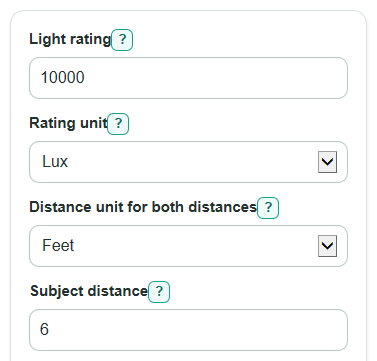
- Enter the maker spec in Light rating, then choose Rating unit as Lux or Foot-candles.
- Choose Subject distance unit, then enter Subject distance measured from the light to the subject.
- Enter Beam angle and Target light on subject so the calculator can check brightness and coverage.
- Open Advanced options only if your rating was measured at a different Rating distance, or if you need Light loss before the subject for diffusion, dimming, bounce, grids, or gels.
- Check Light on subject first, then compare Compared with target, Identical lights needed at this distance, and Beam width at subject to see if the result makes practical sense for your shot.
Definitions
Lux: Light falling on a surface. In this calculator, it means estimated light on the subject.
Foot-candle: Another unit for light falling on a surface. One foot-candle is about 10.76391 lux.
Subject distance: The distance from the light to the subject, not from the camera to the subject.
Beam angle: The full angle of the main beam. A smaller angle gives a tighter, brighter area at the same distance.
Stop: A doubling or halving of light. +1 stop means about twice the target light, and -1 stop means about half the target light.
Light loss before the subject: The percent of light lost to dimming, diffusion, bounce, grids, gels, or other modifiers before it reaches the subject.
Common mistakes and quick fixes
Mistake: Typing the watt number into Light rating.
Fix: Use the brightness spec for Light rating, such as lux at 1 m or foot-candles at a listed distance.
Mistake: Measuring Subject distance from the camera instead of from the light.
Fix: Measure Subject distance from the fixture face or bulb area to the subject.
Mistake: Leaving Rating distance at 1 meter when the maker spec says 2 meters or 3 feet.
Fix: Change Rating distance to the distance printed with the light rating, converted to meters if needed.
Mistake: Using a half-angle for Beam angle.
Fix: Enter the full Beam angle from the light spec, such as 60 degrees for a 60-degree beam.
Mistake: Treating Identical lights needed at this distance as a perfect real-world count.
Fix: Use Identical lights needed at this distance as a planning estimate, then test overlap, shadows, and modifier losses on set.
Mistake: Ignoring Light loss before the subject when adding diffusion or bounce.
Fix: Enter a realistic Light loss before the subject percent so Light on subject is not too optimistic.
Limitations & Key Assumptions / Boundary Conditions
- The result is a planning estimate, not a replacement for a light meter or camera test.
- The distance math uses an inverse-square pattern, so it works best when the subject is inside the useful beam and the light behaves like the listed spec.
- Maker lux ratings may be center-beam ratings. The edges of the beam can be dimmer than the calculated Light on subject.
- Identical lights needed at this distance assumes the same lights overlap on the same subject area and add evenly. Shadows, angle, spill, and modifiers can change the real count.
- Light loss before the subject is only a percent estimate. A thick softbox, bounce wall, grid, gel, or dimmer setting may lose more or less light than expected.
- Beam width uses a simple circular beam model. Rectangular panels, barn doors, lenses, and uneven lenses can make the real coverage shape different.
- Color quality, flicker, shutter angle, ISO, aperture, and log profiles affect video exposure choices, but they are outside this lux-distance calculation.
Methodology
Calculation steps
The calculator first converts the entered Light rating to lux, then converts Subject distance to meters when feet are selected.
rating_lux = rating_value if rating_unit = lux
rating_lux = rating_value * 10.76391 if rating_unit = fc
subject_m = subject_distance * 0.3048 if distance_unit = ft
subject_m = subject_distance if distance_unit = m
Light on subject uses the inverse-square distance pattern: illuminance falls with the square of the distance from the light source [1]. The optional loss factor reduces the usable light after modifiers or dimming.
predicted_lux = rating_lux * (rating_distance_m / subject_m)^2 * (1 - loss_percent / 100)
Foot-candles are shown as a second unit for people who use film or video references in foot-candles.
predicted_fc = predicted_lux / 10.76391
The target check compares predicted light with Target light on subject. Stops are useful because each stop is a factor of 2.
stop_difference = log2(predicted_lux / target_lux)
lights_needed = ceil(target_lux / predicted_lux)
The move-in distance solves the same inverse-square equation for the distance that would hit the target, using the same rating and loss.
distance_for_target_m = rating_distance_m * sqrt((rating_lux * (1 - loss_percent / 100)) / target_lux)
Beam width uses the full Beam angle, shown as θ in degrees, and simple cone geometry.
beam_width = 2 * distance * tan((beam_angle_deg * pi / 180) / 2)
Mini example
If a light is rated at 10000 lux at 1 m, the Subject distance is 6 ft, Beam angle is 60 degrees, Target light on subject is 1000 lux, and Light loss before the subject is 0 percent, the subject distance is 1.8288 m. The calculated Light on subject is about 2990 lux, Compared with target is about +1.58 stops, Identical lights needed at this distance is 1, and Move light to about is 10.37 ft. The Beam width at subject is about 6.93 ft.
Display and validation choices
The calculator blocks values that would make the math impossible: Light rating, Subject distance, Rating distance, and Target light on subject must be greater than 0; Beam angle must be greater than 0 and less than 180 degrees; Light loss before the subject must be at least 0 and less than 100 percent. Number format changes display only. Auto format uses scientific notation when the absolute value is at least 1000000, or when it is nonzero and below 0.0001.