
Estimate how many patio lights to buy, expected brightness, edge spacing, and monthly energy use from your patio and bulb details.
Advanced options
Table of contents
How to use our Patio Lighting Calculator
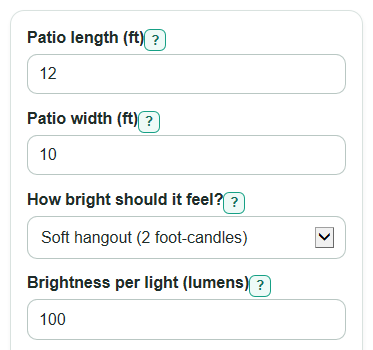
- Enter Patio length (ft) and Patio width (ft) for the area you want lit, not the whole yard.
- Choose How bright should it feel?, or pick Use my own level and enter Your target light level (foot-candles).
- Enter Brightness per light (lumens) and Power per light (watts) from the bulb or fixture package.
- Open Advanced options if you want to change Light that reaches the patio (factor), Use time (hours per night), Electricity price ($ per kWh), Light color (K), or Number display.
- After you calculate, sanity-check Lights to buy, Estimated brightness on the patio, and Approximate edge spacing. If spacing looks too wide or brightness is much higher than your target, try a different lumen rating or split the patio into zones.
Definitions
Lumen: Light made by a bulb or fixture. In the calculator, Brightness per light (lumens) is the lumen rating for one light.
Foot-candle: Light landing on one square foot. One foot-candle means 1 lumen on 1 square foot.
Light that reaches the patio (factor): A number from 0.10 to 1.00 that estimates how much bulb light actually lands on the patio after direction, shade, dirt, and fixture losses.
Lux: The metric version of light landing on a surface. The calculator also shows Target light level in lux for comparison with metric lighting guides.
Kilowatt-hour (kWh): A unit of electrical energy. Energy use per month uses total watts, hours per night, and average days per month.
Light color (K): Color temperature in kelvin. Lower numbers such as 2700 K look warmer and more yellow; higher numbers look cooler and more blue-white.
Common mistakes and quick fixes
Mistake: Using the whole backyard for Patio length (ft) and Patio width (ft).
Fix: Measure only the patio area you want lit, or use dimensions that give about the same lit area.
Mistake: Entering watts in Brightness per light (lumens).
Fix: Find the lumen number on the package for Brightness per light (lumens), and put watts in Power per light (watts).
Mistake: Choosing How bright should it feel? as Use my own level, then leaving Your target light level (foot-candles) blank.
Fix: Enter a positive foot-candle target, or switch back to Soft hangout, Dinner or games, or Bright tasks.
Mistake: Setting Light that reaches the patio (factor) above 1 or below 0.10.
Fix: Use a factor from 0.10 to 1.00. Lower values fit blocked, sideways, or dirty fixtures.
Mistake: Treating Approximate edge spacing as an exact layout for every light style.
Fix: Use Approximate edge spacing as a quick check for edge lights. For string lights or wall lights, adjust placement for doors, outlets, posts, and glare.
Mistake: Leaving Electricity price ($ per kWh) filled with a guess and reading Estimated cost per month as exact.
Fix: Use the rate from your bill, or leave Electricity price ($ per kWh) blank and use Energy use per month instead.
Limitations & Key Assumptions / Boundary Conditions
- The patio is treated as a rectangle. For curves, L-shapes, or several seating zones, enter an equivalent area or calculate each zone separately.
- Brightness is an average over the patio. Real patios can have bright spots, shadows, glare, and darker corners.
- Light that reaches the patio (factor) is a planning estimate, not a measured fixture efficiency. Aim, shade, height, dirt, walls, and nearby plants can change it.
- Approximate edge spacing assumes lights are spread around the patio perimeter. It is less exact for overhead strings, wall sconces, pendants, or lights grouped in one area.
- Energy use per month uses 30.4375 days per month and the Use time (hours per night) you enter. Seasonal use, dimmers, timers, and motion controls can change real use.
- Estimated cost per month is shown only when Electricity price ($ per kWh) is filled in. Taxes, tiered rates, fees, and time-of-use pricing are not included.
- The Lighting check is a practical note, not a code review or professional lighting design. Local rules, neighbors, safety needs, and wildlife-sensitive areas may need stricter choices.
Methodology
Core calculation
The calculator first finds the lit patio area, then multiplies that area by the target light level. A foot-candle is lumens per square foot, so this area method estimates the bulb output needed before rounding to whole lights.
area_sq_ft = patio_length_ft * patio_width_ft
target_fc = 2, 5, 10, or custom_target_fc
total_lumens_needed = (target_fc * area_sq_ft) / light_reach_factor
lights_to_buy = ceil(total_lumens_needed / lumens_per_light)
Rounding uses the next whole light because you cannot buy part of a light.
Brightness and spacing check
After rounding up the light count, the calculator checks the average installed brightness and a simple edge spacing guide.
installed_brightness_fc = (lights_to_buy * lumens_per_light * light_reach_factor) / area_sq_ft
total_lumens_installed = lights_to_buy * lumens_per_light
edge_spacing_ft = (2 * (patio_length_ft + patio_width_ft)) / lights_to_buy
If installed brightness is much higher than the target, lower-lumen bulbs, a dimmer, or fewer higher-aimed zones may feel better. The responsible lighting note also checks for very cool light or a setup that may use more light than needed; directing home outdoor light only where it is needed is part of responsible outdoor lighting guidance [1].
Power, cost, and lux
Power and energy are based on the rounded-up light count, entered watts per light, and the entered nightly use time.
total_power_w = lights_to_buy * watts_per_light
energy_per_month_kwh = total_power_w * hours_per_night * 30.4375 / 1000
cost_per_month = energy_per_month_kwh * electric_rate_per_kwh
target_lux = target_fc * 10.7639
The monthly cost is skipped when Electricity price ($ per kWh) is blank. The lux result is a metric comparison for the target brightness level.
Mini-example
For a 12 ft by 10 ft patio, the area is 120 square feet. With Soft hangout at 2 foot-candles and a light reach factor of 0.80, the target bulb output is (2 * 120) / 0.80 = 300 lumens. If each light is 100 lumens, the result is ceil(300 / 100) = 3 lights. Installed brightness is (3 * 100 * 0.80) / 120 = 2 foot-candles, and edge spacing is 2 * (12 + 10) / 3 = 14.67 ft between lights.